Server temporarily out of operation?



 Freshman Member
My network is based on 1 WSQ60 in bridge more, another WSQ60 and a WSQ20.
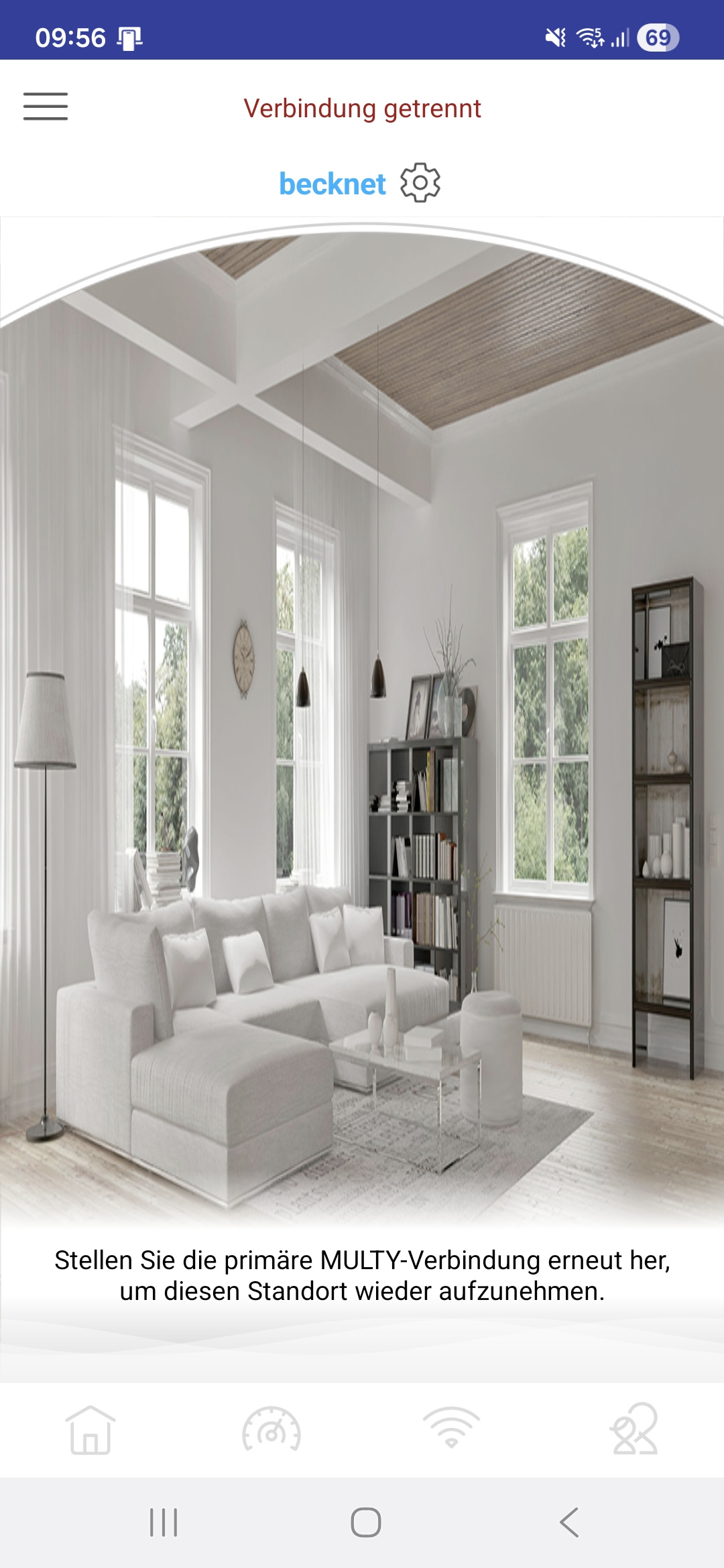
For a little while now, my Multy can't connect to the server any more.
It's still working fine, though, I just can't make any changes at this time.
When I enter one of the remaining available menu options (such as "add Multy"), it doesn't show any devices, but upon returning to the main menu, my devices are shown for like a split second.
This has happened before, last time in May of 2025. At that time, the issue was resolved on the Zyxel end.
Does anyone else see similar issues right now?
On to contemplating possible what-if scenarios…
What if I replaced the WSQ20 with another WSQ60 - would that be likely to help in any way?
And thinking even further: what attractive offers for end customers does Zyxel have at this time?
Another thought that comes up: does the end-of-support status of my devices also mean that Zyxel is legally permitted to simply "pull the plug" on their end?
All Replies
-
Hi @w8rn8r,
It sounds like you're experiencing connectivity issues with your Multy system, where the app can't connect to the server, and you're seeing intermittent device displays. This can certainly be frustrating, especially when your network is otherwise functioning.
Here's a step-by-step guide to troubleshoot:
Verify Multy App and Firmware Versions:
- Ensure your Multy app is updated to the latest version available on your device's app store. For Android, recent versions have been 2.6.2.240202 or 2.6.3.240201. For iOS, version 2.6.1 is often cited.
- Check the firmware version on your Multy WSQ60 and WSQ20 devices. The latest official firmware for Multy M1 (WSM20, which is often referenced in similar discussions and likely applies to your WSQ60/WSQ20) is V1.00(ABZF.6)C0. If your devices are running V1.00(ABZF.7)C0, it's recommended to downgrade to V1.00(ABZF.6)C0 due to identified issues with the .7 version. You can typically do this via the web GUI by navigating to
https://192.168.212.1/gui/#/main/debug/firmwareupgradeand uploading the firmware file.
Restart Devices:
- Perform a power cycle on all your Multy devices (WSQ60 and WSQ20) and your primary router. This can often resolve temporary connectivity glitches.
Check for Known Server Issues:
- While your Multy devices are still functioning, the app's inability to connect to the server might indicate a temporary service disruption on Zyxel's end. This has been reported by other users as well.
Consider End-of-Life (EOL) Status:
- Your Multy WSQ60 and WSQ20 devices are considered End-of-Life (EOL) models. While Zyxel continues to support users for EOL products for a period (e.g., Multy M1 had technical support until 2025-12-31), new firmware developments, feature enhancements, or bug fixes cease. This means critical security updates may also eventually stop. Zyxel does not "pull the plug" on your devices; they continue to function, but support and updates become limited.
To help us investigate this issue further and provide more specific guidance, please provide the following information:
- Multy App Version: The exact version number of the Multy app you are using.
- Multy Device Firmware Versions: The current firmware versions installed on your WSQ60 and WSQ20 units.
- Screenshots: A screenshot of the error message you receive in the Multy app.
- Main Multy Device Serial Number and MAC Address: This will help us check logs and specific details related to your devices. You can send this via private message for security.
- Multy Account: The email address or username associated with your Multy app account.
This AI response aims to provide initial troubleshooting steps and identify information needed for further diagnosis. Feel free to share additional details based on the suggestions above — this will help community members offer more targeted assistance.
If you have feedback or idea about this AI assistant, share them in Community Feedback.0 -
Hi Barry,
thanks for responding.
Multy app version is 2.6.4.250701. That's what's currently offered on Google Play.
Multy device firmware versions: how can I check these while the app isn't working?
When have the most recent versions of the firmware been released?From the "Information" screen: last InternetConnectSuccess is recorded as 2025/10/07.
Does that date somehow correlate to any changes on your end?Device restart: I've done that, more than once; no change.
Check for Known Server Issues: how can I do that?
My app account: since I can't use the "Settings" button, I can't read that from the app.
Is there another way for me to find out?
I'm asking because I know I had changed that some time (long) ago.
-recorded by Zyxel MelenMy network is named "becknet".
My devices:
"Main" WSQ60: S183F39000935, B8-EC-A3-F1-07-3A
(operates in bridge mode, connected to Telekom router via LAN cable)"Secondary" WSQ60: S183F39000936, B8-EC-A3-F1-09-CA
WSQ20: S193F28001749, BC-CF-4F-F4-97-6E
An observation: Every now and then, I'm also seeing the error message "Please connect to the internet".
(this is manually translated by me as I'm using German language)A screenshot showing the current "disconnected" status is attached below.
Best Regards
Werner0 -
Hi @w8rn8r
Thanks for the info.
Does anyone else see similar issues right now?
Currently, there's no other user report this issue. To help us to clarify this issue, could you:
- Share the login account and password (provide via private message) so we can login to check this issue?
- Or use another account, not the account has "becknet", to reinstall again.
You may choose one of the methods to try first.
What if I replaced the WSQ20 with another WSQ60 - would that be likely to help in any way?
We think the issue isn't related to the device, so this should not help.
Zyxel Melen0 -
Thanks for your response, Melen.
How should I interpret that "disconnected" message at the top of the home screen:
Does it mean that your server doesn't recognize the connection between my account and my site/network?
Or does it mean that your server can't reach the devices in my home network?
Or what exactly should that "disconnected" really tell me?
I assume that it doesn't mean that the app on my smartphone can't connect to your server; correct?I'm wondering if the following approach makes sense :
- simply leave the current situation as-is
- create a new account
- set up a new site/network, adding the existing devices
… all while the current account & setup remain unchanged - will that work?
Will it even be possible to proceed in this way without bringing our home network down at all?
Or, at least not for a long time?Thanks
Werner0 -
Hi @w8rn8r
How should I interpret that "disconnected" message at the top of the home screen
This means the devices are disconnected with our server. Which could be solved by recreate a new network and add the current devices. You may try with the current account, but if the issue happens again, you might need to try adding with a new account. Please note that the device only disconnects with our server, the Internet access should be available and will not bringing your home network down.
Another thought that comes up: does the end-of-support status of my devices also mean that Zyxel is legally permitted to simply "pull the plug" on their end?
The EOL status is for the device only. The Multy cloud management service is still available and our team haven't announced EOL.
And thinking even further: what attractive offers for end customers does Zyxel have at this time?
If you need any upgrade suggestion or attractive, please feel free to ask me via private message. I will help to check with our product team.
Zyxel Melen0 -
Hi Melen,
is there any way for me to access or retrieve the current configuration of my devices?
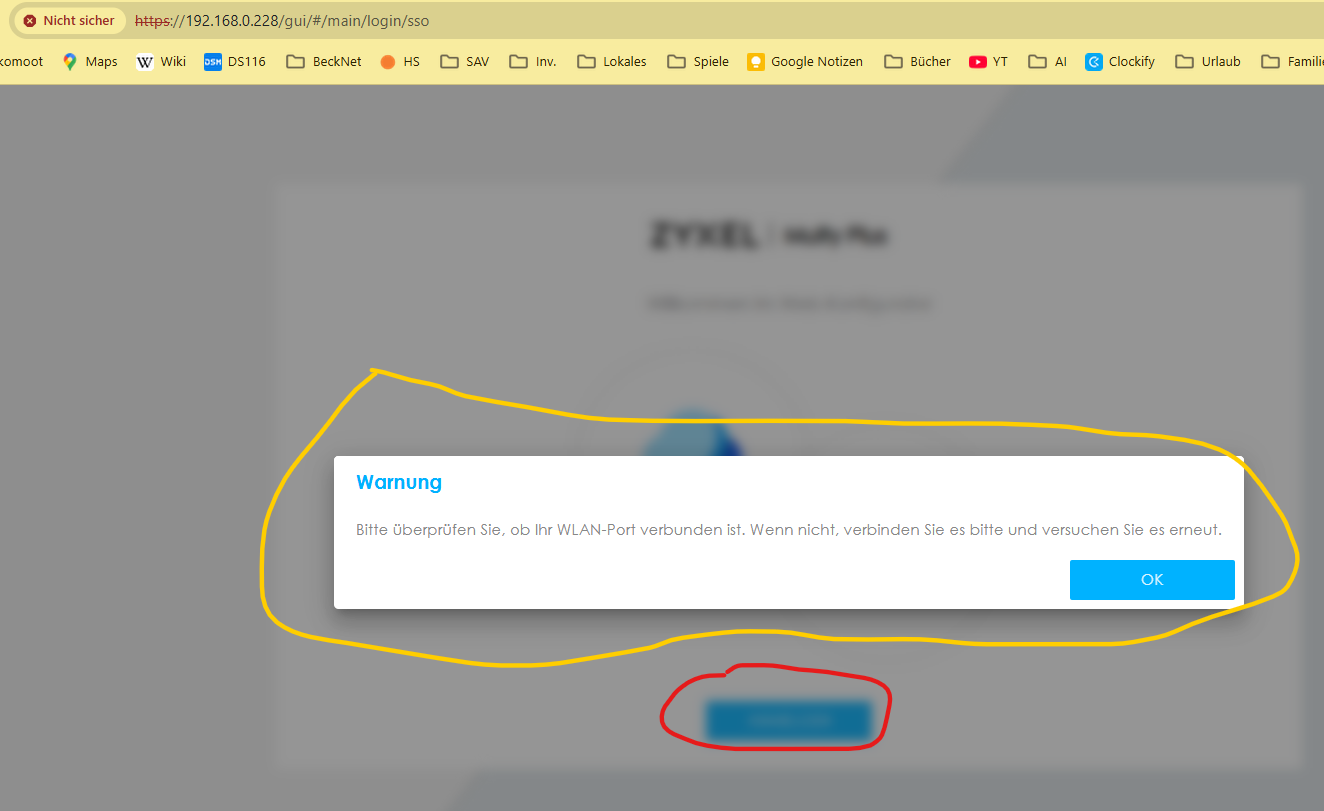
If at all possible, I'd rather not have to re-think its details.I tried the web GUI access and found that the two WSQ60 devices responded. When I then tried to sign in, it failed with this error message:
Please check if your Wi-Fi port is connected. If not, please connect it and try again.
(translated from German language)
That seems consistent with what the Multy app states.The WSQ20 device refused the connection attempt. Is that to be expected? Or is its interface just a little different?
Thanks
Werner0 -
Hi @w8rn8r
I checked with our team about the first question. We can provide you the configuration, but it still need to reset the device to configure it.
The WSQ60 access question, may you share the screenshot when getting this error? Also, was the Internet still available?
The WSQ20 access question, it is because it doesn't support http access. Therefore, it is a normal result.
Zyxel Melen0 -
Hi Melen,
here's the screenshot for the web access to my main WSQ60.
The "Login" button is marked with red color, the error message with yellow.
Thanks
Werner0



 Zyxel Community Virtual Assistant



Categories
- All Categories
- 442 Beta Program
- 3.1K Nebula
- 242 Nebula Ideas
- 6.8K Security
- 780 USG FLEX H Series
- 387 Security Ideas
- 1.8K Switch
- 87 Switch Ideas
- 1.5K Wireless
- 58 Wireless Ideas
- 7.2K Consumer Product
- 324 Service & License
- 527 News and Release
- 101 Security Advisories
- 31 Education Center
- 10 [Campaign] Zyxel Network Detective
- 5.3K FAQ
- 34 Documents
- 91 About Community
- 121 Security Highlight