Help to understand

 Ally Member



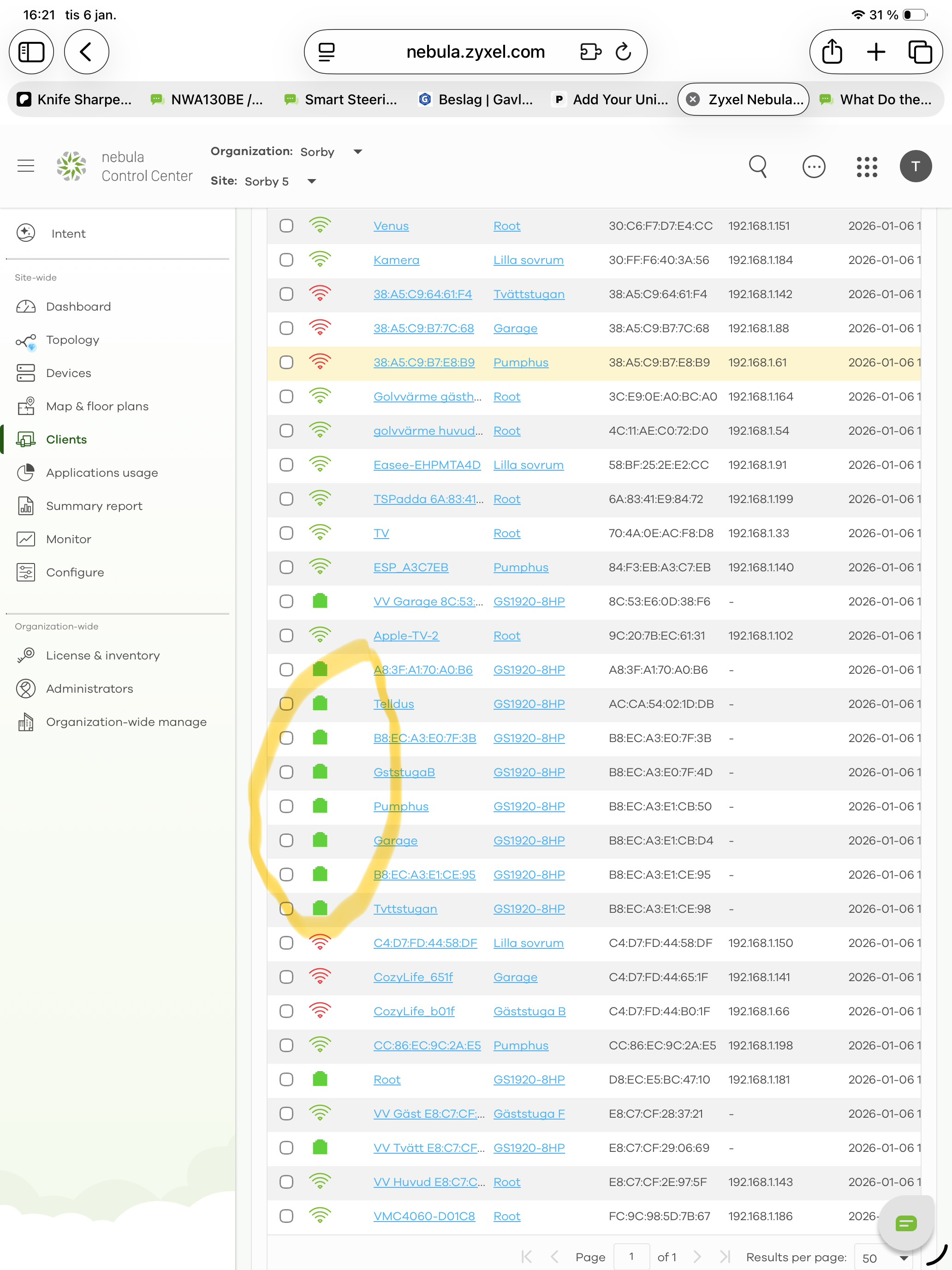
Can someone explain for me what the meaning to show what I have circulated with yellow.
I have a mesch network controlled with Nebula.
Al ap,s are in mesh mode except the root which is connected to the router
Most devices are connected with WiF and on my switch I have two devices.
But it look like that a device are as well connected to the green figure but without an ip adress.
Accepted Solution
-
Hi @saltet
Thanks for the privilege. Let me share the spec in here. These clients didn't display IP is because they are switch clients. The switch gets IP address info by LLDP, Nebula AP, and Nebula security gateway/firewall.
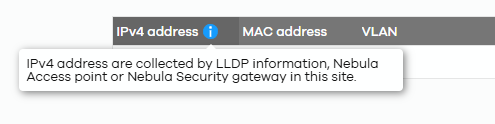
If you see no IP address in the client list or switch port detailed page > MAC table, it means we don't have the IP info for this MAC address.
About the status ring issue, Tina has updated you that we have addressed this issue, and it will be fixed as Nebula 19.30 release - 2026/01/19.
Zyxel Melen0
 Zyxel Employee



All Replies
-
Hi @saltet,
The yellow-highlighted entries in your Nebula client list, specifically those showing a green cube icon and no IP address, indicate wired clients connected to a Nebula-managed switch where the IP address information is not being fully reported.
Here's a breakdown:
- Green Cube Icon: This icon generally represents a wired client.
- No IP Address Displayed: Nebula primarily gathers IP addresses from Link Layer Discovery Protocol (LLDP) information, Nebula-managed Access Points, or Nebula-managed Security Gateways/Firewalls. When a wired client's IP address is not shown, it's typically because the client device itself does not include IP address information in its LLDP advertisements, or the switch it's connected to doesn't support LLDP, or there is no traffic passing through a Nebula-managed firewall for that client. In your case, since your setup involves a mesh network with APs and switches, it's likely these are wired devices connected to your switch that aren't providing their IP via LLDP.
To help us investigate this further and provide more specific guidance, please provide the following information:
- Network Topology: A simple diagram illustrating how your APs, switches, and the router are connected.
- Device Models: The specific models of your Zyxel switches and APs.
- Firmware Versions: The current firmware versions running on your Zyxel switches and APs.
- Zyxel Support Access: Please enable Zyxel Support Access through your Nebula Control Center by navigating to Help > Support Request. This will allow our support team to view your cloud configuration directly and expedite troubleshooting.
- Organization and Site Name: Provide the exact Organization and Site names in your Nebula Control Center.
This AI response aims to provide initial troubleshooting steps and identify information needed for further diagnosis. Feel free to share additional details based on the suggestions above — this will help community members offer more targeted assistance.
If you have feedback or idea about this AI assistant, share them in Community Feedback.0 -
The green cubes in the yellow circle represent each ap - none connected with wire.
But it is also a few devices which have got a green cube - for example vv tvätt which is my heatpump. Only connected through WiFi.0 -
Hi @saltet
Could you help to enable Zyxel support access for us to investigate? This needs to check the device's LLDP and MAC table to identify.
Zyxel Melen0 -
please also if you have any comments about list rings which I asked some weeks ago0 -
Hi @saltet
Thanks for the privilege. Let me share the spec in here. These clients didn't display IP is because they are switch clients. The switch gets IP address info by LLDP, Nebula AP, and Nebula security gateway/firewall.
If you see no IP address in the client list or switch port detailed page > MAC table, it means we don't have the IP info for this MAC address.
About the status ring issue, Tina has updated you that we have addressed this issue, and it will be fixed as Nebula 19.30 release - 2026/01/19.
Zyxel Melen0


Categories
- All Categories
- 442 Beta Program
- 3K Nebula
- 232 Nebula Ideas
- 132 Nebula Status and Incidents
- 6.7K Security
- 691 USG FLEX H Series
- 365 Security Ideas
- 1.8K Switch
- 87 Switch Ideas
- 1.4K Wireless
- 56 Wireless Ideas
- 7.1K Consumer Product
- 312 Service & License
- 505 News and Release
- 97 Security Advisories
- 31 Education Center
- 10 [Campaign] Zyxel Network Detective
- 5.1K FAQ
- 34 Documents
- 89 About Community
- 112 Security Highlight


