Nebula Configuration with 2 access points NWA50BE

 Freshman Member

Hi all,
I have installed 2 NWA50BE at my house.
1 access point at the ground floor, the second one on first floor.
I do run 2 SSID 2,4 and 5GHZ, but it seems I have maybe not done it 100% correctly. As my Oneplus 11 really often jumps into the mobile G5. I hate this of course, because it always jumps out and in.
I did read something about some VLAN ID's, could that help anything.
Hope for some good input so I get the grip on the road instead of losing quality.
best regards
tomatoman
Accepted Solution
-
Hi @Tomatoman,
First, please confirm: Does the issue only occur on the OnePlus 11 phone (MAC:
9a:ad:df:xx:xx:xx)?After reviewing the configuration and event logs, we recommend adjusting the following settings as shown in the image below:
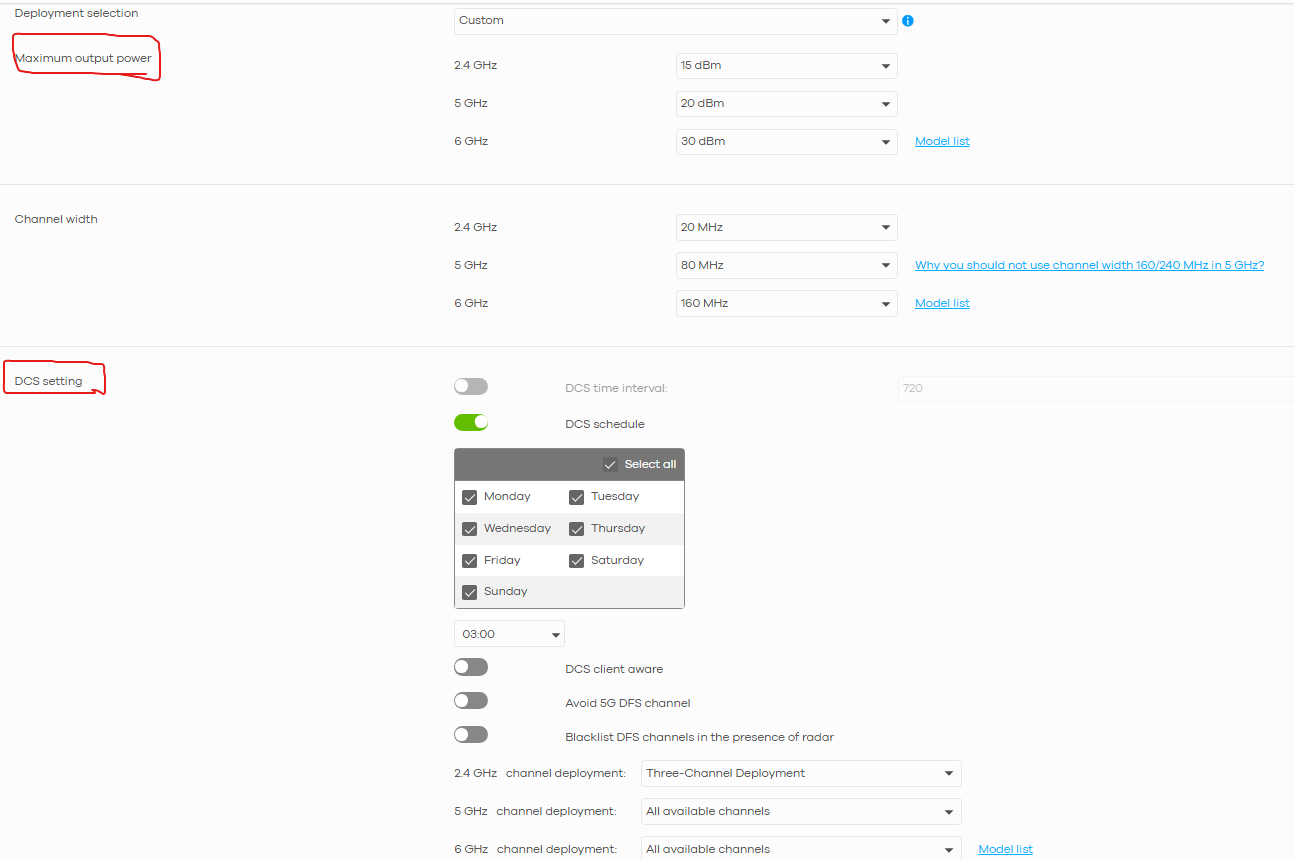
If the issue still persists, please share:
- The timestamp when it occurred and a detailed description of the symptoms. Also, please share what actions you took before the issue occurred. For example, were you moving from the ground floor to the first floor, and did the issue happen in between?
- Detailed device deployment info, such as their locations (specific spots on each floor, not just "one on ground floor and another on first floor") and whether they are wall-mounted or ceiling-mounted. This will help us investigate further.
Thanks for your cooperation!
Zyxel Tina
0

 Zyxel Employee



All Replies
-
Hi @Tomatoman,
Thank you for reaching out to the Zyxel Community. It sounds like you're experiencing some roaming issues with your OnePlus 11 switching to mobile data despite having two NWA50BE access points. This is a common challenge with wireless client devices.
Here are some steps you can take to optimize your Nebula configuration for better roaming:
Optimize AP Placement and Signal Overlap: Ensure there is about 15-20% signal overlap between your two NWA50BE access points for seamless transitions. If the signals do not overlap sufficiently, clients may disconnect when moving between APs. Conversely, excessive overlap can lead to interference. You may need to adjust AP placement or output power. Aim for a signal strength around -65 dBm in overlapping areas.
Enable 802.11k/v/r Roaming Features: These standards help devices intelligently select the best available Wi-Fi network and facilitate faster, smoother transitions between APs.
- Navigate to
Configure > Access Point > SSID Advanced settingin Nebula. - Enable 802.11k (Radio Resource Management) and 802.11v (Wireless Network Management).
- Enable 802.11r (Fast Basic Service Set Transition) for faster roaming, especially with WPA2-Enterprise. However, note that some older client devices may not fully support these advanced roaming features.
- Navigate to
Configure Smart Steering Threshold Settings: Smart steering encourages devices to roam to a stronger signal.
- Go to
Configure > Access points > Radio settings > Smart steering. - Adjust the "Station Signal Threshold" and "Disassociation Station Threshold." These should be set lower than the RSSI in your overlapping areas. If set too low, clients may stick to an AP despite a better one being available. If set too high, clients might disconnect even if no better AP is nearby.
- Go to
Band Select: It is generally recommended to disable "Band Select" as it can sometimes cause roaming delays and interruptions for time-sensitive applications.
Regarding your question about VLAN IDs, while VLANs are crucial for segmenting network traffic and creating separate networks for different SSIDs (e.g., guest, IoT, private), they are not directly related to client roaming issues between access points broadcasting the same SSIDs. Your current setup with two SSIDs (2.4GHz and 5GHz) for each NWA50BE can utilize VLANs if you intend to isolate traffic for these SSIDs, but it won't resolve the client's decision to jump to mobile data instead of roaming to another AP.
To further investigate and provide more specific recommendations, please provide the following information:
- Enable Zyxel Support Access: Go to
Help > Support Requestin your Nebula console and enable Zyxel Support Access. This allows our support team to view your cloud environment configuration, significantly shortening troubleshooting time. - Organization and Site Name: Please provide the name of your Nebula Organization and Site.
- Screenshot of your current Smart Steering settings: This will help us understand your current configuration.
- Mobile device model and OS version: Your OnePlus 11's specific model and software version can sometimes impact roaming behavior.
This AI response aims to provide initial troubleshooting steps and identify information needed for further diagnosis. Feel free to share additional details based on the suggestions above — this will help community members offer more targeted assistance.
If you have feedback or idea about this AI assistant, share them in Community Feedback.0 -
Hi, where do I find that help area? Is that also available for privat users or only business users?
best regards
tomatoman
0 -
Hi @Tomatoman,
To enable Zyxel Support Access, please refer to this FAQ.
(Zyxel Support Access is available to both business and private users, as long as the device is registered in Nebula Control Center.)
To better understand and assist with your issue, could you confirm a few details?
- "I do run 2 SSID 2.4 and 5GHz"
- Does this mean each AP has two separate SSIDs (one locked to 2.4 GHz only, one to 5 GHz only)?
- Or do both APs broadcast the same two SSIDs, each supporting both 2.4 GHz and 5 GHz (dual-band)?
- "My OnePlus 11 often jumps into the mobile G5"
- Do you mean the phone often switches between Wi-Fi and 5G mobile data (your cellular network)?
- If so, can you share roughly where in the house this happens most often? For example:
- Ground floor or first floor?
- Is the phone closer to the ground-floor AP or the first-floor AP at that moment?
To help fine-tune your Wi-Fi deployment, here's a practical guide on Wi-Fi design best practices for multi-floor homes.
Zyxel Tina
0 - "I do run 2 SSID 2.4 and 5GHz"
-
Hi all,
please find below screenshot around the actual SSID setup. Meanwhile I also have open up for Zyxel support, but where do I send the relevant data, here in the forum?
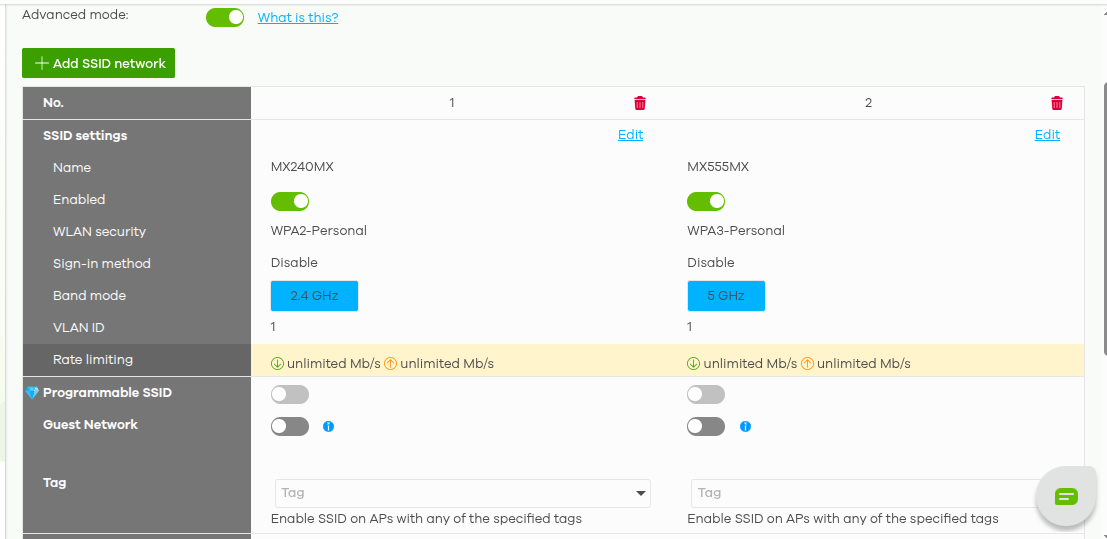
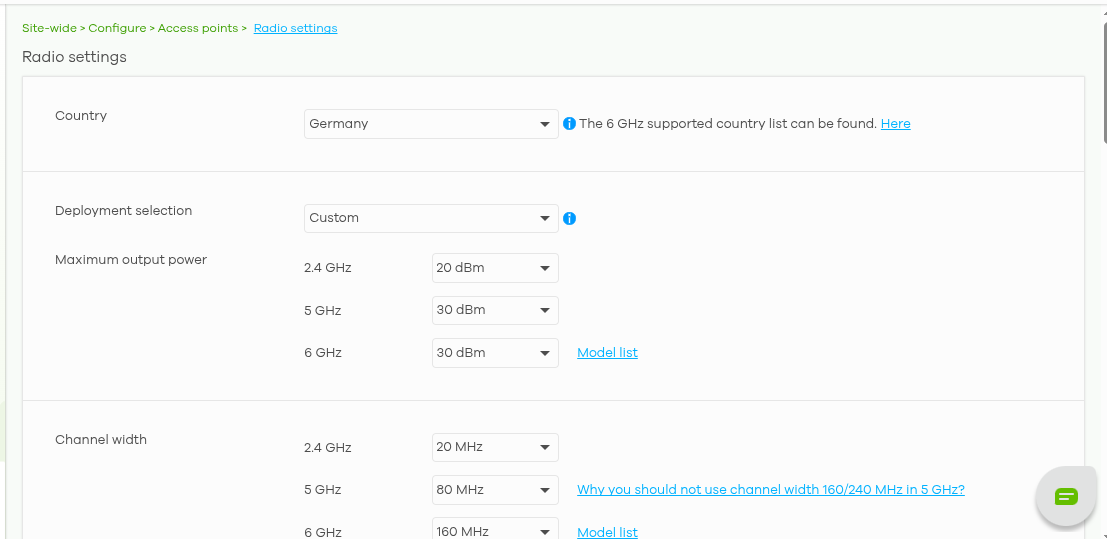
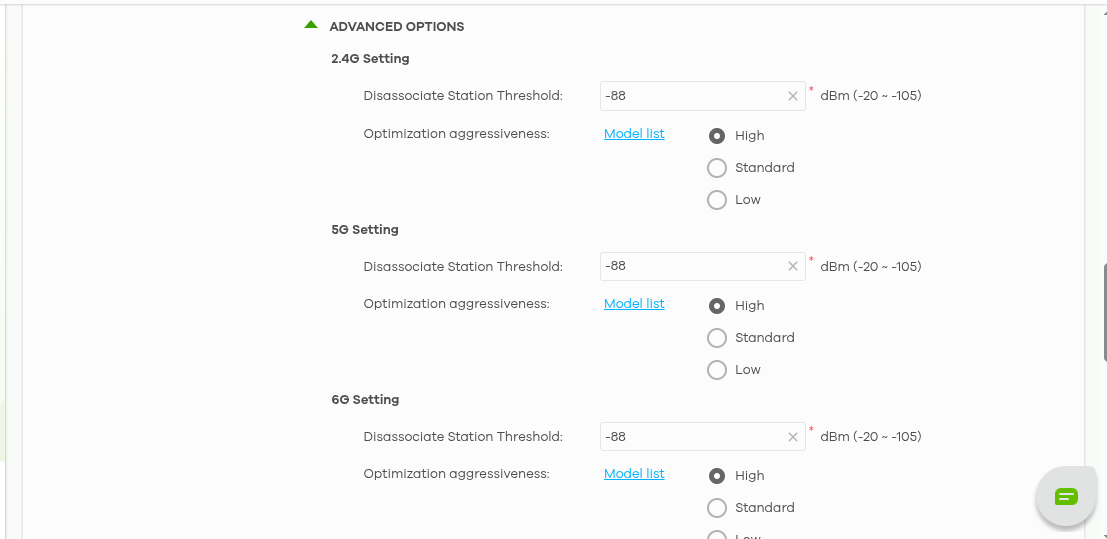
best regards
tomatoman
0 -
Hi all,
how should I do that? In the guide is mentioned:
4. Channel planning
Proper channel separation prevents co-channel interference and ensures clean airtime.
2.4 GHz (Use Only Non-Overlapping Channels)
- Basement → Channel 1
- Ground Floor → Channel 6
- First Floor → Channel 11
As I have only 2 SSID how could I distinguish the channels there, should not evert access point also have the same SSID?
best regards
tomatoman
0 -
Hi all,
I found it where to set different channels.
best regards
tomatoman
0 -
Hi @Tomatoman,
Thanks for sharing the information!
Seems like you have followed the FAQ and found the settings. May I confirm if the issue has been resolved? If not, feel free to provide your org/site name here in this thread.
(Please note that org/site names can be customized by users and don't uniquely identify anyone. Only authorized Zyxel agents can access them with proper permissions.)
Zyxel Tina
0 -
Hi @Tomatoman,
First, please confirm: Does the issue only occur on the OnePlus 11 phone (MAC:
9a:ad:df:xx:xx:xx)?After reviewing the configuration and event logs, we recommend adjusting the following settings as shown in the image below:
If the issue still persists, please share:
- The timestamp when it occurred and a detailed description of the symptoms. Also, please share what actions you took before the issue occurred. For example, were you moving from the ground floor to the first floor, and did the issue happen in between?
- Detailed device deployment info, such as their locations (specific spots on each floor, not just "one on ground floor and another on first floor") and whether they are wall-mounted or ceiling-mounted. This will help us investigate further.
Thanks for your cooperation!
Zyxel Tina
0 -
Hello, thanks a lot for the reply. I have now changed accordingly to your recommendation, I will now keep an eye on it the coming days and give feedback if I do have better performance from now on.
best regards
tomatoman
0



Categories
- All Categories
- 442 Beta Program
- 3.1K Nebula
- 237 Nebula Ideas
- 6.8K Security
- 747 USG FLEX H Series
- 377 Security Ideas
- 1.8K Switch
- 87 Switch Ideas
- 1.5K Wireless
- 58 Wireless Ideas
- 7.2K Consumer Product
- 319 Service & License
- 512 News and Release
- 99 Security Advisories
- 31 Education Center
- 10 [Campaign] Zyxel Network Detective
- 5.3K FAQ
- 34 Documents
- 90 About Community
- 119 Security Highlight


