Performance issue on WIFI 5 GHZ

 Freshman Member

All Replies
-
Hi @Tomatoman
I installed a huge number of APs and never faced huge issues with 5 GHz.
Please could you share more info about your hardware and wireless scenario?
0 -
Hi @Tomatoman
Could you help to provide:
- Your device's info.
- Is it Nebula mode or standalone mode? If is Nebula mode, please help to enable Zyxel support access.
- How often does this issue happen?
- What device is the issue client?
- What signal strength was it when this issue happens? Please help to check on the client.
- What percentage is the channel utilization of 5G band?
Zyxel Melen0 -
Also, you may have some adjustment:
- Check Nebula Event Logs: Go to Site-wide > Monitor > Event logs and filter for "Radar" or "DFS". This will confirm if the 5GHz radio is shutting down due to radar detection.
- Adjust 5GHz Channel: If radar detection is frequent, navigate to Site-wide > Configure > Access points > Radio settings. Try manually setting the 5GHz channel to a non-DFS channel (typically channels 36, 40, 44, or 48) to see if the stability improves.
- Reduce Channel Width: In the same Radio settings menu, ensure the 5GHz channel width is set to 40MHz or 20MHz instead of 80/160MHz. Wider channels are more likely to overlap with DFS frequencies.
Zyxel Melen0 -
Hi all,
I do have 2 devices in use NWA50BE (floor and 1 floor).
Everything is configured in Nebula
Issue happen frequently
Laptop, Mobile phone, firetv stick
I have open for support access Org.: Zuhause, Site: Zuhause.
I have no clue what I really can do.
br
tomatoman
0 -
Hi @Tomatoman
Since lacking issue timestamp and issue client's mac address, we took some time to monitor the logs to identify your issue. It seems like the reason that the client connects to 5G band/SSID disconnect is related with the signal strength and stability. (Station: xxx blocked by key handshake fail on Channel: 40, SSID: SSID name, 5GHz, Signal: -65dBm, Download/Upload: 588Bytes/624Bytes, reason 15, Interface: wlan-2-2, MLO Phy MAC address: xxx, blocked by key handshake fail happens is more likely because "Signal interference", "Poor signal strength", or "Pre-share key error")
We suggest you can take these actions first:
- Change both AP channel setting to DCS, and the maximum output power to 25 dBm.
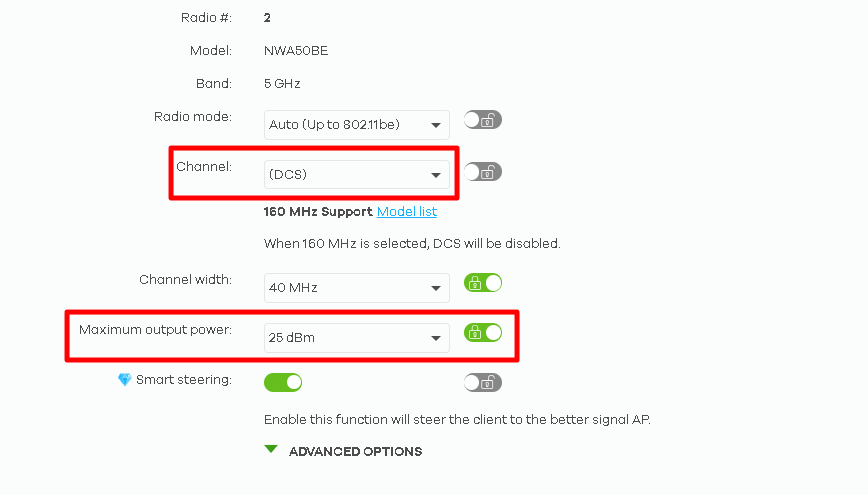
- Disable "Avoid 5G DFS channel" and "Blacklist DFS channel in the presence of radar".
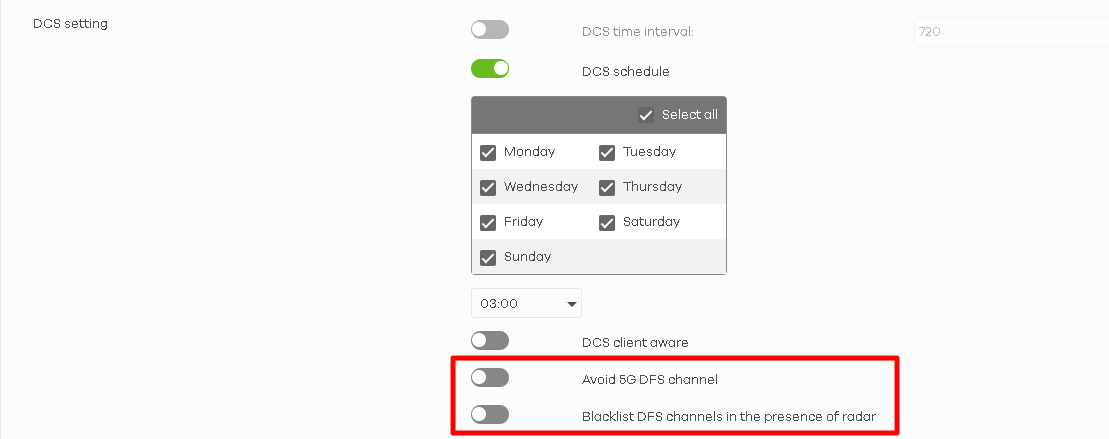
- Upgrade to the latest firmware version. One of your NWA50BE is still 7.30 patch2.
If the issue remains, please help to record the timestamp and client's MAC address. With these information, we can better identify this issue. Thanks.
Zyxel Melen0 - Change both AP channel setting to DCS, and the maximum output power to 25 dBm.

 Guru Member



 Zyxel Employee


Categories
- All Categories
- 442 Beta Program
- 3.1K Nebula
- 237 Nebula Ideas
- 6.8K Security
- 740 USG FLEX H Series
- 376 Security Ideas
- 1.8K Switch
- 87 Switch Ideas
- 1.5K Wireless
- 58 Wireless Ideas
- 7.2K Consumer Product
- 319 Service & License
- 512 News and Release
- 99 Security Advisories
- 31 Education Center
- 10 [Campaign] Zyxel Network Detective
- 5.3K FAQ
- 34 Documents
- 91 About Community
- 119 Security Highlight


