244 Cloud-saving mode won't activate.
Options

FabioBasso
Posts: 16




 Freshman Member
Freshman Member
in Nebula
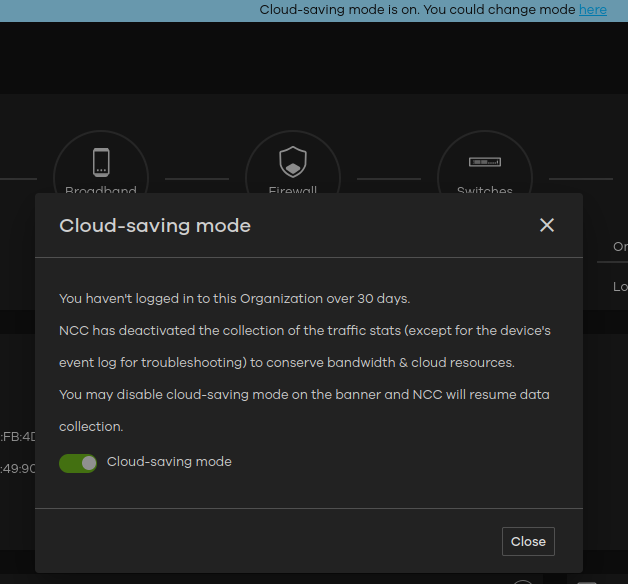
When accessing a client's nebula.zyxel.com, I receive the attached warning, but the button is not enabled for me. I have already tried accessing it via Firefox and Chrome, and also using Windows 10, Windows 11, and Linux.
0
Accepted Solution
-
Hi @FabioBasso,
The issue you are experiencing with the disabled button is typically related to administrator privilege restrictions. Please refer to the following information and troubleshooting steps:
- Check Administrator Permissions: Accounts with Owner, Full Administrator, or Delegated privileges can disable Cloud-Saving Mode.
- Verify Your Role: You can verify your account's exact privilege level in the Org. privilege field by navigating to Organization-wide > Administrators.
- Enable Zyxel Support Access: If you confirm that your account has one of the privileges mentioned above but the button remains greyed out, please enable Zyxel Support Access under Help > Support Request so our team can investigate the organization directly.
To help narrow down the issue, could you share:
- What is your current administrator privilege level under that organization?
- What is the name of the Nebula Organization experiencing this?
Zyxel Tina
1





 Zyxel Employee
All Replies
-
Hi @FabioBasso,
The issue you are experiencing with the disabled button is typically related to administrator privilege restrictions. Please refer to the following information and troubleshooting steps:
- Check Administrator Permissions: Accounts with Owner, Full Administrator, or Delegated privileges can disable Cloud-Saving Mode.
- Verify Your Role: You can verify your account's exact privilege level in the Org. privilege field by navigating to Organization-wide > Administrators.
- Enable Zyxel Support Access: If you confirm that your account has one of the privileges mentioned above but the button remains greyed out, please enable Zyxel Support Access under Help > Support Request so our team can investigate the organization directly.
To help narrow down the issue, could you share:
- What is your current administrator privilege level under that organization?
- What is the name of the Nebula Organization experiencing this?
Zyxel Tina
1
Categories
- All Categories
- 442 Beta Program
- 3.1K Nebula
- 243 Nebula Ideas
- 6.8K Security
- 783 USG FLEX H Series
- 389 Security Ideas
- 1.8K Switch
- 87 Switch Ideas
- 1.5K Wireless
- 58 Wireless Ideas
- 7.2K Consumer Product
- 325 Service & License
- 527 News and Release
- 101 Security Advisories
- 31 Education Center
- 10 [Campaign] Zyxel Network Detective
- 5.3K FAQ
- 34 Documents
- 91 About Community
- 122 Security Highlight