Login Password
Options

 Freshman Member
All Replies
-
Hi @AWB0072 ,
Since your device is still managed by Nebula, even performing a physical factory reset won't help — as soon as it boots up and connects to the internet, it will contact Nebula Cloud, and Nebula will immediately resume management of the device, overriding the default local credentials with the secure Site-Wide Password.
If you want to access the local web GUI, you'll need to log in using the username
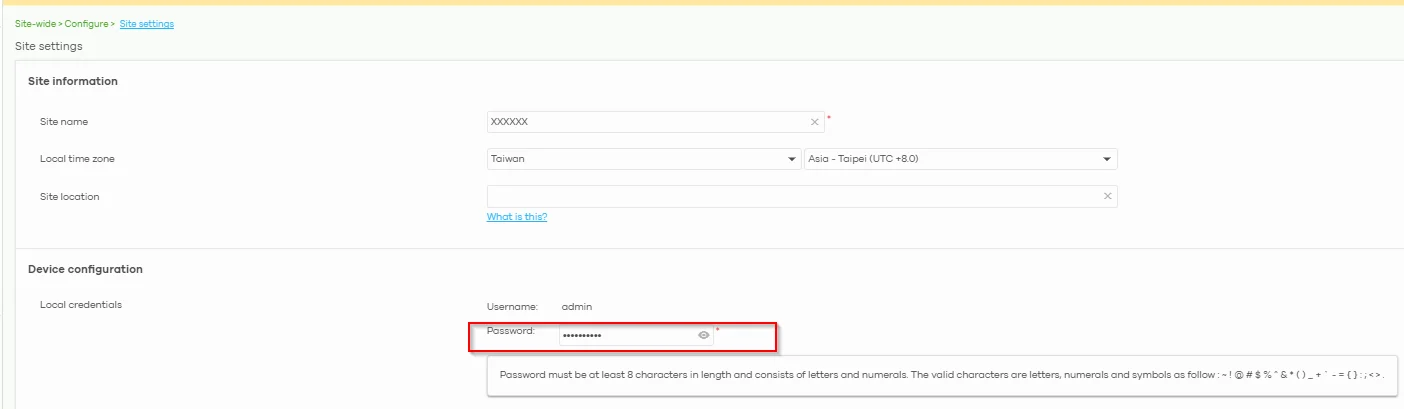
adminand your Nebula Site-Wide Password:- Log into the Nebula Control Center.
- Navigate to Site-Wide > Configure > Site Settings.
- Scroll down to Device Configuration > Local Credentials.
- Click the eye icon next to Password to reveal the password currently assigned to your device.
Zyxel_Judy
0 -
Hi @AWB0072 ,
Have you been able to log in to your device successfully? If not, please provide the following information:
- What is your device model?
- Is your device in Nebula Cloud mode (assigned to a specific site or just in an organization) or in Standalone mode?
- Which password did you try when logging into the local GUI — 1234, the password printed on the label, or something else?
Zyxel_Judy
0





 Zyxel Employee
Categories
- All Categories
- 442 Beta Program
- 3.1K Nebula
- 243 Nebula Ideas
- 6.8K Security
- 783 USG FLEX H Series
- 389 Security Ideas
- 1.8K Switch
- 87 Switch Ideas
- 1.5K Wireless
- 58 Wireless Ideas
- 7.2K Consumer Product
- 325 Service & License
- 527 News and Release
- 101 Security Advisories
- 31 Education Center
- 10 [Campaign] Zyxel Network Detective
- 5.3K FAQ
- 34 Documents
- 91 About Community
- 122 Security Highlight


