USG Flex 200 (Nebula mode) won't upgrade to latest firmware



 Freshman Member
We have several USG Flex 200 routers. 1 of the routers can not be upgraded via Nebula to the latest version. Wheb I try to upgrade from version V5.42 to V5.43 the upgrade starts, the device restarts and when booted, it still runs the V5.42 version. Other devices don't have the problem. What can be the reason? Thanks for helping me. Danny
All Replies
-
Hi @IctPk,
Could you please confirm if this USG FLEX 200 is currently [online] in Nebula?
If it is confirmed to be [online], please try the following steps to upgrade the firmware again:
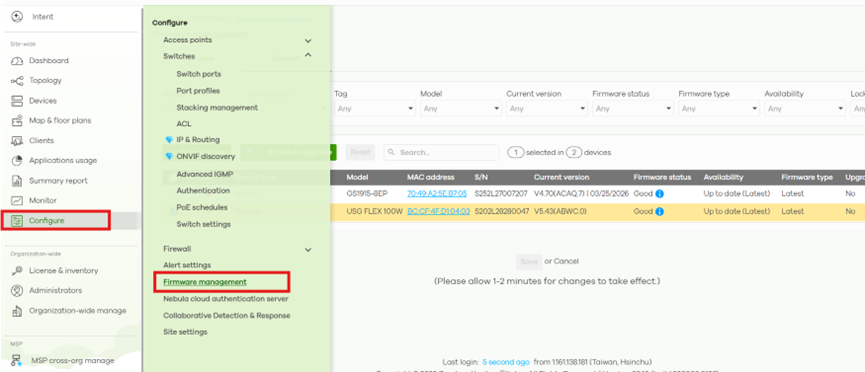
1.Go to Site-wide > Configure > Firmware management.
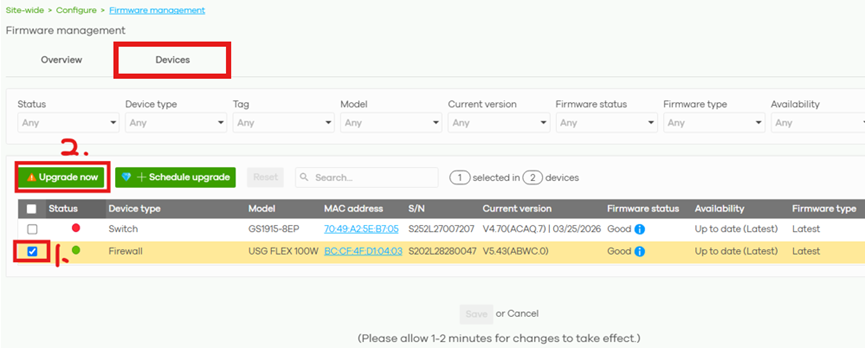
2. Switch to the [Device] tab, select this device, and click [Upgrade now].
3. Under Firmware type, select [Latest] and click OK to proceed with the upgrade.
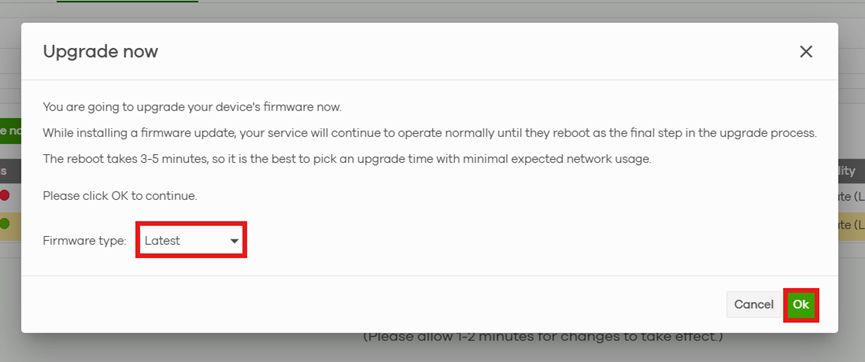
Note: If you want to upgrade to V5.43(ABUI.0), please make sure to select Latest.
If the upgrade still fails, please follow the FAQ below to enable remote support access:
Once configured, please provide your Organization name and Site name so that we can assist you further, thank you.
0 -
Dear Luna,
I tried it twice before posting here. No success.
With your remote support I tried it a third time just now.
And now I succeeded! It runs v5.43.
Yeah.
Thank you very much. Support call can be closed. Have a nice day.
Danny0



 Zyxel Employee
Categories
- All Categories
- 442 Beta Program
- 3.1K Nebula
- 243 Nebula Ideas
- 6.8K Security
- 783 USG FLEX H Series
- 389 Security Ideas
- 1.8K Switch
- 87 Switch Ideas
- 1.5K Wireless
- 58 Wireless Ideas
- 7.2K Consumer Product
- 325 Service & License
- 527 News and Release
- 101 Security Advisories
- 31 Education Center
- 10 [Campaign] Zyxel Network Detective
- 5.3K FAQ
- 34 Documents
- 91 About Community
- 122 Security Highlight


