Download MAC address import template


 Freshman Member
Dear community and @Zyxel_CSO,
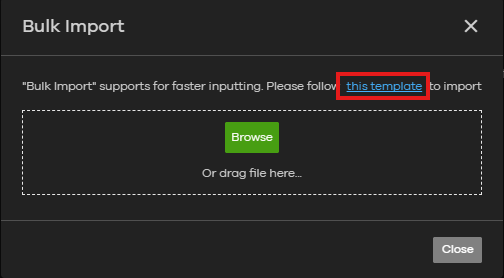
Could you let me know if there is another location to download the MAC address import template?
For a customer I need to add 20+ MAC addresses across multiple tenants.
Copying and pasting is fine and all but I would much more prefer to use a CSV.
Sadly the link to the template doesn't appear to be working.
If you require additional information, please let me know.
Kindest regards,
Bas
All Replies
-
Welcome to the Zyxel Community!
From your screenshot, it looks like you’re using the Bulk Import option on one of these pages:
- Site-wide > Configure > Nebula cloud authentication server
- Organization-wide > Organization-wide manage > Nebula cloud authentication server
If it’s the Site-wide > Configure > Nebula cloud authentication server page, you can use the template file attached below: (Please note that this file can be used in Site-wide Cloud authentication only, since Org-wide Cloud authentication import needs to add the authorized site option.)
We've also tested the “this template” link on Edge, Chrome and Firefox. We can download the template file, cloud-auth (.xlsx), without any problem. If the download link is still not available on your side, please:
- Try another browser (including a private/incognito window) or a different computer
- Check whether a browser extension (such as an ad blocker) is blocking the file
- Check whether your company’s proxy or firewall is blocking the download
Hope this helps!
Zyxel Tina
0



 Zyxel Employee
Categories
- All Categories
- 442 Beta Program
- 3.1K Nebula
- 244 Nebula Ideas
- 6.9K Security
- 805 USG FLEX H Series
- 392 Security Ideas
- 1.8K Switch
- 88 Switch Ideas
- 1.5K Wireless
- 60 Wireless Ideas
- 7.3K Consumer Product
- 332 Service & License
- 540 News and Release
- 106 Security Advisories
- 31 Education Center
- 10 [Campaign] Zyxel Network Detective
- 5.5K FAQ
- 34 Documents
- 89 About Community
- 124 Security Highlight