Dashboard overload.
Options




 Freshman Member
The old dashboard was clean and simple, it had 8 boxes, most of them useful.
My new dashboard has 13 boxes, 9 of which say 'No Data'. Nine boxes of nothing - its just TMI (yes I realise the irony in that ?).
If there's no data, I would suggest hiding the box and re-arrange the other boxes to give a simplified presentation of data that does exists.
0
Comments
-
Hi @airfox,
Thanks for your input. The new dashboard includes an option to customize what are the widgets that you need, click "Customize" on the top-right of your Dashboard and there you can select the needed widgets or move the widgets to your preferred location:
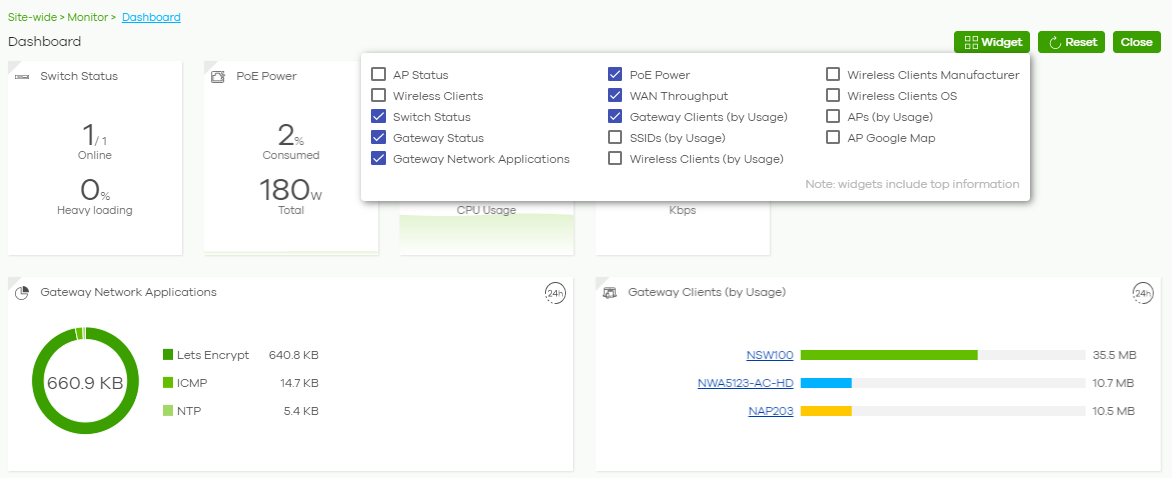
Hope is useful for you!
1 -
Thanks for that. Very useful! ?️
1


 Zyxel Employee
Categories
- All Categories
- 442 Beta Program
- 3.1K Nebula
- 241 Nebula Ideas
- 6.8K Security
- 759 USG FLEX H Series
- 380 Security Ideas
- 1.8K Switch
- 87 Switch Ideas
- 1.5K Wireless
- 58 Wireless Ideas
- 7.2K Consumer Product
- 321 Service & License
- 520 News and Release
- 100 Security Advisories
- 31 Education Center
- 10 [Campaign] Zyxel Network Detective
- 5.3K FAQ
- 34 Documents
- 90 About Community
- 119 Security Highlight


