Can't access SMB on NAS326 using windows 10
Options

Ryder17z
Posts: 7


 Freshman Member
Freshman Member
Hello.
This is really frustrating, I have enabled SMB 1.0 in windows 10 but i'm still unable to access it.
\\server\path\ - Invalid (request times out)
ip/path/ - Invalid (request times out)
I can see the device as a network device and confirm it's IP.
Accessing it through as a network location in "this pc" only presents me with 3 folders; Photos, Videos, Music. The folder I need to access is named "Shard" and it is not listed.
I can use the share just fine on Android v5 and above as well as Windows 8.1
Is there any way to fix this?
Edit Firmware is V5.21(AAZF.5)
#NAS_Jan_2020
This is really frustrating, I have enabled SMB 1.0 in windows 10 but i'm still unable to access it.
\\server\path\ - Invalid (request times out)
ip/path/ - Invalid (request times out)
I can see the device as a network device and confirm it's IP.
Accessing it through as a network location in "this pc" only presents me with 3 folders; Photos, Videos, Music. The folder I need to access is named "Shard" and it is not listed.
I can use the share just fine on Android v5 and above as well as Windows 8.1
Is there any way to fix this?
Edit Firmware is V5.21(AAZF.5)
#NAS_Jan_2020
0
All Replies
-
Try to clean the authority cache, I think you were login as guest account before.
And guest account doesn't has "Shard" access right.Open Command Prompt, type cmd at Windows search page. And then type net use * /delete to flash login history. After that, try again.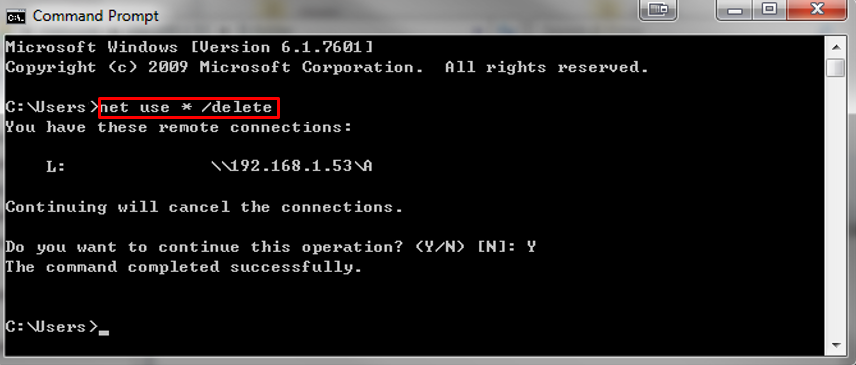
Or you can try to "Map network drive" on Windows 10 PC. 0
0

 Ally Member
Categories
- All Categories
- 442 Beta Program
- 3.1K Nebula
- 243 Nebula Ideas
- 6.8K Security
- 781 USG FLEX H Series
- 387 Security Ideas
- 1.8K Switch
- 87 Switch Ideas
- 1.5K Wireless
- 58 Wireless Ideas
- 7.2K Consumer Product
- 324 Service & License
- 527 News and Release
- 101 Security Advisories
- 31 Education Center
- 10 [Campaign] Zyxel Network Detective
- 5.3K FAQ
- 34 Documents
- 91 About Community
- 121 Security Highlight
