NSA320S Web UI not appears after PHP-Mysql package update fails

 Freshman Member

Hi!
I've tried to upgrade the Php-MySql package on my NSA320S using Mijzelf's MetaRepo (thanks again, it works) because the WebUi was always naggig me.
The upgrade stucked at 96%, after few hours it cannot finished, so I've restarted the nas.
From this time, the Web UI's login screen appears after restart, I can login, the main screen partially appears, but only the loading animation shown. After a browser refresh the url change to http://nas/r41151,/adv,/admin/# but cannot load it.
I have a working ffp, I can log in with ssh.
I tried to find the boot log but couldn't. Searching this forum I found a hint to try restart /etc/init.d/httpd.sh. It respond:httpd: Syntax error on line 8 of /etc/service_conf/httpd.conf: Cannot load /usr/local/zy-pkgs/lib/libphp5.so into server: libmysqlclient.so.16: cannot open shared object file: No such file or directory
Do you have any ideas?
Thanks: Norbert
Accepted Solution
-
OK, that's the right repo. Those are all for firmware 4. As you can see it contains 5 versions of PHP-MySQL-phpMyAdmin, one _2.0, and four _1.0 . The v2.0 package is almost twice as big as the others. I sifted the packages to find out why the v2 doesn't load on the NSA320s, but it was not conclusive. It should be some dependence outside the package itself, but I couldn't find it. Unfortunately I don't know where this package comes from, or for which box it was intended, I just collected as much fw4 packages as I could find /after/ ZyXEL took them offline. And it's clearly a fw4 package. fw5 packages have a different structure. I have (had?) a script which created a ZYPKGS file pointing to all latests packages, and so the v2 is 'active'.
Anyway, yes you can install another package 'by hand'. By default MetaRepository also handles a local repo. As you can see in the webinterface that is the directory …/admin/MyRepo/. If you create that directory and put package(s) inside together with a describing ZYPKGS file, it is handled. The content of ZYPKGS can be found inside the package. The package can be extracted with tar (or 7zip, or winzip, or …). It contains another archive called control.tar.gz, which contains a file 'control'. The ZYPKGS file contains all the 'control' files of all the packages glued together. If you look at fw4_stock_packages/ZYPKGS it will be clear. You only have to add the 'MD5SUM' line.
When your local repo is ready, disable fw4_stock_packages, and update the list. Now your local repo will contain the newest PHP-MySQL-phpMyAdmin, and that will be shown. Another option is to blacklist that PHP-MySQL-phpMyAdmin_2.0_arm_009 in MetaRepository.
0

 Guru Member



All Replies
-
There could be several reasons for this error.
- The package is simply not compatible. Where does it come from? The backup stock packages on metarepo.tk, or one of the NAS packages on ftp.zyxel.com? The latter are not compatible, the first might.
- The package is not completely installed. It needs libmysqlclient.so.16. Do you have that? I think it should be in /usr/local/zy-pkgs/lib/
- You restarted with the wrong environment. When I remember well the correct way to restart the http server is ```LD_LIBRARY_PATH=/usr/local/zy-pkgs/lib/ /etc/init.d/httpd.sh restart```
You can disable the package by removing it's startscript from /usr/local/zy-pkgs/etc/init.d/ and restart the box.
There should be a huge logfile somewhere in /usr/local/zy-pkgs/, which might tell why the package didn't finish it's install.
0 -
Thanks Mijzelf, you are the best, as always :-)
The PHP package removal from the init.d solved my problem, but as a lesson to the others here my answers:
- I'm using the following repo:
http://zyxel.diskstation.eu/Users/Mijzelf/zypkg-repo/fw4_stock_packages/
because the url I used before has disappeared:
http://zyxel.diskstation.eu/Users/Mijzelf/zypkg-repo/zyxel_fw4_zypkgs/ - Yes, I have the libmysqlclient.so.16 file in the directory you mentioned, but I could not restart the httpd daemon with your command. It responded the same error message.
- And yes, I found the logfile, too, and I found in it, that after the install it tries to start httpd 4 times and it fails
My only problem is, I cannot install the old PHP package which was work fine, because it is not in the package list anymore, and I cannot install the new one (2.0zypkg009) because some compatibility issue.
Can I install the old one "by hand"?
Thanks again!0 - I'm using the following repo:
-
OK, that's the right repo. Those are all for firmware 4. As you can see it contains 5 versions of PHP-MySQL-phpMyAdmin, one _2.0, and four _1.0 . The v2.0 package is almost twice as big as the others. I sifted the packages to find out why the v2 doesn't load on the NSA320s, but it was not conclusive. It should be some dependence outside the package itself, but I couldn't find it. Unfortunately I don't know where this package comes from, or for which box it was intended, I just collected as much fw4 packages as I could find /after/ ZyXEL took them offline. And it's clearly a fw4 package. fw5 packages have a different structure. I have (had?) a script which created a ZYPKGS file pointing to all latests packages, and so the v2 is 'active'.
Anyway, yes you can install another package 'by hand'. By default MetaRepository also handles a local repo. As you can see in the webinterface that is the directory …/admin/MyRepo/. If you create that directory and put package(s) inside together with a describing ZYPKGS file, it is handled. The content of ZYPKGS can be found inside the package. The package can be extracted with tar (or 7zip, or winzip, or …). It contains another archive called control.tar.gz, which contains a file 'control'. The ZYPKGS file contains all the 'control' files of all the packages glued together. If you look at fw4_stock_packages/ZYPKGS it will be clear. You only have to add the 'MD5SUM' line.
When your local repo is ready, disable fw4_stock_packages, and update the list. Now your local repo will contain the newest PHP-MySQL-phpMyAdmin, and that will be shown. Another option is to blacklist that PHP-MySQL-phpMyAdmin_2.0_arm_009 in MetaRepository.
0 -
Thanks Mijzelf,
after a lot of experimenting and endless restarts, I finally succeeded using the LocalRepo method.
An important addition to your description of the process: as I realized, in the LocalRepo's ZYPKGS file the name of the package must be different of the main repo's name. At the first dozen of tries I was created the ZYPKGS file with the exact copy of the 'control' file content added a MD5DUM (using the md5sum command), but that package never appeared.
I tried to figure out how to disable fw4_stock_packages: finally my solution was to comment out that line in the /usr/local/zy-pkgs/etc/MetaRepository.conf file not worked alone, unless I also left at least one working url outside of the LocalRepository. It is a strange behaviour, I tried every combinations of the config file lines and package names, every time removed the automatically created /admin/zy-pkgs/MetaRepository directory and restarted the NAS.
Finally the list appears on the website with the old PHP package renamed, the install also succeeded and after a restart the PHP started to work again.
And I reverted the MetaRepository.conf, restarted the box again, and now I see 2 PHP packages and it works.So now it is not exactly the same situation as before I started the update, but I'm happy, because it is working, I have Apache/PHP/MySql again.
Thanks Mijzelf!
Norbert
0 -
Hello,
I've faced with exactly the same problem as @Norbi had except my box is a bit older - a NSA320. I've tried to create a local repo 'MyRepo' under admin filled with PHP-MySQL-phpMyAdm_1.0_arm_005.zpkg and the relative ZYPKGS file:
Package: PHP-MySQL-phpMyAdm
Version: 1.0zypkg005
Description: This tool can be used to manage MySQL through the web. Enter 'root' as the username and '1234' as the password to log in.
Depends:
Size: 23595056
Installed-Size: 67543040
Architecture: arm
Zy-Model: NSA320, NSA-220, NSA-220 PLUS, NSA210, NSA221
IsBuiltin: N
Filename: PHP-MySQL-phpMyAdm_1.0_arm_005.zpkg
MD5SUM: 4d15df5e2de8d1499ecfbfc0861d93d1
I've changed the file and package name according to Norbi's suggestion - without any success.
Can you give me some suggestion, how to resolve this problem?Thanks in advance
Gabi0 -
…update
actually the situation has been changed. Finally I've successfully(?) installed the PHPMyAdmin 1.0zypkg008 version. The result is here: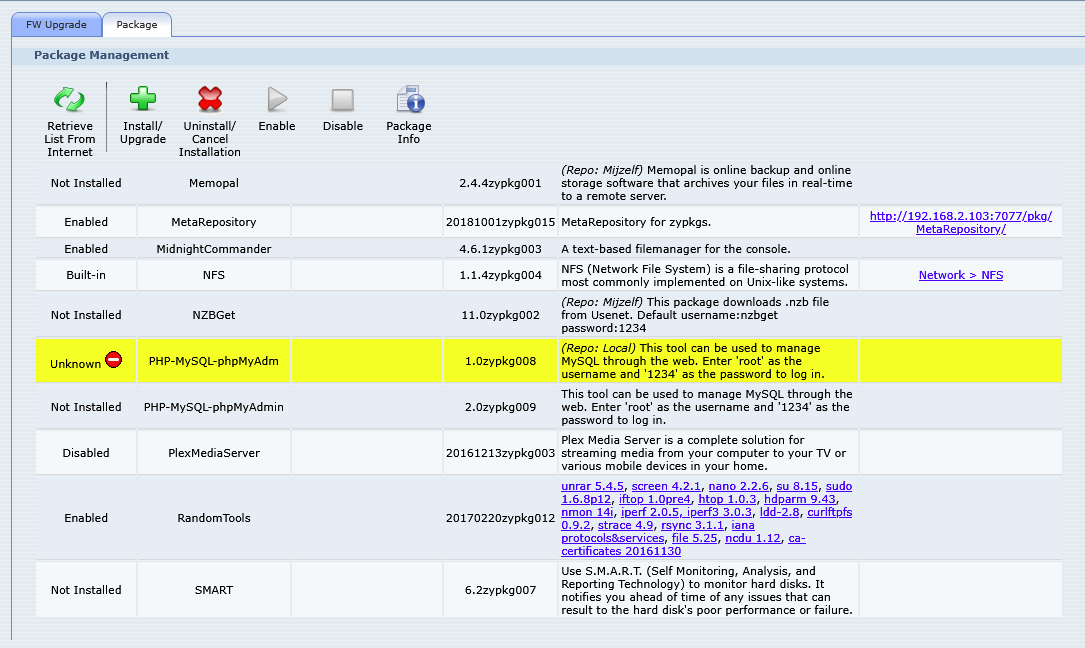
the state of the installed package is 'Unknown'. Moreover, the WEB service is not working as expected, the php scripts are visualised as txt .
Thnx for any help
0 -
Moreover, the WEB service is not working as expected, the php scripts are visualised as txt .
The box runs Apache, and in Apache php is enabled with a dynamic library. Apparently the provided library in PHP-MySQL-phpMyAdmin is not compatible with the running Apache. In which case the php scripts cannot be executed.
Try the oldest PHP-MySQL-phpMyAdmin package.
0


Categories
- All Categories
- 442 Beta Program
- 3K Nebula
- 222 Nebula Ideas
- 129 Nebula Status and Incidents
- 6.5K Security
- 619 USG FLEX H Series
- 349 Security Ideas
- 1.7K Switch
- 84 Switch Ideas
- 1.4K Wireless
- 53 Wireless Ideas
- 7K Consumer Product
- 298 Service & License
- 486 News and Release
- 92 Security Advisories
- 31 Education Center
- 10 [Campaign] Zyxel Network Detective
- 4.8K FAQ
- 34 Documents
- 88 About Community
- 105 Security Highlight
