How to dimm or disable LED on NWA130BE ?

 Freshman Member
Best Answers
-
Hi @Jeoffrey
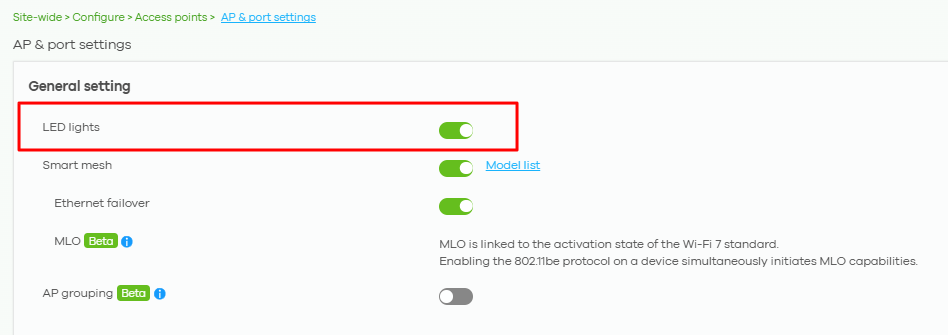
Please help to navigate to Nebula CC > your org & site > Menu > Site-wide > Configure > Access points > AP & port settings to disable the LED lights setting. This setting will be applied to all of AP in this site.
Zyxel Melen0 -
Hi,
So no way to just Dimm the LED, or to set it one by one if we don't want a global setting ?0

 Zyxel Employee



All Replies
-
Hi @Jeoffrey
Please help to navigate to Nebula CC > your org & site > Menu > Site-wide > Configure > Access points > AP & port settings to disable the LED lights setting. This setting will be applied to all of AP in this site.
Zyxel Melen0 -
Hi,
So no way to just Dimm the LED, or to set it one by one if we don't want a global setting ?0 -
Hi @Jeoffrey
If you want to disable the LED for specific AP, please navigate to the Menu > Devices > Access point page to select the APs and add "LED_off" tag. Here is the guide video.
Zyxel Melen0
Categories
- All Categories
- 442 Beta Program
- 3K Nebula
- 222 Nebula Ideas
- 129 Nebula Status and Incidents
- 6.5K Security
- 619 USG FLEX H Series
- 348 Security Ideas
- 1.7K Switch
- 84 Switch Ideas
- 1.4K Wireless
- 53 Wireless Ideas
- 7K Consumer Product
- 298 Service & License
- 485 News and Release
- 92 Security Advisories
- 31 Education Center
- 10 [Campaign] Zyxel Network Detective
- 4.8K FAQ
- 34 Documents
- 88 About Community
- 105 Security Highlight


