How do I switch wifi channels on the EX7710-B0 router?

 Freshman Member
There are multiple other wifi channels on the same channel causing interference and I wanted to change channels. When entering the default gateway IP into my browser and entering in the username and password, I get taken to "EX7710-B0 WAN service" which appears to be where I can change settings relating to the PPPoE user and password, IP addresses, and the VLAN ID. There's nothing here to indicate where I should be able to change the channels on the router and no other submenus. Is the router locked to a single channel or am I just missing something?
Accepted Solution
-
Hi Sir
I believe your EX7710 is a opensync-Plume model
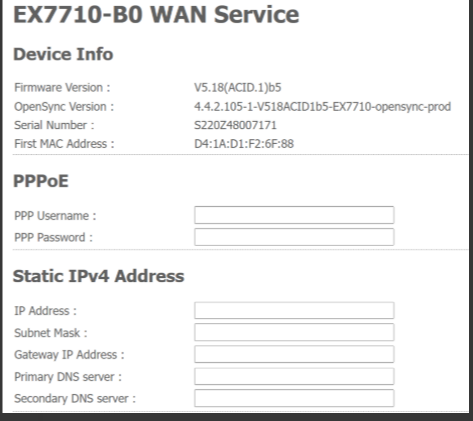
The Wi-Fi channel of this model is controlled by the Plume cloud, and users are not able to change the Wi-Fi channel settings by themselves.
Technical Support Engineer
Technical Support Department I
ZyXEL Communications Corp.
0




All Replies
-
Hi Sir
I believe your EX7710 is a opensync-Plume model
The Wi-Fi channel of this model is controlled by the Plume cloud, and users are not able to change the Wi-Fi channel settings by themselves.
Technical Support Engineer
Technical Support Department I
ZyXEL Communications Corp.
0
Categories
- All Categories
- 442 Beta Program
- 3.1K Nebula
- 234 Nebula Ideas
- 6.7K Security
- 727 USG FLEX H Series
- 372 Security Ideas
- 1.8K Switch
- 87 Switch Ideas
- 1.5K Wireless
- 57 Wireless Ideas
- 7.1K Consumer Product
- 318 Service & License
- 511 News and Release
- 99 Security Advisories
- 31 Education Center
- 10 [Campaign] Zyxel Network Detective
- 5.2K FAQ
- 34 Documents
- 89 About Community
- 116 Security Highlight
