Unable to access my FWA 505

 Freshman Member
Hi, just set up my new FWA505 and updated firmware to latest version but the unit is still not recognised as being online by Nebula (even though it is and all looks healthy). Tried the port testing and my network allows port 4335 but not 6667. Don’t really know what this means. Please could you assist?
All Replies
-
So the internet works by it ok?
can you login fine? are you using the password set by Nebula ?
0 -
Hi @ChrisMace
If your FWA505 is online on Nebula, and you want to access its device's web GUI, you may use the remote configurator - a live tool function - to access.
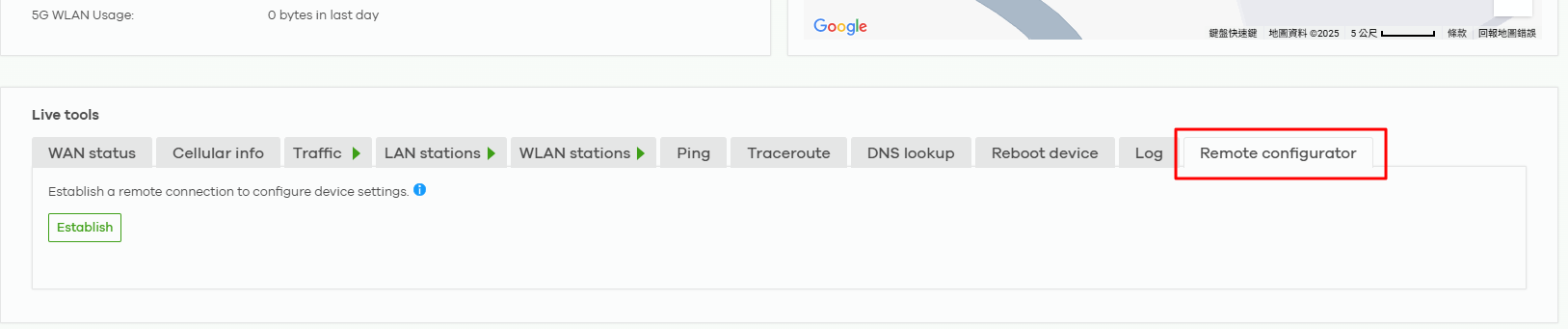
And you will need to use Nebula site-wide password to login.
Zyxel Melen0 -
Hi, the internet on my router works ok but shows as been offline when I try to interrogate via Nebula.
0 -
also the lan drops out sometimes and the admin pages do not show a computer connected via lan when it is?
0 -
Might be your ISP is blocking the FWA 505 from fully connecting to Nebula?
if you remove it from Nebula and use as standalone after a reset does it work fine?
0 -
Yes, it works well and I can monitor using the admin log in. Just cannot link up on Nebula?
0 -
Hi @ChrisMace
Regarding to your update, this is more likely your ISP blocks ports 4335/6667 which are using for Nebula connection. Please help to contact your ISP for confirming the blocking ports.
P.S. Here are some troubleshooting steps for issue the device can't connect to Nebula.
- Please use the device's diagnostic tool to ping the Internet. EX. 8.8.8.8.
- Please use the device's diagnostic tool to resolve DNS for d.nebula.zyxel.com.
- Please connect a device under FWA505 and access the port test website to check the port 4335/6667. Example test link
- Please check the device's system time is whether up to date or not. If not, please check the NTP sync issue. (DNS resolve issue or port UDP 123 been blocked)
Zyxel Melen0

 Guru Member




 Zyxel Employee



Categories
- All Categories
- 442 Beta Program
- 3K Nebula
- 222 Nebula Ideas
- 129 Nebula Status and Incidents
- 6.5K Security
- 619 USG FLEX H Series
- 348 Security Ideas
- 1.7K Switch
- 84 Switch Ideas
- 1.4K Wireless
- 53 Wireless Ideas
- 7K Consumer Product
- 298 Service & License
- 485 News and Release
- 92 Security Advisories
- 31 Education Center
- 10 [Campaign] Zyxel Network Detective
- 4.8K FAQ
- 34 Documents
- 88 About Community
- 105 Security Highlight


