XMG1915-18EP - Tagged VLAN packets dropping

 Freshman Member
Hello,
I'm hoping someone can help troubleshoot a VLAN issue. VLAN 20 is my management VLAN. I'm seeing different behaviours with tagged and untagged use of the VLAN.
Setup:
Port (Tagging) | PVID | Untagged | Tagged |
|---|---|---|---|
1 (Untag only) | 20 | 20 | |
9 (All) | 20 | 20 | 30, 40, 50 |
16 - FW Uplink (Tag only) | 20 | 20, 30, 40, 50 | |
15 (Tag only) | 20 | 20 |
The switch's IP status page shows:
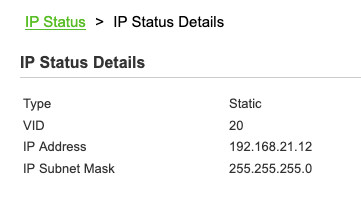
If I connect my Mac to port 15 (vlan 20, tag only), using a virtual interface with VLAN 20, I get assigned an address from DHCP:
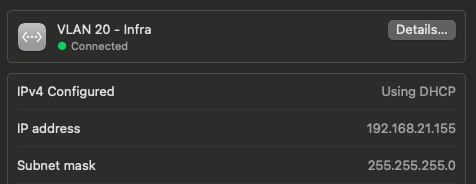
From now, I can ping other devices on the same VLAN/subnet. I can also establish TCP-based sessions (e.g) SSH out to internet hosts without issue.
However, if I try TCP-based sessions to devices on the same subnet, it's problematic. It'll establish the connection (mostly), but quickly drop (a few seconds, maybe more - seems to be traffic volume related). Accessing the switch UI fails, curl shows:
MP:~ xxx$ curl -kv https://switch3/login.html
- Host switch3:443 was resolved.
- ….
- Connected to switch3 (192.168.21.12) port 443
- …
- ALPN: server did not agree on a protocol. Uses default.
- Server certificate:
- subject: CN=XMG1915 7049a2295139
- start date: Jan 1 00:02:22 2022 GMT
- expire date: Mar 27 00:02:22 2082 GMT
- issuer: CN=XMG1915 7049a2295139
- SSL certificate verify result: self signed certificate (18), continuing anyway.
- using HTTP/1.1
- GET /login.html HTTP/1.1
Host: switch3
User-Agent: curl/8.7.1
and it hangs waiting for a response and eventually times out.
If I connect the Mac to Port 1 (vlan 20, untagged only), using the standard network interface (no tagging), everything's OK, I get a DHCP address again, and this time ping and SSH/HTTP local subnet access is A-OK.
Why am I seeing different behaviours on these two ports? The intermittent working on port 15 suggest something funky is going on somewhere and I can't work it out.
Thank you for any guidance you can provide.
All Replies
-
Port PVID is for untagged end devices, so why would you connect your Mac PC to a tag only port that with both PVID and tagged 20?
Ofc, the switch could handle packets from Mac PC to VLAN 20 by PVID 20, but how come the Mac PC's adapter without tagged VLAN 20 be handled when the packets with tagged VLAN 20 from the switch. However, if you tagged VLAN 20 on your Mac PC's adapter, just don't set PVID 20 on port 15.
0 -
Hi @jkt,
To investigate further, could you please test whether devices within VLAN 20 can ping each other to check for packet loss or high latency? Additionally, if you can still access the switch's GUI while the issue is occurring—especially when observing the symptom "TCP-based sessions on the same subnet can establish but quickly drop"—please collect a Tech-support Info file. This will help us identify any abnormal logs or system behavior.
On top of that, please perform some cross-testing. For example, try using different PCs on the same port. If you have an additional switch capable of VLAN tagging, you may connect through it to send tagged VLAN traffic on the same port. This can also help us determine which part is causing the issue.
We appreciate your cooperation!
Zyxel Tina
0









 Zyxel Employee



Categories
- All Categories
- 442 Beta Program
- 3K Nebula
- 222 Nebula Ideas
- 129 Nebula Status and Incidents
- 6.5K Security
- 619 USG FLEX H Series
- 348 Security Ideas
- 1.7K Switch
- 84 Switch Ideas
- 1.4K Wireless
- 53 Wireless Ideas
- 7K Consumer Product
- 298 Service & License
- 485 News and Release
- 92 Security Advisories
- 31 Education Center
- 10 [Campaign] Zyxel Network Detective
- 4.8K FAQ
- 34 Documents
- 88 About Community
- 105 Security Highlight


