Huge issues with one customer

 Master Member



Hello
At one customer we have huge issues with an USG Flex50h and Switch GS1920-24HP.
the devices are like once a week offline. For example: what i see now:
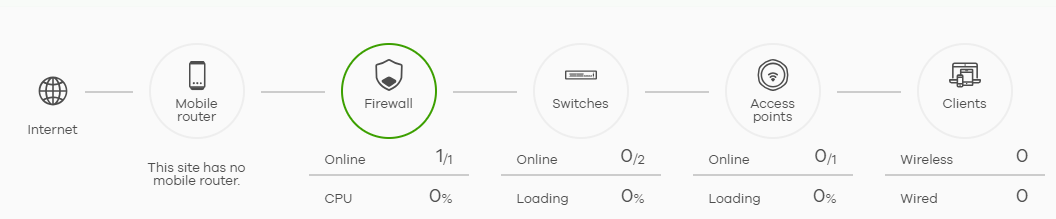
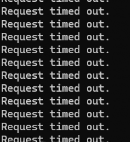
one computer is online, because it is connected by the WIFI from the neighbours. (so not through zyxel devices). When i try to ping the firewall:
We allready replaced firewall and switch. But no result. after one week the same issues again.
When i try the remote configurator of with nebula, i get the message: device offline.
The strange thing is, why can't i ping the device? normaly absolutely possible. It seems the device completely hangs.
What can i do? this has to be solved quickly.
If it was the internet connection only, why does the device not respond at all anymore?
All Replies
-
So this one computer is online by neighbours wifi but you can ping? Maybe they have firewall? Or PC has firewall?
Can you test with a known working device like your laptop for troubleshooting?
Does the USG or Switch have VLAN's or is it all untag? What about cables are they in the walls? Test direct to the Switch or USG.
0 -
no, different peter,
The computer is online, because they use wifi from the neighbours now. So i took control of this computer, and i see the lan adapter has no dhcp adress received from the firewall. So i put an static address on this adapter. and tried to ping the firewall. no response at all.
but also in nebula, when i try to create an remote control session it tells me, the device is offline, but in the dashboard its online?strange isn't it?
i'm sure when we do an reboot the devices will come online again.Last week i also had one customer, where an firewall was offline, and not responding at all. after an reboot everything came back online again.
0 -
Hi @Dpj
Does this issue occur with any configuration change? If not, could you help connect the firewall to the console to verify whether it can respond to console access?
If it can, please help to enter the command "
usgflex200h> cmd diagnostics diaginfo collect ac start" to collect the diagnostic file and use commend "usgflex200h> show diagnostics diaginfo collect status" to check the status. Please reboot the device when the diaginfo collect status shows "status Standby", it can ensure the diagnostic can be downloaded after reboot.Zyxel Melen0 -
Ehh the devices are all dhcp, except 1
0 -
-
then i have to adjust the vlan or security settings. difficult to say remotely
is there anything i can do when i connect the console cable?
never used this. so unknown with the command line
0 -
oh sorry missed your message before. It's an 50h
0 -
oh i see, just can use those commands. not very fresh at the moment;) i will see if i can get an console to usb on time.
0 -
Do you know if the device that is static works fine?
Can you setup a PC with static IP without turning it off that when the problem happens that Pc works fine.
Could be the DHCP server is the problem do you have "Source IP Spoofing Prevention" enabled in Security policy?
0

 Guru Member


 Zyxel Employee


Categories
- All Categories
- 442 Beta Program
- 3K Nebula
- 222 Nebula Ideas
- 129 Nebula Status and Incidents
- 6.5K Security
- 619 USG FLEX H Series
- 348 Security Ideas
- 1.7K Switch
- 84 Switch Ideas
- 1.4K Wireless
- 53 Wireless Ideas
- 7K Consumer Product
- 298 Service & License
- 485 News and Release
- 92 Security Advisories
- 31 Education Center
- 10 [Campaign] Zyxel Network Detective
- 4.8K FAQ
- 34 Documents
- 88 About Community
- 105 Security Highlight


