Domain join | AAA Server

 Freshman Member


Good morning / Hi everyone,
I have a 200 Flex H firewall and I would like to allow VPN access via SSL only to certain domain users (domain on Windows Server 2025).
In the past I was able to configure this type of setup, but with this new customer I can’t get it to work.
Is there something that no longer works after the firmware update?
On this firewall, with firmware version 1.36, I’m not able to make it work.
All Replies
-
Hi @Alex_91,
The USG FLEX H Series firewalls support Active Directory (AD) authentication for SSL VPN users, allowing you to centralize user management and leverage your existing AD infrastructure. Even with firmware version 1.36, this functionality should be available.
Here's a general guide to help you configure AD authentication for your SSL VPN:
- Create a Domain Zone for AD Authentication: Ensure your firewall is configured to use your AD domain. The firewall needs to join the Active Directory domain to authenticate users.
Set Up AD Server Authentication on the Firewall:
- Navigate to
User & Authentication>User Authentication. - Select
AD Serverand clickAdd. - Enter the domain name (e.g., yourdomain.com) and the IP address of your AD server.
- Click
Join Domain. Enter the NetBIOS domain name, an AD username with sufficient privileges, and the corresponding password.
- Note: The maximum number of characters for an AD hostname is 15.
- Navigate to
Configure SSL VPN to use AD Authentication:
- Navigate to
VPN>SSL VPN. - Set up your SSL VPN with AD authentication. Ensure that users are created and managed in your Active Directory. Users will authenticate using their AD credentials.
- Navigate to
External Group Users (for specific domain users): Since uOS 1.35, external group users can be used in Remote Access VPN profiles. This allows you to restrict VPN access to specific AD groups.
- Create an AD server profile on the firewall.
- Place the desired AD users into an AD group via Windows Server Active Directory Users and Computers.
- Reference this group object in your SSL VPN profile. Only AD users who are members of that group will be able to authenticate to the VPN.
To help us investigate further, please provide the following information:
- Screenshots of your current AD server configuration on the USG FLEX 200H.
- Screenshots of your SSL VPN configuration, specifically the authentication settings.
- Any error messages you encounter during the domain join process or when users attempt to connect to the SSL VPN.
- Could you enable Zyxel Support Access via Help > Support Request in the Nebula console and provide your Organization or Site name? This will allow our support team to view your cloud environment configuration directly, which can significantly shorten troubleshooting time.
This AI response aims to provide initial troubleshooting steps and identify information needed for further diagnosis. Feel free to share additional details based on the suggestions above — this will help community members offer more targeted assistance.
If you have feedback or idea about this AI assistant, share them in Community Feedback.0 -
Yes, I followed the procedure.
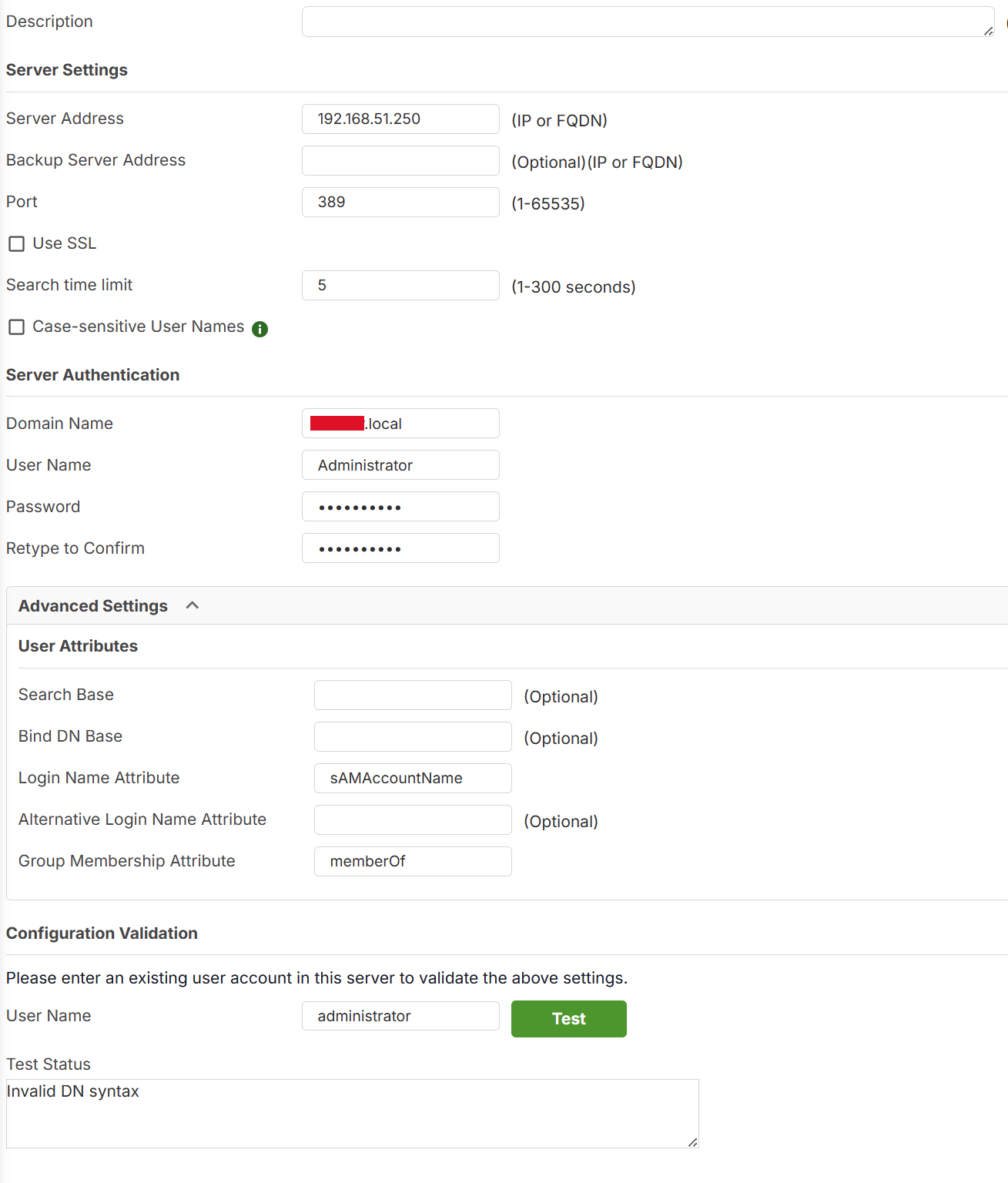

Where can I find the logs related to this issue?
Basically, the connection seems to be established, but the user is not being identified, or I’m not sure how to send the user authentication request.
Last question: What is the “Group Membership Attribute” used for? Isn’t it enough to filter it by Organizational Unit by setting it in the parameter Bind DN Base?
0 -
Hi @Alex_91,
Regarding your question about the difference between Bind DN Base and Group Membership Attribute:
While the Bind DN Base defines the search scope (the where), the Group Membership Attribute defines the specific authorization (the who).
Using groups is the AD best practice because it allows you to manage access rights without moving users between OUs, which could otherwise disrupt their Windows GPOs. It gives you the flexibility to grant VPN access to specific users even if they are scattered across different OUs, simply by adding them to a designated AD group (e.g., usually using the
memberOfattribute in Microsoft AD).Regarding your authentication issue:
Based on your screenshot, we recommend adjusting your configuration and testing it again. You may refer to the following link or the image.
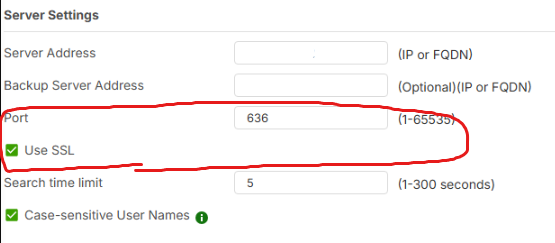
If the issue persists after these changes, please provide more detailed symptoms, any error messages, or logs. Additionally, if the device is registered on Nebula, please enable Zyxel Support Access and share your Organization/Site name so we can review the configuration directly.
Zyxel Tina
0 -
Now it’s even worse.
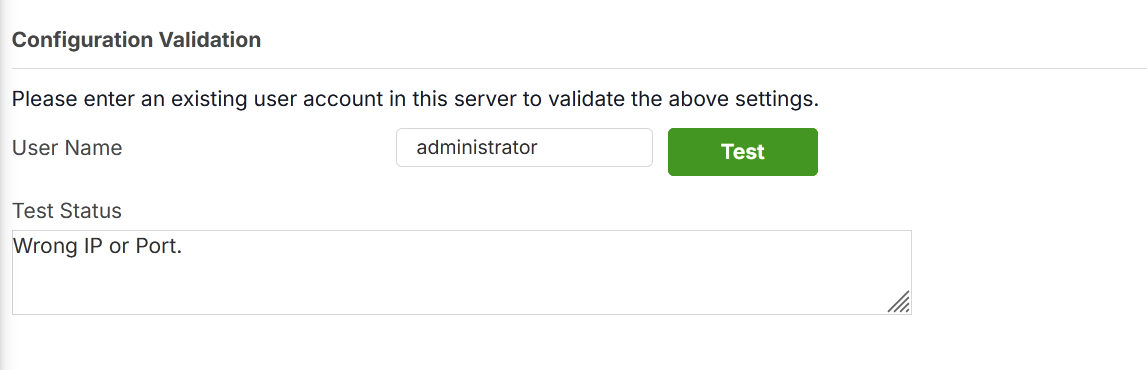 0
0 -
Hi @Alex_91,
To investigate further, please provide remote access or your configuration file via private message so we can review the settings.
Zyxel Tina
0

 Zyxel Community Virtual Assistant





Categories
- All Categories
- 442 Beta Program
- 3K Nebula
- 222 Nebula Ideas
- 129 Nebula Status and Incidents
- 6.5K Security
- 619 USG FLEX H Series
- 349 Security Ideas
- 1.7K Switch
- 84 Switch Ideas
- 1.4K Wireless
- 53 Wireless Ideas
- 7K Consumer Product
- 298 Service & License
- 485 News and Release
- 92 Security Advisories
- 31 Education Center
- 10 [Campaign] Zyxel Network Detective
- 4.8K FAQ
- 34 Documents
- 88 About Community
- 105 Security Highlight


