Interface Rate Limiting UDP gets high! Priority with or without BWM

 Guru Member



V1.37
Its great that Interface Rate Limiting has been added works on interfaces of a bridge but you must remove them to set the rate limit to add them back which is fine. Too bad you BWM for Transparent Bridge interface as listed in notes plus no FQDN support for BWM yet.
Back to this problem when you set a Egress limit on a interface say 50Mb when a device is connected to that interface it should limit to 50Mb download and it does with or without BWM good so far. As a test youtube can use UDP or TCP which to test TCP you block UDP port 443 to make youtube use TCP and this is the a 4K Video
https://www.youtube.com/watch?v=LXb3EKWsInQ&t=65s
the test is to make the Video buffer which sounds wrong but is correct due to limited bandwidth you set being 50Mb. Which firewall blocking UDP 443 you run the above Video all is fine then you want to test load with a download like this test file
http://ipv4.download.thinkbroadband.com/1GB.zip
with a download manager to add threads as bandwidth is divided at which point the Video will buffer and for TCP it does.
So now allow UDP 443 and run the above Video (check by Wireshark) and do the same test and the Video does not buffer this is wrong with the added download file and number of threads it didn’t buffer and it should.
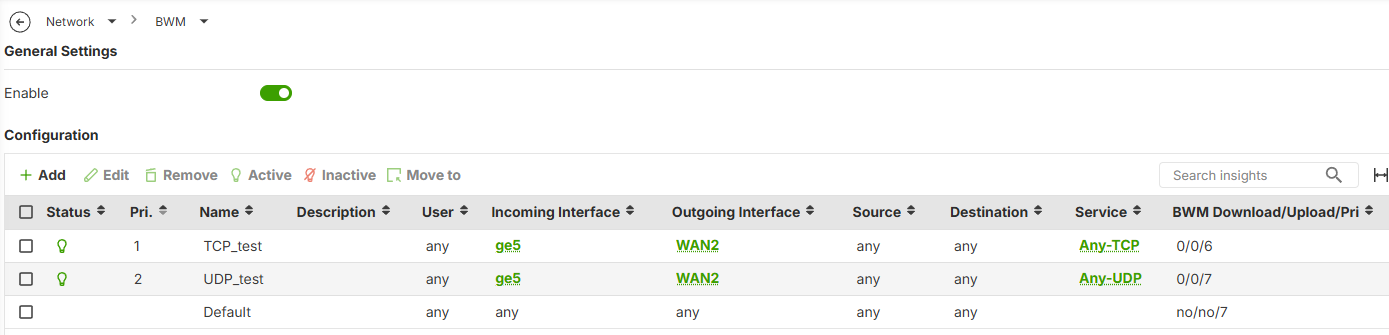
I then did this in BWM where I made any TCP Priority 6 and any UDP Priority 7 it still didn't buffer the Video and it should meaning BWM rules are being ignored.
Can this be looked in to thanks
edit just on another note looks like control-tcp-ack is on by default 😎
All Replies
-
Hi @PeterUK,
Thank you for reaching out to the Zyxel Community regarding your USG FLEX H Series device. I understand you're experiencing unexpected behavior with Interface Rate Limiting and Bandwidth Management (BWM) when handling UDP traffic, specifically with YouTube video streaming not buffering as expected when combined with a download.
Here are some steps to review your BWM configuration and ensure it's functioning as intended:
Verify BWM Rule Application:
- Ensure that BWM is globally enabled on your USG FLEX H Series device.
- Confirm that the BWM rules you've created (TCP_test and UDP_test) are active and correctly ordered. Rules are processed from top to bottom, and the first matching rule is applied.
- Double-check that the
Incoming Interface(ge5) andOutgoing Interface(WAN2) specified in your BWM rules accurately reflect your network topology and the traffic path you intend to manage. - For the "BWM Download/Upload/Pri" column, ensure that the priority values (6 for TCP, 7 for UDP) are correctly entered and that these priorities are within the valid range for your device. A lower number generally indicates higher priority.
Understand BWM Limitations:
- Bandwidth Management on the USG FLEX H Series supports shared criteria, meaning the total bandwidth limit is distributed among all clients matching the policy. For more granular control, such as per-client bandwidth management, you would need to create individual objects and apply separate policies.
- If
ge5is part of a Bridge Interface (e.g., BR0), individual interfaces within the bridge cannot be directly selected for BWM rules; only the overall bridge interface can be configured for BWM.
Review Session Control Settings:
- Check your Session Control settings under
Security Policy > Session Control. The default session limit is 2000 sessions per client, which includes both TCP and UDP sessions. While unlikely to be the primary cause of your specific issue, a very high number of sessions from the download manager might indirectly affect how traffic is prioritized or managed if session resources are being exhausted.
- Check your Session Control settings under
To help us investigate this further, please provide the following information:
- Network Topology Map: A diagram illustrating how your devices (including the USG FLEX H, the client performing the tests, and the internet connection) are connected.
- Firmware Version: Please confirm the exact firmware version of your USG FLEX H Series device. You mentioned V1.37 in your post, but confirming the full version number can be helpful.
- Packet Capture: If possible, a packet capture taken on the USG FLEX H's WAN2 interface while you are performing the YouTube and download test. This can help us analyze how the traffic is being categorized and prioritized by the device.
- Configuration File: If you are comfortable sharing it, an anonymized configuration file of your USG FLEX H Series device could allow us to review all relevant settings.
This AI response aims to provide initial troubleshooting steps and identify information needed for further diagnosis. Feel free to share additional details based on the suggestions above — this will help community members offer more targeted assistance.
If you have feedback or idea about this AI assistant, share them in Community Feedback.0 -
BWM Rules are correct ge5 is not part of a bridge but really is P1 ge1 (due to how I listed it) on FLEX700H, session limit is unlimited in this setup its P1 ge5 SNAT P14 WAN2.
It just looks like UDP at least for port 443 is high Priority by hidden default rule?
0 -
Hi @PeterUK
I followed your setup in my lab, however, the video is still buffering after I inactivate the deny UDP policy.
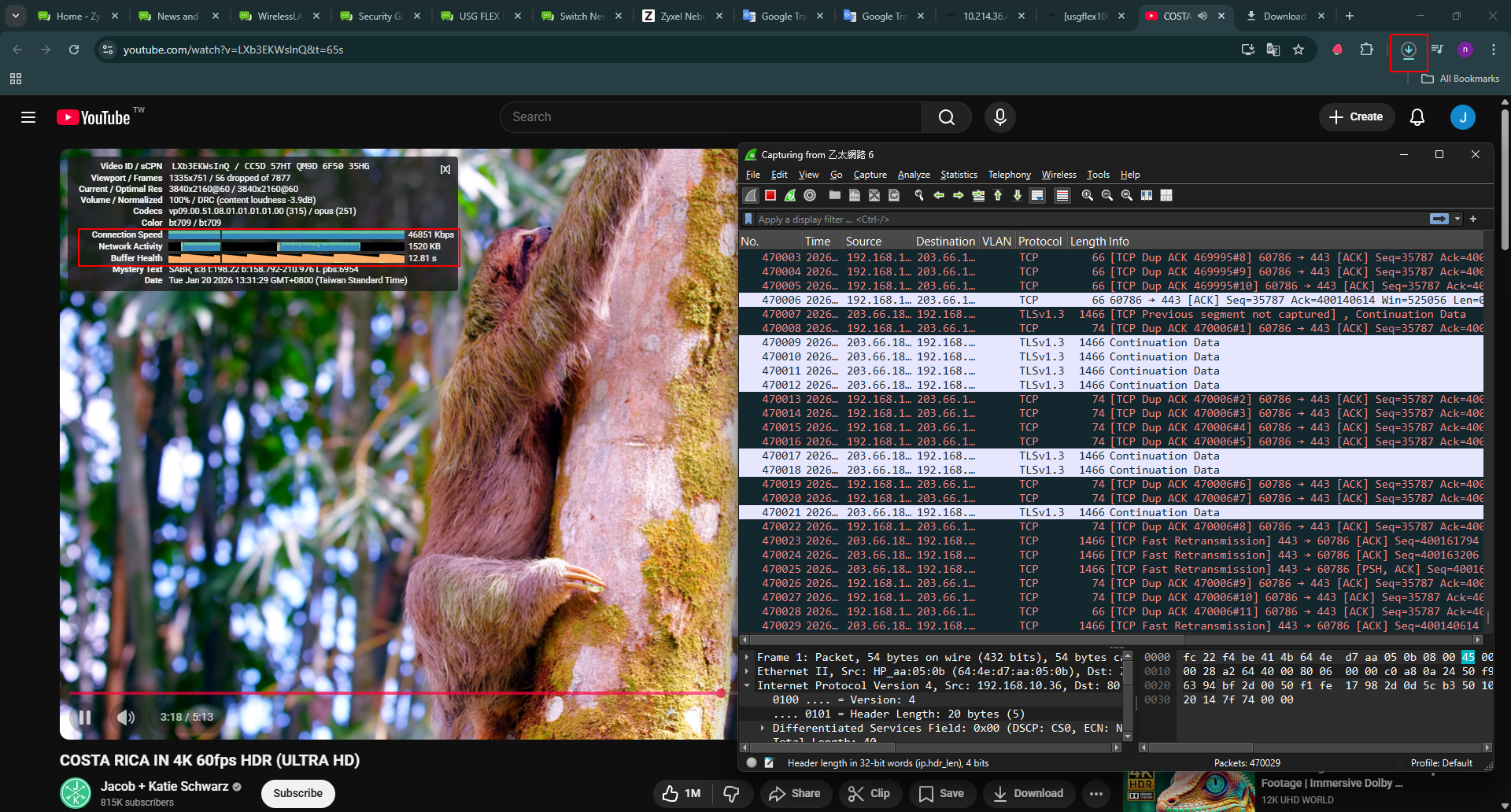
What definition is your "buffer"?
Zyxel Melen0 -
You need to test YouTube by UDP QUIC
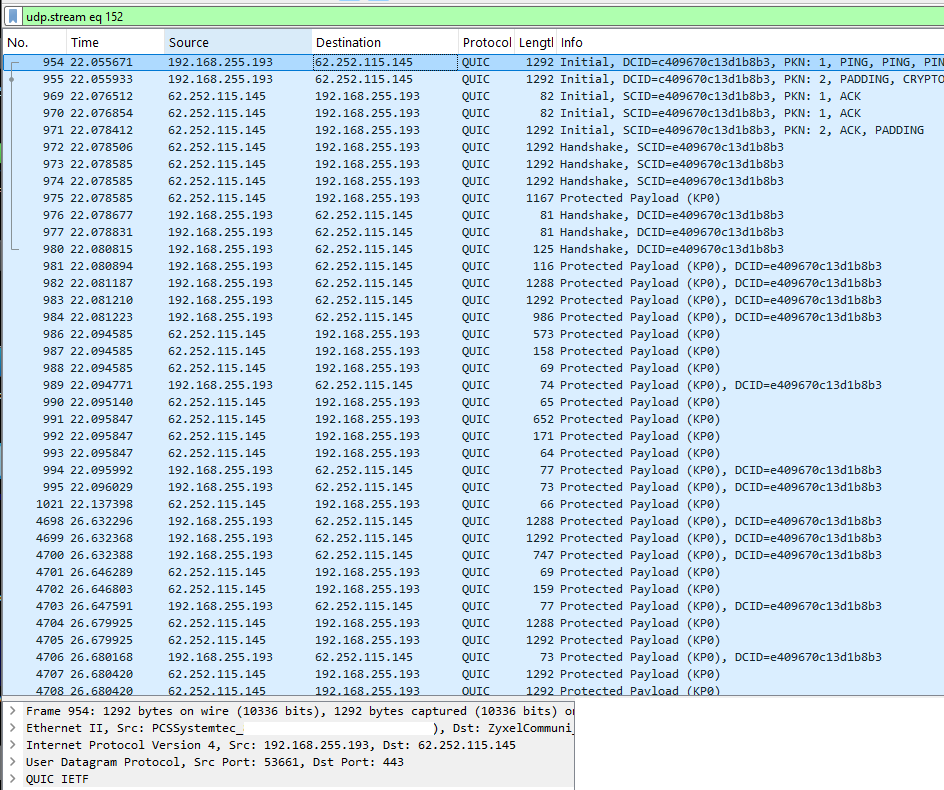
What I'm trying to cause is limited bandwidth test when run with a TCP download to buffer the Video buffer as in not enough bandwidth for the Video to buffer
0 -
Hi Peter,
I also test with UDP after allow UDP, like this. It seems like is still buffering. Could you help point out what I might miss, so we can better replication this issue in our lab?
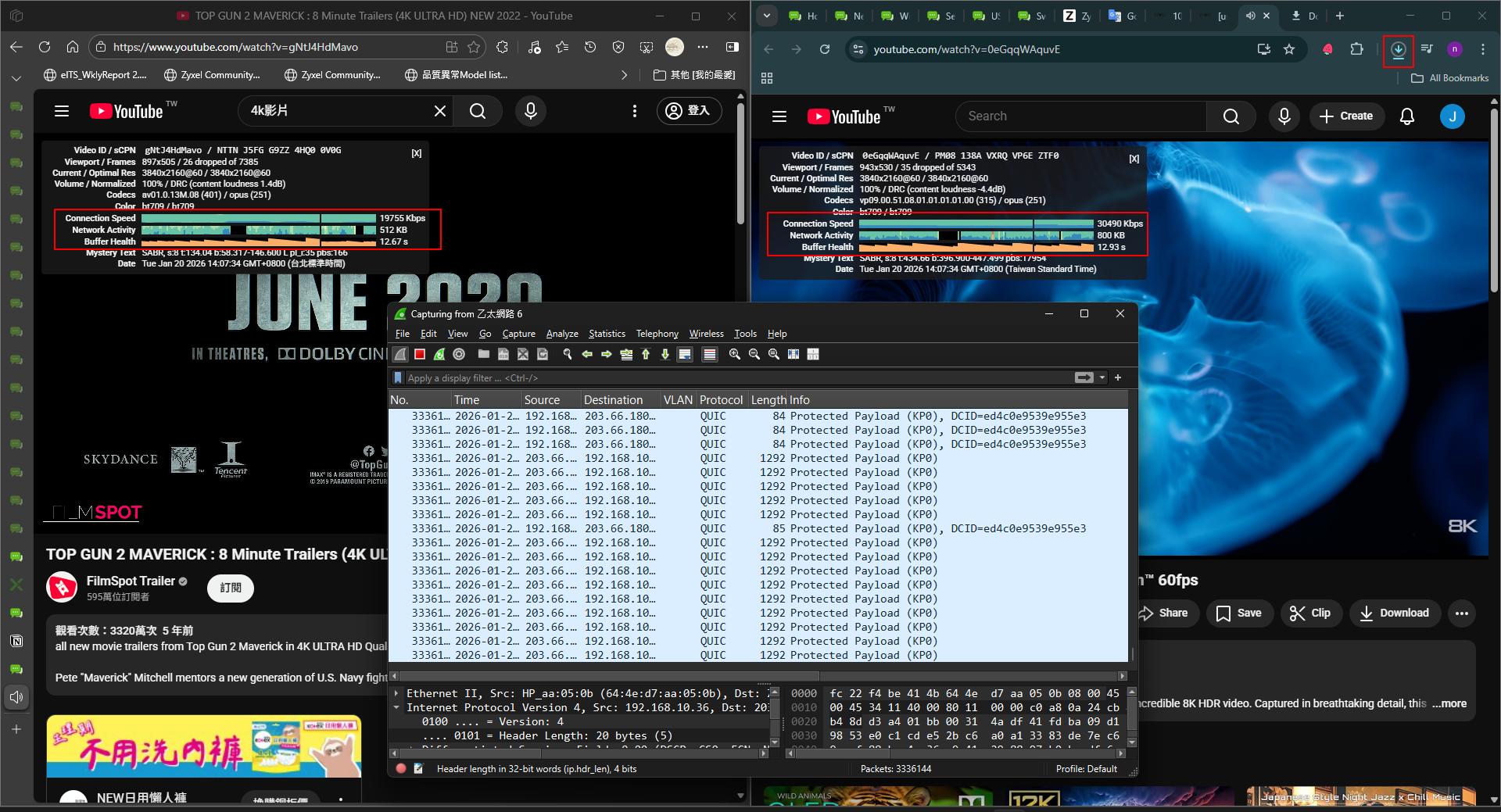
Please also help to record a video so we can better verify this issue.
Zyxel Melen0 -
I think you might of misunderstood when I say buffering as you think buffering as in there is a buffer so that the play back is fine as in no lack of bandwidth. What I'm saying is buffering as in the play back buffers as in play back stops and starts which the test I'm doing it should do that.
So when you egress rate limit to LAN interface to 50Mb on one thread download its 50Mb for that thread then if two threads download at the same time the bandwidth is split 25Mb, 25Mb then four threads 12.5Mb,12.5Mb, 12.5Mb, 12.5Mb and so on of course background low bandwidth happens at times too to not need the full divide bandwidth. But my point is this UDP by youtube when watching and then downloading a TCP download at a number threads should divide bandwidth up to the point the Video buffers due to lack of bandwidth or the fact that I set a BWM rule for low Priority for UDP and TCP is higher Priority.
Hope thats clear.
1 -
Here are the videos of the tests with interface rate limited to 50Mb
expected behaviour
unexpected behaviour
1 -
And for reference here is expected behaviour with UDP YouTube and TCP download on the FLEX 200 non H
Testing back on FLEX H even if I set any TCP BWM rule to Priority 0 realtime! The TCP download does not dominant the UDP YouTube stream!
1 -
Hi @PeterUK
Thanks for the video. Let us take further investigation, and I will keep you posted.
Zyxel Melen1 -
Thank you @PeterUK , I though I am going insane. I also tried to prioritize UDP traffic and didn't get it to work at all. It logs that the rule was matched but does nothing.
Hard limiting UDP bandwidth works, but not prioritization.
One small additional information @Zyxel_Melen: It isn't only the case that the Flex H ignores the difference between lower prioritized UDP traffic and higher prioritized TCP traffic, but also that prioritizing one UDP stream over another does not do anything and they are treated as equal.0

 Zyxel Community Virtual Assistant







 Freshman Member

Categories
- All Categories
- 442 Beta Program
- 2.9K Nebula
- 222 Nebula Ideas
- 129 Nebula Status and Incidents
- 6.5K Security
- 617 USG FLEX H Series
- 347 Security Ideas
- 1.7K Switch
- 84 Switch Ideas
- 1.4K Wireless
- 53 Wireless Ideas
- 7K Consumer Product
- 298 Service & License
- 485 News and Release
- 92 Security Advisories
- 31 Education Center
- 10 [Campaign] Zyxel Network Detective
- 4.8K FAQ
- 34 Documents
- 88 About Community
- 105 Security Highlight


