Stuck on getting SSLVPN authentication with Microsoft Entra ID to work

 Freshman Member


Hi,
I did follow this guide, trying to achieve SSLVPN authentication with Microsoft Entra ID
SSLVPN authentication with Microsoft Entra ID — Zyxel Community
Everything goes well as the guide explains, until step "6 - Click Test on the Firewall" in the section "Create OIDC AAA Server" where I got this error.
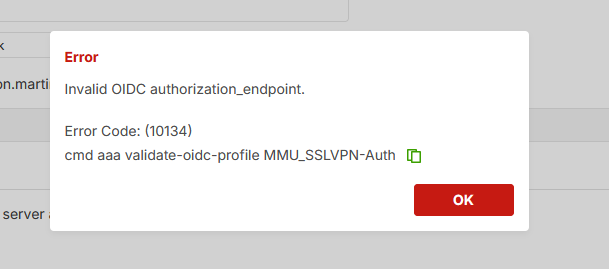
I'm unsure which direction it's pointing in.
In the beginning of the guide, it mentions 4 things to be aware of in advance. The last one is "Network connectivity between your device and Microsoft Entra ID". I wonder if that means we need to have a VPN connection between the USG and the Azure environment?
Anyone getting it to work, or have faced similar issues?
Best regards Ole.
Accepted Solution
-
Hi @MCFH
The URL always different in the TenantID part. https://login.microsoftonline.com/{Tenant ID}/v2.0
But, the domain are the same since all need to find Microsoft Azure first. The related domain is "login.microsoftonline.com". Please help to ensure your firewall can reach this domain first. You may use the firewall's network tool (Maintenance > diagnostics > Network Tool) to test.
If the firewall is reachable to the Microsoft Azure, please help to enable Zyxel support access and share the info for the OIDC Server page and we will help to check. Additionally, please share the info with me by sending a private message. Just click my name and you will see a message button.
Zyxel Melen0
 Zyxel Employee



All Replies
-
Hi @OWB
No, this doesn't require to have VPN connection between the firewall and Azure. But please note that the firewall should be able to access "login.microsoftonline.com". Please check if this domain is allowed. If still has problem, please help to enable Zyxel support access so we can have further checks.
Zyxel Melen0 -
I can't see it but have you got the correct URL as the issuer URL? Mine is something like this
https://login.microsoftonline.com/xxxx/v2.0
In the screenshot I can see a lower case s for server and can't map that to my screens.
0 -
Hi @MCFH
The URL always different in the TenantID part. https://login.microsoftonline.com/{Tenant ID}/v2.0
But, the domain are the same since all need to find Microsoft Azure first. The related domain is "login.microsoftonline.com". Please help to ensure your firewall can reach this domain first. You may use the firewall's network tool (Maintenance > diagnostics > Network Tool) to test.
If the firewall is reachable to the Microsoft Azure, please help to enable Zyxel support access and share the info for the OIDC Server page and we will help to check. Additionally, please share the info with me by sending a private message. Just click my name and you will see a message button.
Zyxel Melen0 -
Hi @Zyxel_Melen
The USG is going to take over for our VPN firewall. We do only have one WAN IP, so due to our production site is running 24/7 on the 5 workdays, I must use the weekends for testing.
I will certainly try out what you suggest next weekend.
Thank you.
Best regards Ole.
0 -
Hi @Zyxel_Melen
You were right, the USG could not reach login.microsoftonline.com. I did add a Global Zone Forwarder querying from WAN and pointing to our ISP DNS server. That solves the issue by not reaching login.microsoftonline.com.
However, I am a bit in doubt if this is the correct way to solve it, by adding a Global Zone Forwarder, can you please comment on that?
Thank you.
Best regards Ole
 0
0 -
Hi @Zyxel_Melen
Do you have the opportunity to get back on this one? Best regards Ole.
0 -
@Zyxel_Melen can you please get back to me on this one?
0 -
Hi @OWB
Sorry for the delayed reply. This is one of the correct ways for issue. Another is using the Domain Zone Forwarder.
The global zone forwarder defines which DNS server the firewall should ask for all of the domains. For specific domains, we can use Domain Zone Forwarder.
Zyxel Melen0 -
Hi @Zyxel_Melen
Thank you for replying.
We are in the process of switching from a VPN series to the USG F 200H, and at the VPN it is possible to choose "tunnel" from the "Query Via" drop down. This is not possible at the USG. So, what is the correct interface to "Query Via"?
Best regards Ole
0 -
Hi @OWB
This is because currently Global/Domain Zone Forwarder only supports route-based VPN tunnel/VTI interface. If your tunnel is a policy-based VPN tunnel, currently is unable to select.
We have a plan to support policy-based VPN tunnel as an option, but the ETA is not scheduled yet.
Zyxel Melen0


Categories
- All Categories
- 442 Beta Program
- 3K Nebula
- 222 Nebula Ideas
- 129 Nebula Status and Incidents
- 6.5K Security
- 619 USG FLEX H Series
- 349 Security Ideas
- 1.7K Switch
- 84 Switch Ideas
- 1.4K Wireless
- 53 Wireless Ideas
- 7K Consumer Product
- 298 Service & License
- 486 News and Release
- 92 Security Advisories
- 31 Education Center
- 10 [Campaign] Zyxel Network Detective
- 4.8K FAQ
- 34 Documents
- 88 About Community
- 105 Security Highlight


