NWA210AX becoming slow

 Freshman Member


Hi,
my NWA210AX is in operation for ~3 years now. It is powered via PoE 12-30W and was working fine. In the last time I got more complaints about slow speed and I am not able to get more than ~30 Mbits via iperf3 from any wifi client to the router.
A macbook shows
Channel: 44 (5 GHz, 160 MHz)
Country Code: DE
RSSI: -36 dBm
Noise: -92 dBm
Tx Rate: 2.401 Mbps
PHY Mode: 802.11ax
MCS Index: 11
NSS: 2
Is this a sign of a failing device? I read that the device can go into a low-power mode if the power supply is insufficient (failing?). Where can I check that? Any way to debug this? The device is stand alone, not connected to Nebula.
I downloaded the diagnostics collection. Very slow via wifi, fast as usual via cable. But I do not understand how to read that.
By the way: When posting there is a "please read our Zyxel Community Guidelines" which links to https://community.zyxel.com/en/discussion/10011. When I try to open that page I get a permission problem.
Another thing: When connecting to the device via HTTP it connects fine (no redirect to HTTPS), but login is not possible (always "Login denied"). With https it works. Very nasty to find that problem ..
Accepted Solution
-
I appreciate your assistance. I enabled flow control on all switch ports, but unfortunately without success regarding data rate.
I compared the autosaved configuration files and recognized that at some point I deactivated ampdu/amsdu. I think that was when I was investigating why webrtc/voip is slow over wifi…
Anyway, after activating it again I got my speed back. I have no idea why that would have such a drastic effect but for now its solved.
0
All Replies
-
Hi @Steini
Thanks for pointing out the Community Guidelines issue, the link you saw was an old guideline post. Here is the new link for you to reference.
About your issue, this might not a sign of a failing device. It could be because the uplink cable has issue. Could you help to change a cable and check again? One of our user experienced the same issue and the root cause is the uplink cable.
By the way, may you share how did you do the iperf3 test? Normally, we use a server with ethernet cable connects to the intranet as a test server to do the intranet speed test. Is this the same as your method?
About the low-power problem, the NWA210AX running in AF mode will decrease the available antenna.
- 2.4G antenna: 2 > 1.
- 5G antenna: 4 > 2.
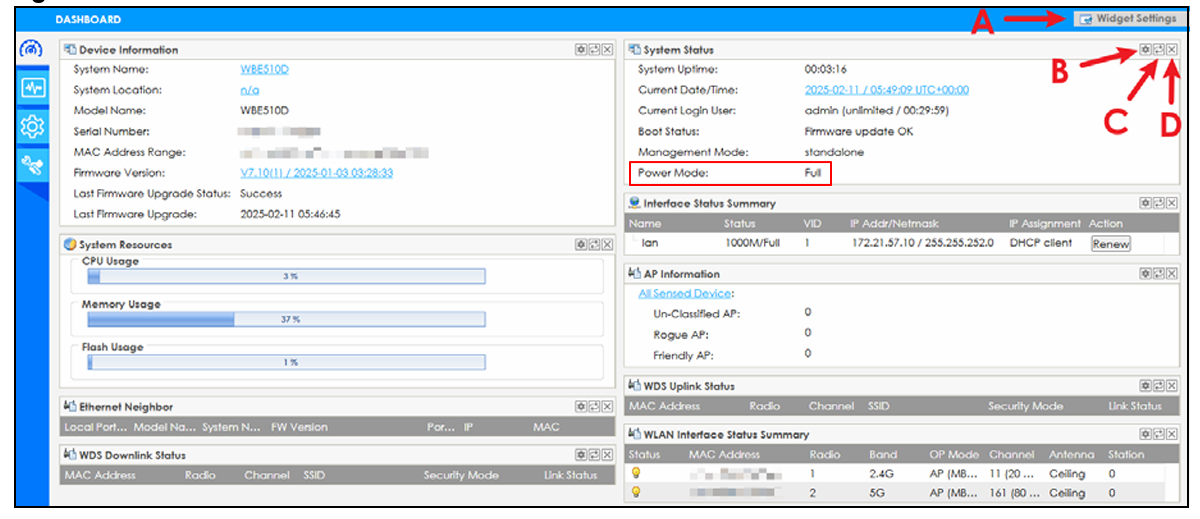
However, the PoE 12-30W should provide AT mode power to NWA210AX. Please check the dashbroad > System Status > Power Mode to check. Here only has two option: Full/Limited. If it is limited, please check the power first.
 Zyxel Melen0
 -
0
-
Thanks much for your suggestions. The System Status > Power mode shows "Full".
I did several test. First about the setup. At the AP I have 2 ethernet sockets available they go to an XGS1210-12. Usually the AP is connected to Port 10 for 2.5 GBit connectivity. The switch says the link status is "2.5G-Full". On port 9 a router is connected doing DHCP/DNS/Firewall and also running iperf3.
I connected a Notebook with a 2.5 GBit stick to the two ethernet ports and it can max out the connection via iperf3 (~940 MBit when connected to a 1 GBit switch port and 2.35 GBits on port 10).
I connected the AP via both ethernet sockets to port 8 or 10 on the switch and both gave me ~100 MBits/s. That is major improvement to the situation before but not what it should be.. When replugging the cable I can see in the log a "Port0 is up! The link speed is 2500M/Full".
I deactivated Radio2 and connected via 2.4 GHz Wifi which gave me ~6-20 MBit. Only 5 GHz Wifi activated back to 30-100 MBit.
So, if the device is not failing, it is probably a configuration error that I did. Any hint what that could be? The max. power is set to 30 dBm.
0 -
Hi @Steini
Thanks for sharing the details! It could be because the high-speed port to low-speed port issue. Please help to enable flow control on the XGS1210-12 to solve this issue.
Zyxel Melen0 -
I appreciate your assistance. I enabled flow control on all switch ports, but unfortunately without success regarding data rate.
I compared the autosaved configuration files and recognized that at some point I deactivated ampdu/amsdu. I think that was when I was investigating why webrtc/voip is slow over wifi…
Anyway, after activating it again I got my speed back. I have no idea why that would have such a drastic effect but for now its solved.
0

 Zyxel Employee



Categories
- All Categories
- 442 Beta Program
- 3K Nebula
- 222 Nebula Ideas
- 129 Nebula Status and Incidents
- 6.5K Security
- 619 USG FLEX H Series
- 349 Security Ideas
- 1.7K Switch
- 84 Switch Ideas
- 1.4K Wireless
- 53 Wireless Ideas
- 7K Consumer Product
- 298 Service & License
- 486 News and Release
- 92 Security Advisories
- 31 Education Center
- 10 [Campaign] Zyxel Network Detective
- 4.8K FAQ
- 34 Documents
- 88 About Community
- 105 Security Highlight


