Devices in mgmt VLAN reachable by VPN and local Clients
All Replies
-
Hi @Sergi330,
The problem you're seeing is due to how the device handles traffic blocking: traffic between segments is blocked by one rule, but traffic to the device itself requires a separate "to device" rule. For example:

Please note that for this rule, it is important to specify the correct port since selecting "Any" will block all traffic from that segment to the device. As shown in the image above for Protocol 443 (USG LITE 60AX web GUI port), this blocks segment IPs from accessing the web interface.
We appreciate your patience and understanding!
Zyxel Tina
0 -
Hi @Zyxel_Tina ,
Thanks for the instructions. Are these rules in addition to the previous two?
I confirm that now I can't reach the router's GUI this way. But what about the access points? Clients connected to Wi-Fi can still reach them (VPN and wired clients it's ok).
Thanks!
0 -
Specifically, clients connected via Wi-Fi to VLAN 10 reach the GUI of the access point to which they are connected, not the other ones present on the site.
0 -
Hi @Sergi330,
Regarding the issue you're encountering, we recommend going to Site-wide > Configure > Site settings to enable "Permit access to Nebula devices exclusively from designated IP addresses" and configure the desired IP addresses. This specifies which segments and clients can access the AP's GUI.
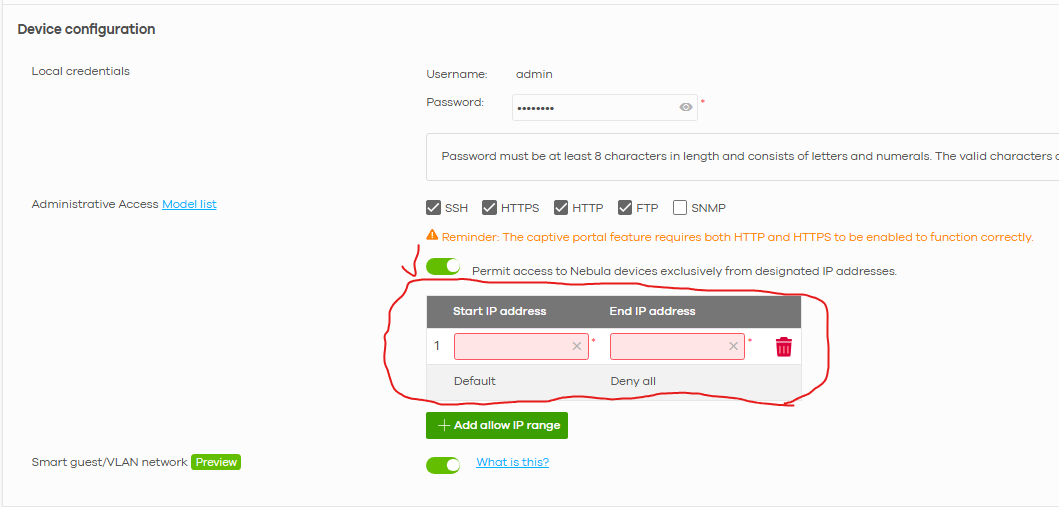
Zyxel Tina
0 -
Hi @Zyxel_Tina
I enabled permission restriction by setting IP as visible here:
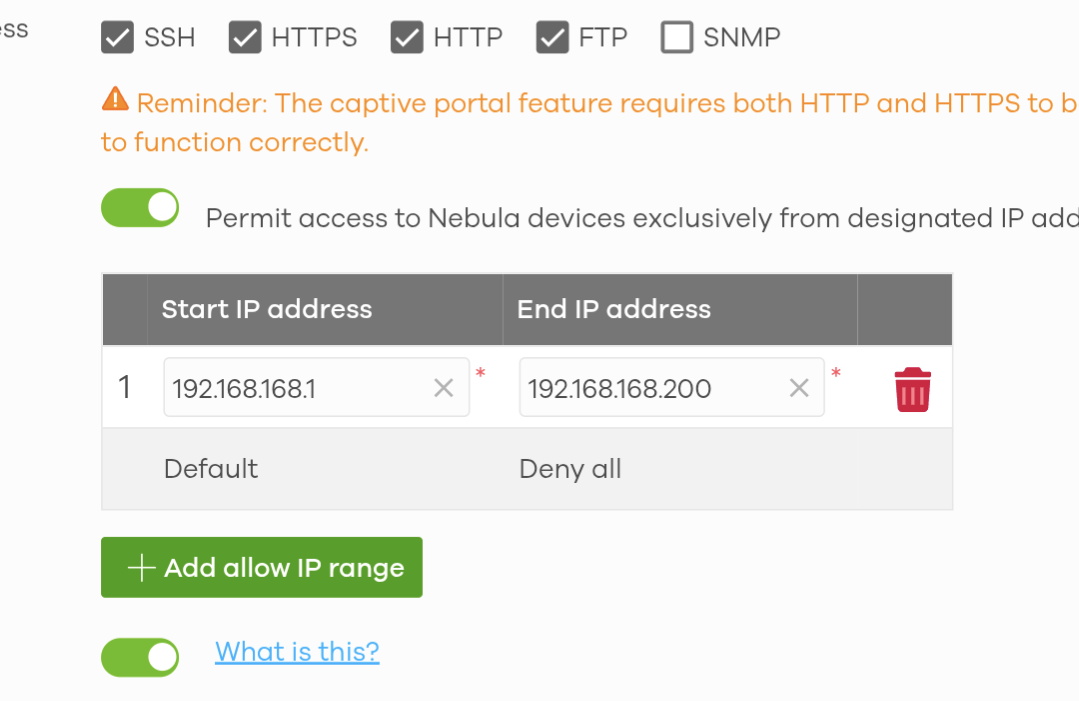
but still with my device in VLAN id 10, I reach its gui.
This basic setup is very laborious. Are there a problems with this specific USG Lite product or is it normal for Zyxel?
0 -
Hi @Sergi330,
As we checked the supported model list for the "Permit access to Nebula devices exclusively from designated IP addresses" functionality, we confirmed your device does not support it—so the configuration won't work in your use case. Apologies for any confusion or inconvenience.
Regarding the issue you're encountering, we are currently investigating the root cause. We'll inform you of any updates after our investigation.
We appreciate your cooperation and patience.
Zyxel Tina
0 -
Hi @Sergi330,
After testing on our side, we found that when clients access the AP's GUI, the packets only reach the AP directly and do not go upstream to the router. As a result, the security policy rule (Deny: 192.168.10.0/24 → 192.168.168.0/24) configured on your LITE 60AX router cannot block or act on this traffic.
If your scenario allows VLAN 10 clients to be isolated from each other and blocked from the internal network, we recommend enabling the Guest Network option.
Alternatively, since the NWA1123ACv3 AP does not support Permit access to Nebula devices exclusively from designated IP addresses functionality, consider upgrading to a newer AP with the Administrative Access feature if feasible.
We appreciate your understanding!
Zyxel Tina
0 -
Thanks for checking,
for my information, what's the use of setting the management VLAN on the AP in question? Is it only for wired clients?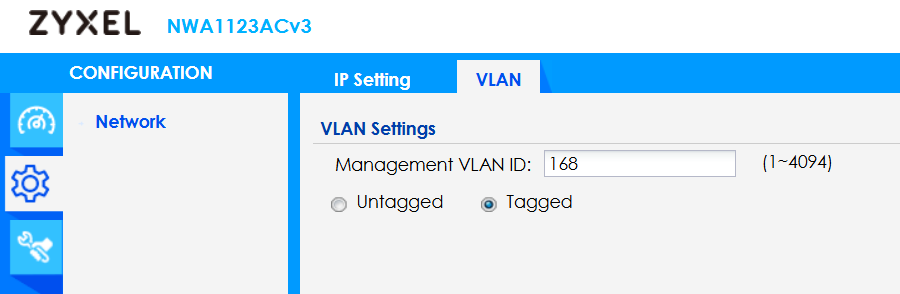

Thanks for the explanation.
0 -
Hi @Sergi330,
The Management VLAN on Zyxel NWA1123ACv3 specifies the VLAN for the AP's own management interface—not for wired clients.
It determines which VLAN the AP uses to obtain its IP address and communicate with Nebula for management, discovery, SSH, etc. Typically, configure your switch port as a trunk with the management VLAN untagged, while SSID VLANs are tagged.
Wireless clients follow their SSID-assigned VLANs separately, independent of the AP's management VLAN.
Zyxel Tina
0

 Zyxel Employee




 Freshman Member


Categories
- All Categories
- 442 Beta Program
- 3K Nebula
- 222 Nebula Ideas
- 129 Nebula Status and Incidents
- 6.5K Security
- 619 USG FLEX H Series
- 349 Security Ideas
- 1.7K Switch
- 84 Switch Ideas
- 1.4K Wireless
- 53 Wireless Ideas
- 7K Consumer Product
- 298 Service & License
- 486 News and Release
- 92 Security Advisories
- 31 Education Center
- 10 [Campaign] Zyxel Network Detective
- 4.8K FAQ
- 34 Documents
- 88 About Community
- 105 Security Highlight


