Zyxel Newbie - Basic Network configuration

 Freshman Member

Hello, I want to make easy and secure management of my home network.
I'm newbie on firewall management and configuration, so forgive me if I can't understand some terms.
My network devices are:
Fritzbox 7690 (DHCP disabled)
Zyxel USG FLEX 50H (DHCP enabled on LAN Zone)
Zyxel XMG1915-18EP (Default configuration with VLAN 1)
Fritz Repeater 6000 (Wired Connection to XMG1915-18EP)
Fritz Repeater 3000 (Wireless Bridge of Fritzbox)
I'm not interested to manage the Repeater 3000 because it exposes only Guest network that doesn't talk with my home network
I want to make my network secure and to do that, I want to make some segregation using VLANs.
My current connections:
ISP --> WAN Fritzbox --> LAN Fritzbox to WAN USG FLEX 50H --> LAN USG FLEX 50H to Uplink XMG1915-18EP —> Fritz Repeater 6000
Fritzbox 7690 - 192.168.0.1
USG FLEX 50H - 192.168.0.2
External | ||||||||
|---|---|---|---|---|---|---|---|---|
Name | Zone |
| IP/Netmask |
| Type | Members | Reference | Gateway IP |
ge1 | WAN |
| 192.168.0.2/255.255.255.0 |
| Ethernet | p1 | 1 | 192.168.0.1 |
ge2 | WAN |
| 0.0.0.0/0.0.0.0 |
| Ethernet | p2 | 1 |
|
| ||||||||
Internal | ||||||||
ge3 | LAN |
| 192.168.1.1/255.255.255.0 |
| Ethernet | p3,p4,p5 | 3 |
|
XMG1915-18EP - I don't know the IP, it disappear from DHCP table of USG FLEX 50H
Fritz Repeater 6000 - I don't know the IP, I have changed it to 192.168.0.3 and disappear from DHCP table of USG FLEX 50H
First, this is the correct configuration in your opinion?
Second, I want to make a standard and basic network segmentations using VLAN (Management, Internet, IoT devices, NAS ecc), which configuration under interfaces settings I need to do? Can you help me also to understand if I need to connect another interface from LAN USG FLEX 50H to the switch XMG1915-18EP to make as VLAN as I want?
All the Zyxel devices are not managed in Nebula.
I hope that everything is clear!
All Replies
-
If you was trying to segment devices connected to your Fritz Repeater 6000 you can't as it don't support SSID to VLAN from what I can tell
0 -
@PeterUK the Fritz Repeater 6000 have 2 ports (I forgot to mention that maybe). One port comes from
XMG1915-18EP (gives me internet and so on), and the other one is attached to an unmanaged switch which is attached a PC, NAS and others.
In the future, all the devices will be attached directly to the Zyxel switch XMG1915-18EP
0 -
yes but the Fritz Repeater 6000 having 2 ports is that is acks as a unmanaged switch an AP that supports VLAN means you can have a SSID tag to a VLAN to a VLAN switch XMG1915-18EP then tag to a the FLEX 50H so that you have a given subnet for that SSID on the AP to segment the network.
0 -
Hi @Kave
You have 2 problems:
- Your repeater 6000 not support the VLAN tagging, so you cannot segment your LAN from this device (all the devices attached to this SSID appear as untagged into the firewall);
- You have configured the XMG1915-18EP VLAN 1 but I not see any VLAN configured to the GE3 interface (this can be the problem of the disappear).
For implement your network as requested you need to create at least one VLAN interface with tag id 1 for manage the switch (or disable the VLAN management from the switch), and then you need an access point that can create VLAN segmentation based on SSID. Also, you can create a series of VLAN on your switch, but the VLAN tag is needed also from source (IE: A PC by default not have VLAN ID so it's traffic is untagged; to create a VLAN ID tag you need to modify network interface properties to create a VLAN if is supported by your network adapter)
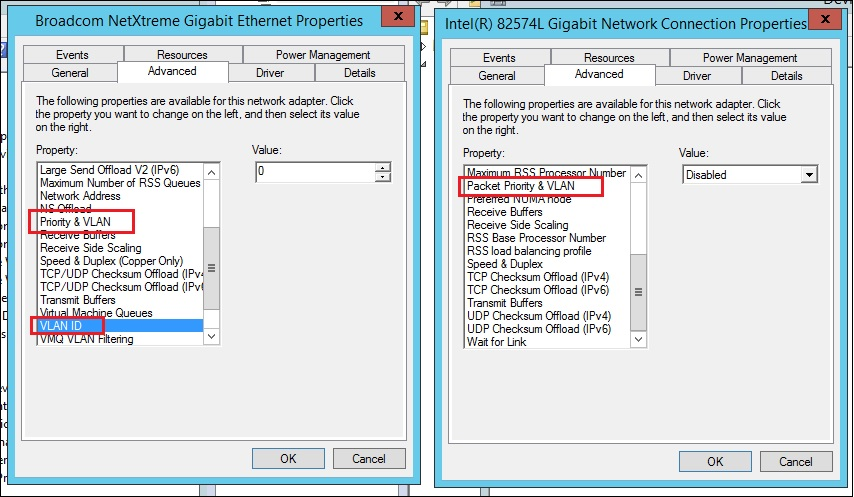
I personally manage my network as you requested but I have as access point the NWA130BE that can create multiple SSID with VLAN network.
So, in this way I created:- Managed SSID with VLAN 10
- Guest SSID with VLAN 20
- IoT SSID with VLAN 100
In this way, every devices attached to the SSID take the correspond VLAN ID. So a phone attached to the Guest SSID take the VLAN ID 20.
After this, I have created N interfaces into my firewall, one for every VLAN, in this way I can manage different IP&Subnet classes, Policy Rule, etc etc for every VLAN. Obviously, into the firewall, the port member are the same VLAN to VLAN, because all these VLANs are coming from the same access point attached into the same one port on the firewall.
Other this, I've created a Management VLAN with tag 1 that I use to manage the network devices (Access Point/Switch etc etc).
0 -
Also… if the fritzbox don't have the DHCP enabled, all the devices connected to the internal fritz wifi or into the fritz 3000 not working because the fritzbox don't release IPs
0 -
Hi @Kave,
Welcome to the Zyxel Community!
To better understand the issue regarding “XMG1915-18EP - I don't know the IP, it disappeared from the DHCP table of the USG FLEX 50H”, could you please help confirm whether the switch is currently still not obtaining an IP address?
If the issue is still ongoing, we would appreciate it if you could capture the DHCP packets (UDP 67&68) on FLEX 50H and share with us via private message. This will help us further analyze and identify the root cause.
On the other hand, regarding the VLAN setup, as mentioned by PeterUK and Maverick87, the Fritz Repeater 6000 does not support VLAN, and VLAN segmentation is not based on using multiple Ethernet cables, but rather on VLAN tagging mechanisms.
From your current network environment, the Fritz Repeater 6000 operates as a device that forwards traffic without VLAN tagging capability. This means all client traffic from the repeater is transmitted as untagged traffic.
If your goal is to separate general LAN and a specific VLAN, one possible approach is to configure a PVID on the switch. For example, assigning a specific PVID (e.g., VLAN 10) to the switch port connected to the repeater allows all incoming untagged packets from that port to be associated with that VLAN.
With this setup, the switch can separate traffic between different interfaces. However, since the repeater forwards all traffic without VLAN tags, all connected client traffic will be treated as part of the same VLAN. This makes it suitable for single VLAN assignment per port.
Zyxel Tina
0 -
Hello mates! I'm happy for all the answers that I receive 😍 @PeterUK @Zyxel_Tina @Maverick87
Just to recap:
I'm aware that if the devices itself don't manage the VLANs (like Fritzbox and Fritz Repeater), all the traffic goes without VLAN tags = no segmentationThis situation is "temporary" because I'm renovating my house and I have a 30 ethernet cable that goes from a black rack with all network device above three floors from me and my PC 😅
Would you suggest to:
- Remove the Fritzbox 7690 and configure USG FLEX 50H as modem/router (I am connected to the fiber optic via ONT, unfortunately the USG doesn't support the 2.5G network as my ISP support, but anyway at least to 1G)
- Buy 2 Zyxel APs that support Wireless Smart Mesh (that extend the Wireless network) for a 100 square meters space that they will replace the 2 Fritz Repeater?
I see that with USG FLEX 50H comes the wireless features, but is because I have the Entry Defense Pack bundled with the device and expire in 1 year i suppose: will continue to work after the expiration of the license? Or comes with Gold Security Pack Trial?
I'm in Italy so if you suggest to buy Zyxel APs, which is the best that suite for my expectation?
@Zyxel_Tina as explained by @Maverick87 , I don't see both the Fritz repeater and XMG1915-18EP (that have 192.168.0.x network as the Fritzbox and USG FLEX )because on USG FLEX 50H I didn't set a dedicated VLAN as Management.
@Maverick87 I have disabled the DHCP on Fritzbox, but I set static IP for every network devices in 192.168.0.x network 😉 (I hope I did good 😬)
0

 Guru Member



 Ally Member
 Zyxel Employee



Categories
- All Categories
- 442 Beta Program
- 3K Nebula
- 222 Nebula Ideas
- 129 Nebula Status and Incidents
- 6.5K Security
- 619 USG FLEX H Series
- 349 Security Ideas
- 1.7K Switch
- 84 Switch Ideas
- 1.4K Wireless
- 53 Wireless Ideas
- 7K Consumer Product
- 298 Service & License
- 486 News and Release
- 92 Security Advisories
- 31 Education Center
- 10 [Campaign] Zyxel Network Detective
- 4.8K FAQ
- 34 Documents
- 88 About Community
- 105 Security Highlight


