Switches not getting default gateway when connected to Eir Sagemcom routers



 Freshman Member
Hi all,
Encountered this issue on mutiple client sites where Eir Sagemcom routers have been installed. When installing switches specific models GS1920-8hp, GS1920-24hp and GS1920-48hp Switch boots up just fine and any devices connected work perfectly,
However the switch itself fails to find the default gateway and must be configured manually before the switch will register with NCC.
Has anyone encounterd this issue?
Accepted Solution
-
Hi @LukeArchbold,
Thank you for providing the packet capture!
As mentioned before, when connecting a GS1915 switch directly to a Zyxel firewall (e.g., USG FLEX 200H), the switch obtains a DHCP IP properly without issues. In our test, we confirmed the DHCP process completed successfully with the full Discover → Offer → Request → ACK sequence. This verifies that the GS1915 functions as expected.
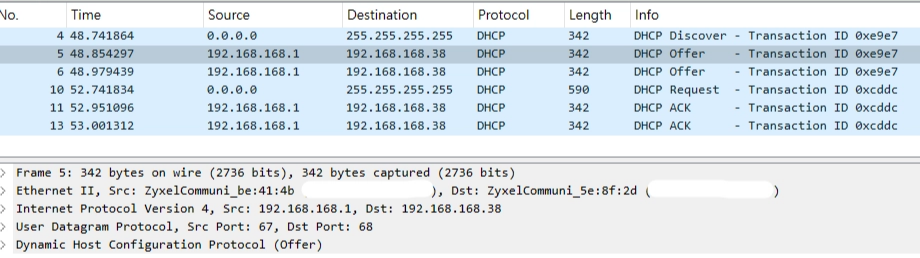
Comparing our capture with yours, we noticed a difference in how the uplink router delivers the DHCP Offer. In your environment, the Offer is sent as an Ethernet broadcast (ff:ff:ff:ff:ff:ff). The GS1915, following standard DHCP client behavior, discards Offer packets not addressed to its MAC address, which prevents the handshake from proceeding.

Therefore, we recommend reaching out to the router vendor to investigate this issue.
Zyxel Tina
0





 Zyxel Employee
All Replies
-
Hi @LukeArchbold,
Regarding the issue you’re encountering, please first verify DHCP server functionality on the Sagemcom router, whether it is correctly providing the default gateway option (DHCP Option 3).
In our local testing with USG FLEX 200H, we confirmed that the default gateway is successfully received.
Therefore, if possible, we recommend capturing packets to confirm whether the router is sending the default gateway information in its DHCP Offer. This will help us narrow it down and investigate further.
Zyxel Tina
0 -
Hi Tina,
We have done some futher testing and found that when the network edge device is a Zyxel router or firewall the issue doesnt occur.
When connected to an ISP router (Eir Sagemcom or Virgin Hub) the switch doesnt pick up an IP through DHCP and does not connect back to Nebula. The switch works properly otherwis we just cant monitor it using the Nebula dashboard.
Kind regards,
Lue Archbold
0 -
Hi @LukeArchbold,
Could you please confirm if the DHCP server on the ISP routers (Eir Sagemcom and Virgin Hub) is running normally, yet the switch still fails to obtain an IP? If so, kindly capture packets so we can investigate further.
Additionally, after packet capture, please collect the Tech-Support file and share via private message.
Thank you for your cooperation!
Zyxel Tina
0 -
Hi Tina,
Please find report attached. Switch was factory reset, after reset it could no longer communicate with Nebula but all attached devices had internet and network access. Please let me know if you need any more information.
Kind regards,
Luke Archbold.
0 -
Hi @LukeArchbold,
Thank you for the information!
However, we've noticed that the attached file cannot be opened properly. Could you please resend it as a .zip file or provide a download link?
We appreciate your assistance and look forward to your response.
Zyxel Tina
0 -
Hi Tina,
Apologies, please find report attached.
Kind regards,
Luke Archbold
0 -
Hi @LukeArchbold,
Thank you for the detailed report. We see your observations about the router (192.168.1.254) and switch (192.168.1.1) sending ARP requests to each other but receiving no replies, and the switch is not sending any DHCP packets.
Before proceeding, could you please confirm whether the switch can ping the router and the internet? Also, please provide a screenshot from the switch GUI under Basic Setting > IP Setup > IP Status Details. For example
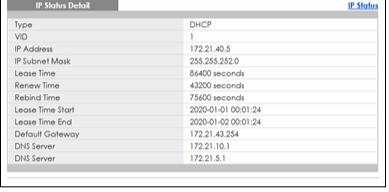
To investigate efficiently and effectively, could you also double-check how the packet capture was taken? If it was done via port mirroring on the switch, please share the original packet capture file—the full, detailed logs will help us analyze this issue and identify the root cause more thoroughly.
Zyxel Tina
0 -
Hi Tina,
Please find packet capture and findings report attached.
Kind regards,
Luke Archbold
0 -
Hi @LukeArchbold,
Thank you for providing the packet capture!
As mentioned before, when connecting a GS1915 switch directly to a Zyxel firewall (e.g., USG FLEX 200H), the switch obtains a DHCP IP properly without issues. In our test, we confirmed the DHCP process completed successfully with the full Discover → Offer → Request → ACK sequence. This verifies that the GS1915 functions as expected.
Comparing our capture with yours, we noticed a difference in how the uplink router delivers the DHCP Offer. In your environment, the Offer is sent as an Ethernet broadcast (ff:ff:ff:ff:ff:ff). The GS1915, following standard DHCP client behavior, discards Offer packets not addressed to its MAC address, which prevents the handshake from proceeding.
Therefore, we recommend reaching out to the router vendor to investigate this issue.
Zyxel Tina
0
Categories
- All Categories
- 442 Beta Program
- 3.1K Nebula
- 241 Nebula Ideas
- 6.8K Security
- 755 USG FLEX H Series
- 379 Security Ideas
- 1.8K Switch
- 87 Switch Ideas
- 1.5K Wireless
- 58 Wireless Ideas
- 7.2K Consumer Product
- 320 Service & License
- 512 News and Release
- 99 Security Advisories
- 31 Education Center
- 10 [Campaign] Zyxel Network Detective
- 5.3K FAQ
- 34 Documents
- 90 About Community
- 119 Security Highlight


