Issue generating .ovpn file on Flex 500H (SSL VPN)


 Freshman Member
Hello,
I’m having a problem with my Zyxel Flex 500H.
I’m trying to generate an .ovpn configuration file for SSL VPN, but instead of getting an .ovpn file, the system downloads a .tgb file when I click the “Download” button in the SSL VPN section.
I expected to receive a standard OpenVPN (.ovpn) configuration file, but I’m not sure why it’s generating a .tgb file instead.
Is this the correct behavior for this model/firmware, or am I missing some configuration step required to generate the .ovpn file?
I would appreciate any guidance on how to properly obtain the .ovpn file.
Thank you.
Best Answers
-
-
Hi @Maruda
However, the OpenVPN client still connects successfully using only username and password. The VPN tunnel is established and access to internal resources is available immediately, without entering any OTP code or opening the authorization page.
This is different from my test result, no matter full tunnel or split tunnel. I can't reach any host under firewall until I pass the 2FA authentication. Please note that my testing user is created on device's local, not AD or other database.
https://jam.dev/c/4b03c586-c55d-484e-a92f-72782367b97f
Is 2FA fully supported and enforced for native OpenVPN clients on the Flex 500H?
Yes, 2FA fully is supported and enforced for native OpenVPN clients on H series. But the user is limited for device's local users.
Should network access be blocked until authorization is completed on the authorize page?
The network access will be blocked if you're using full tunnel and unblocked after authorize.
Does certificate-based authentication bypass 2FA for SSL VPN?
We currently do not support certificate-based authentication, so this will be a feature request.
Additionally, to help you check this issue if you're using device's local user, please help to enable Zyxel support access so we can access and check your configuration first.
Zyxel Melen0





 Zyxel Employee
All Replies
-
-
Hello,
We managed to solve the issue.
The problem was resolved by performing a factory reset and initializing a completely new configuration on the Flex 500H. After that, the option to generate the .ovpn file appeared correctly.
Interestingly, before the reset we were already using the latest firmware version downloaded from the cloud. We also tried a manual firmware upgrade and manual firmware file upload, but neither helped. The .ovpn generation option was still missing until the device was reset and reconfigured from scratch.
We now have an additional question:
Is it possible to configure and enforce 2FA/MFA for SSL VPN connections using the standard OpenVPN client with the Zyxel Flex 500H?At the moment, even with Google Authenticator configured for the user account, the OpenVPN client still authenticates successfully using only username and password, without requesting an OTP code.
Could you please clarify whether MFA is supported for native OpenVPN clients on the Flex 500H, or only for SecuExtender / SSL VPN Portal connections?
Thank you.
0 -
Hi @Maruda
Thanks for your update. Since I can't replicate in my lab, I'm not sure the root cause of this issue. If it happens again, please help to enable Zyxel support access so we can check.
About the new question "Is it possible to configure and enforce 2FA/MFA for SSL VPN connections using the standard OpenVPN client with the Zyxel Flex 500H?"
Yes, with enables VPN Access for SSL VPN access, the traffic for local users (users created in firewall) are required to pass the 2FA/MFA even using OpenVPN. However, you need manually open the authorize page to enter the 2FA.
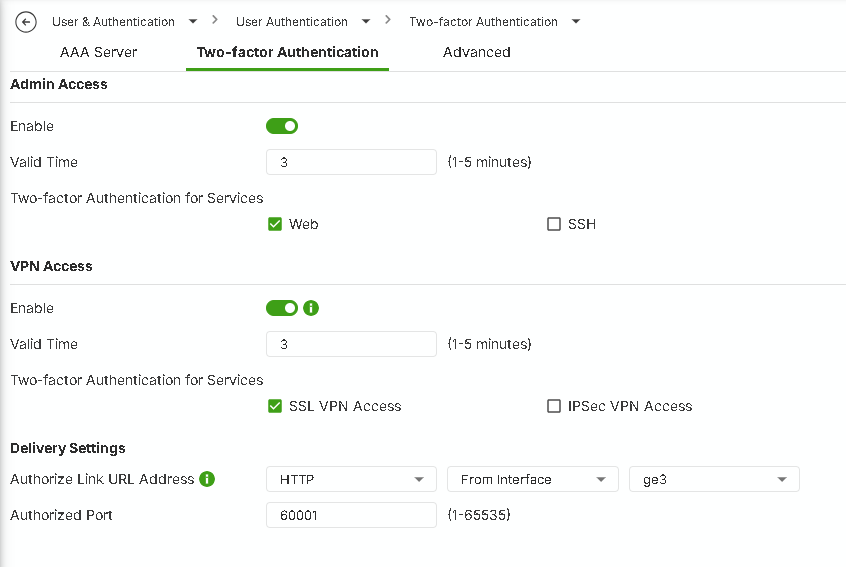
If you have any issue, please help to enable Zyxel support access so we can access and check your configuration first.
Zyxel Melen1 -
Thank you for the clarification.
We have configured:
- Two-Factor Authentication for the user,
- VPN Access with SSL VPN Access enabled,
- HTTPS authorization page on port 8443.
However, the OpenVPN client still connects successfully using only username and password. The VPN tunnel is established and access to internal resources is available immediately, without entering any OTP code or opening the authorization page.
Could you please clarify:
- Is 2FA fully supported and enforced for native OpenVPN clients on the Flex 500H?
- Should network access be blocked until authorization is completed on the authorize page?
- Does certificate-based authentication bypass 2FA for SSL VPN?
At the moment, SSL VPN access appears to work without any OTP verification despite all 2FA settings being enabled.
Thank you.
0 -
Hi @Maruda
However, the OpenVPN client still connects successfully using only username and password. The VPN tunnel is established and access to internal resources is available immediately, without entering any OTP code or opening the authorization page.
This is different from my test result, no matter full tunnel or split tunnel. I can't reach any host under firewall until I pass the 2FA authentication. Please note that my testing user is created on device's local, not AD or other database.
https://jam.dev/c/4b03c586-c55d-484e-a92f-72782367b97f
Is 2FA fully supported and enforced for native OpenVPN clients on the Flex 500H?
Yes, 2FA fully is supported and enforced for native OpenVPN clients on H series. But the user is limited for device's local users.
Should network access be blocked until authorization is completed on the authorize page?
The network access will be blocked if you're using full tunnel and unblocked after authorize.
Does certificate-based authentication bypass 2FA for SSL VPN?
We currently do not support certificate-based authentication, so this will be a feature request.
Additionally, to help you check this issue if you're using device's local user, please help to enable Zyxel support access so we can access and check your configuration first.
Zyxel Melen0
Categories
- All Categories
- 442 Beta Program
- 3.1K Nebula
- 243 Nebula Ideas
- 6.8K Security
- 781 USG FLEX H Series
- 387 Security Ideas
- 1.8K Switch
- 87 Switch Ideas
- 1.5K Wireless
- 58 Wireless Ideas
- 7.2K Consumer Product
- 324 Service & License
- 527 News and Release
- 101 Security Advisories
- 31 Education Center
- 10 [Campaign] Zyxel Network Detective
- 5.3K FAQ
- 34 Documents
- 91 About Community
- 121 Security Highlight


