Lost UDP natting after 1.38 upgrade on Flex 700H




 Freshman Member
Hello,
I have a couple of Flex 700H upgaded from 1.36 to 1.38, with multiple public IP addresses on each of them.
I natted some services managed by appliances connected on the DMZ, among them a SSL VPN working with both TCP and UDP connections on port 443 on one of the public IPs.
Since the upgrade, tunnels using UDP sessions are not working anymore, whereas the TCP ones work fine.
Any idea ?
Thanks.
Accepted Solution
-
Hello Judy / Peter,
I can confirm that everything is back to normal after disabling the QUIC protocol.
Thank you for your help.
Regards1
All Replies
-
Not seeing this problem but I'm on V1.38(ABZI.0)ITS-26WK16-m11228
setup as
Client > VPN server Zywall 110 > tunnel FLEX 700H > ServerThe Client can DNS by UDP to server over the tunnel fine with routeing rule to SNAT from FLEX 700H LAN gateway IP
Its a bit unclear of your setup to go on
0 -
Thanks for your reply,
On our side we are using firmware V1.38(ABZI.0) | 2026-04-09 08:23:09Sorry if I was a bit unclear, the issue is not related to DNS but it's related to SSL VPN tunnels based on UDP that are now failing to establish.
Regards
0 -
I don't think FLEX H supports the SSL VPN by openVPN over UDP for the tunnel…
0 -
Well, SSL VPN is done by an appliance on the DMZ. The firewall is just passing the traffic (and it was working perfectly until v1.38 firmware upgrade).
0 -
-
There shouldn't be any connection with the firewall's OpenVPN module, which isn't being used (and is disabled): the firewall is simply redirecting TCP and UDP network traffic to a third party VPN server in the DMZ.
Thank you very much for your help.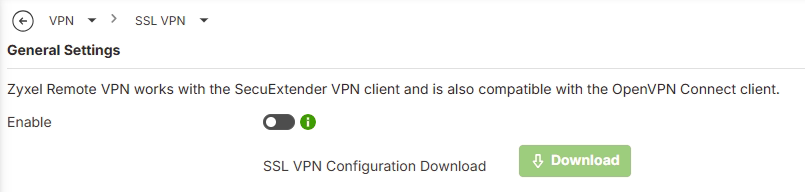 0
0 -
hmm so what happens if you change the SSL VPN port on FLEX H that your not using?
or is SSL VPN port 10443 and you need 443 what the FLEX H has for UI?
It might be caused by this
however the setting is a bit buggy to disable in system > advanced disable Block QUIC Protocol0 -
Yes, maybe it's the same bug, IMHO it's on the NATing side because the rule is not triggered anymore in the Network Policies… (0 hits since the FW upgrade).
BTW, we are using port 443 and the embedded SSL VPN server has 10443 configured.0 -
Hi @Delta69 ,
Could you share with us the SSL VPN tunnels based on UDP worked as expected if you disable Block QUIC Protocol?
By the way, could you provide the Nebula Organization and site name, and enable Zyxel support access for our checking?
Zyxel_Judy
0 -
Hello Judy / Peter,
I can confirm that everything is back to normal after disabling the QUIC protocol.
Thank you for your help.
Regards1



 Guru Member





 Zyxel Employee
Categories
- All Categories
- 442 Beta Program
- 3.1K Nebula
- 243 Nebula Ideas
- 6.8K Security
- 783 USG FLEX H Series
- 389 Security Ideas
- 1.8K Switch
- 87 Switch Ideas
- 1.5K Wireless
- 58 Wireless Ideas
- 7.2K Consumer Product
- 325 Service & License
- 527 News and Release
- 101 Security Advisories
- 31 Education Center
- 10 [Campaign] Zyxel Network Detective
- 5.3K FAQ
- 34 Documents
- 91 About Community
- 122 Security Highlight


