RemoteAccess users cannot ping devices on the LAN


 Freshman Member
Hello,
I am trying to setup remote access using VPN IPSec native Windows VPN Client. The users can connect fine but cannot ping any device on the lan they are connected to. However pinging devices on remote lan's that are connected to this lan with site-to-site tunnels works fine. What is missing on the USG Flex 200H they are connecting to?
I can't add a routing policy for this can I?
All Replies
-
I do beleive that ping is disable by default.
Initiate ping and check the logs. If you can see that packets are dropped then you know that a rule permiting icmp traffic is required.0 -
likely this
if you have added routing rule with Destination Address any incoming LAN to WAN this will include the VPN IP pool as there is no way currently to do incoming VPN to LAN you have to change the Destination Address from any for incoming LAN to WAN to exclude VPN IP pool
0 -
Hi @Marco64,
Welcome to the Zyxel Community!
Based on your description, we would like to first confirm your usage scenario: are you trying to establish a Remote Access VPN through a site-to-site VPN interface/network environment?
To help us better understand your network setup and traffic flow, could you please provide a network topology? (A simple diagram is sufficient)
This will help us clarify how the Remote Access VPN clients, LAN subnet, and site-to-site VPN tunnels are connected.
In addition, please help provide remote access for further investigation:
- If the device is managed via Nebula, please enable Zyxel Support Access and share the organization name and site name with us.
- If the device is managed in standalone mode, please refer to this article to allow access for us.
This will allow us to directly review the device status and configuration for further analysis.
Zyxel Tina
0 -
Hi Tina, I try to establish remote access to a network where multiple sites are connected using site-to-site vpn tunnels. One of the sites has a fixed WAN ip-address and is chosen as the remote-access gateway (it uses a 200H). So I did define a remote-access definition on that site with a vpn pool that is outside of any subnet on the different lans. Routing policies are in place to route traffic through the correct tunnels to the different sites based on their respective subnet. So normal traffic between sites is working correct, the problem exists only for the remote access users. I am not using Nebula. When the remote users connect, their vpn connection is established. So I see the connections in the vpn-monitor. They can ping devices on the networks that are connected to the lan of the remote-access gateway, but they don't receive a ping-reply of devices on the own lan of the gateway device. I did a packet capture and I see these devices replying to the 200H but it is not routed through the vpn-connection to the remote client.
0 -
correct like I said do you still need help in what I said the problem might be in my other posts?
0 -
Hi PeterUK, I do not have a specific LAN to WAN routing policy under the network tab, I do however have a vpn site-to-site connection for the other sites specified with a subnet mask (192.168.0.0/16) that also contains the RA-vpn pool (192.168.101.0/24). I used this netmask to avoid having a specific tunnel for each remote site that is behind the site I am connecting to, to reach the other sites. The sites are all connected to a main site (192.168.4.0/24), but this is not the remote access gateway site (192.168.6.0/24). Other subnets like 192.168.3.0/24 to 192.168.11.0/24 are all reacheable through the central 192.168.4.0/16 site. I guess this is what needs to be changed? How can I tackle this in the best possible way? I am a networking novice, so pointers to a good solution are welcome.
So, to summarize: RA Client connects to 200H on subnet 192.168.6.0/24 (via its fixed WAN address) and gets an ip from the pool 192.168.101.0/24. Connection succeeds. I can ping devices on all subnets except on the subnet 192.168.6.0/24. There is a site-to-site tunnel from 192.168.6.0/24 to 192.168.0.0/16 to reach all other subnets thru the 192.168.4.0/24 subnet it is connecting to.0 -
It would help to see the rules and Destination Address for these rules and site to site policy .
The problem might be 192.168.0.0/16
0 -
Hi @Marco64,
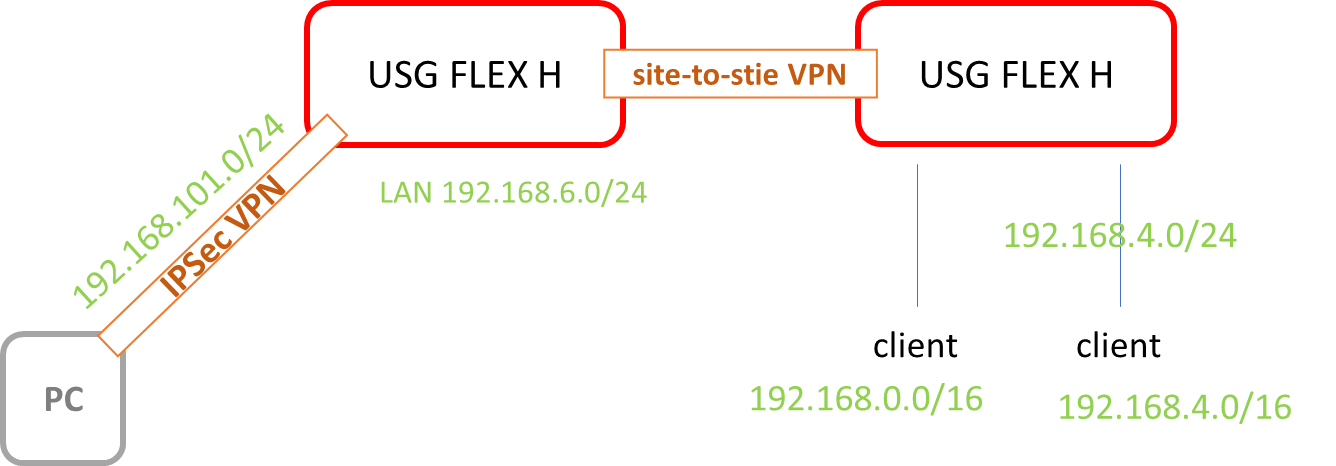
Based on previous discussion, I have illustrated the topology above.
In this network scenario, additional routing rules are required to ensure that the traffic is properly directed into the VPN tunnel.
If you have already configured the routing rules and the issue still persists, please provide the configuration file so we can investigate further.
Zyxel Tina
0






 Guru Member



 Zyxel Employee
Categories
- All Categories
- 442 Beta Program
- 3.1K Nebula
- 243 Nebula Ideas
- 6.8K Security
- 783 USG FLEX H Series
- 389 Security Ideas
- 1.8K Switch
- 87 Switch Ideas
- 1.5K Wireless
- 58 Wireless Ideas
- 7.2K Consumer Product
- 325 Service & License
- 527 News and Release
- 101 Security Advisories
- 31 Education Center
- 10 [Campaign] Zyxel Network Detective
- 5.3K FAQ
- 34 Documents
- 91 About Community
- 122 Security Highlight


