Nebula 20.00 - WAN is declared "Up" but it is down





 Guru Member
Hello everyone,
as you can see I have a firewall with 2x WANs:
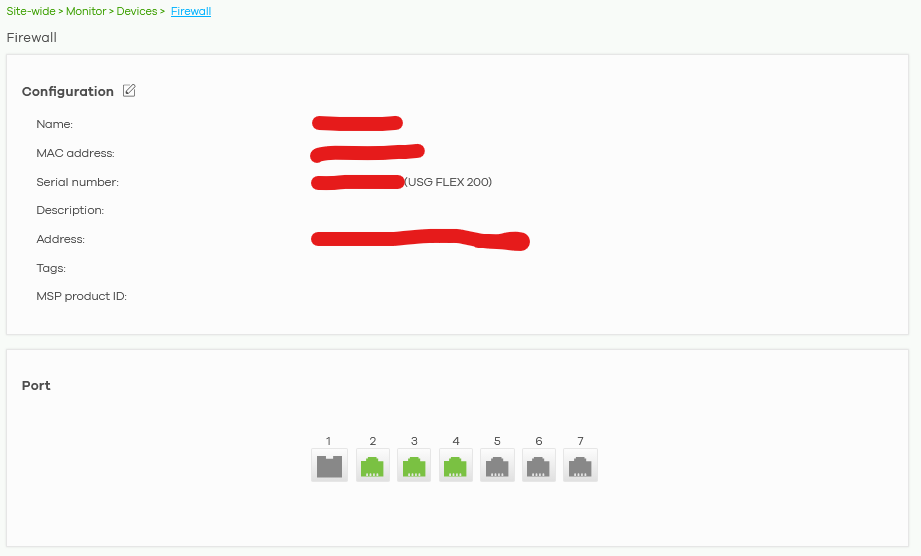
WAN2 is my backup on that site.
WAN1 is down:
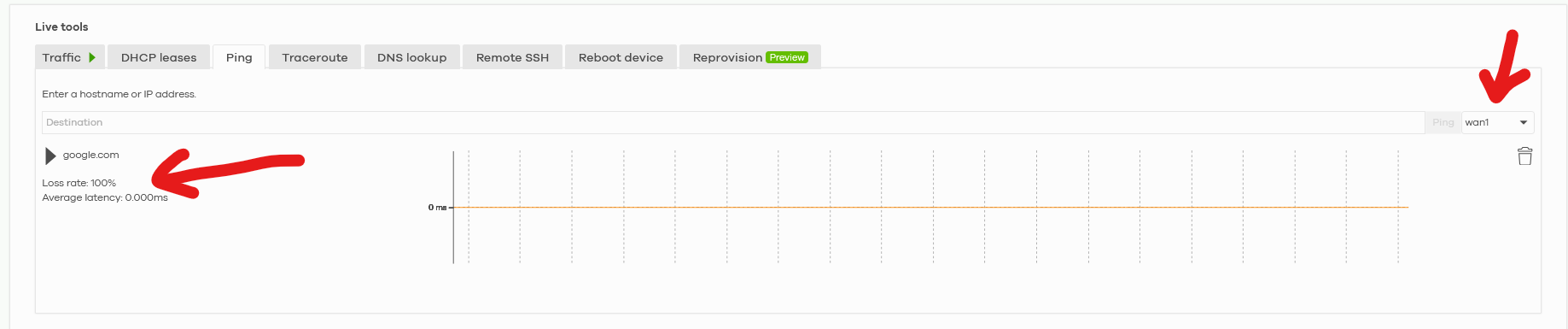
Anyway I see that it is declared as "Up":

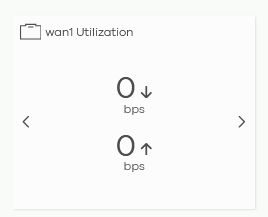
I think it is a little bit confusing info, as you can see there is zero WAN1 traffic:
How can I solve that?
Thanks in advance.
Accepted Solution
-
Hi @GiuseppeR ,
The "Port Status" shown in Nebula reflects the physical link status of the port — it indicates whether a cable is physically connected, regardless of whether that connection actually has internet access.
In your case, we believe the USG FLEX 200 is online on Nebula because WAN2 is currently providing internet connectivity. As a result, the device is able to report to Nebula, and WAN1's port status may still display as "Up" simply because the cable is physically connected, even though WAN1 itself has no internet access at the moment.
Zyxel_Judy
0



 Zyxel Employee
All Replies
-
Hi @GiuseppeR ,
Based on the screenshot provided, we are unable to confirm that WAN1 is actually down.
The behavior could be caused by the device not allowing ping and related to a traffic statistics display issue. How about the traffic in real?
Could you please provide your Nebula organization and site name and enable Zyxel Support access so we can investigate further?
Zyxel_Judy
0 -
Hi @Zyxel_Judy
sent a PM with infos and detailed screenshots
0 -
Hi @GiuseppeR ,
The "Port Status" shown in Nebula reflects the physical link status of the port — it indicates whether a cable is physically connected, regardless of whether that connection actually has internet access.
In your case, we believe the USG FLEX 200 is online on Nebula because WAN2 is currently providing internet connectivity. As a result, the device is able to report to Nebula, and WAN1's port status may still display as "Up" simply because the cable is physically connected, even though WAN1 itself has no internet access at the moment.
Zyxel_Judy
0 -
Hi @Zyxel_Judy
I had the same suspect on its behaviour. Could be possible to add "Port status" and "WAN status"?
This could be effective also because each ISP connectivity has a "Connectivity check" section when you setup its parameters for routing options.
0 -
Hi @GiuseppeR ,
Recognizing the potential usefulness of adding actual connectivity check to WAN 'Up' status for users, we are considering this as a potential feature for future evaluation. You can view and contribute to this idea in the following section:
Adding Actual Connectivity Check to WAN 'Up' Status — Zyxel Community
Zyxel_Judy
0
Categories
- All Categories
- 442 Beta Program
- 3.1K Nebula
- 242 Nebula Ideas
- 6.8K Security
- 777 USG FLEX H Series
- 387 Security Ideas
- 1.8K Switch
- 87 Switch Ideas
- 1.5K Wireless
- 58 Wireless Ideas
- 7.2K Consumer Product
- 324 Service & License
- 526 News and Release
- 101 Security Advisories
- 31 Education Center
- 10 [Campaign] Zyxel Network Detective
- 5.3K FAQ
- 34 Documents
- 91 About Community
- 121 Security Highlight


