WA510 - Systemic 5G-NSA Scanning Loop & Packet Loss after firmware mismatch (Module stuck on V1.60)



 Freshman Member
Hi Zyxel Team,
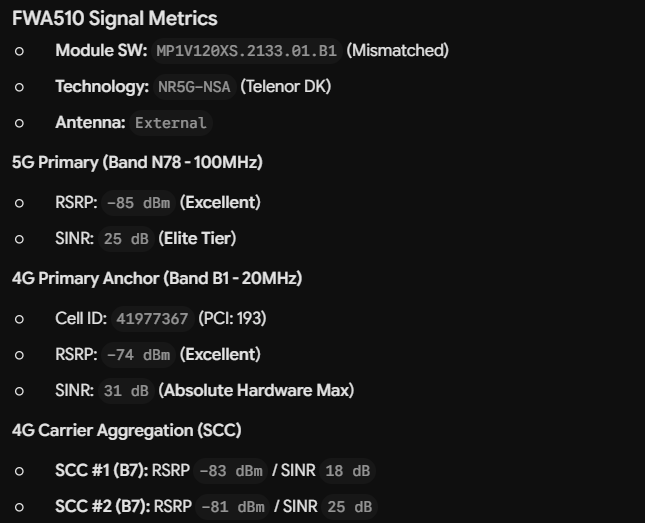
I am experiencing severe network degradation and a critical scanning loop on my FWA510. Please do not reply with standard positioning or signal advice; my RF environment is verified as excellent, and the issue is strictly logical within the cellular module firmware.
The Issue:Following a manual upgrade attempt, the router has ended up in a "split-state" software conflict:
- Host OS Version: Downgraded successfully to V1.20(ACGD.1)C0
- Cellular Module Version: Stuck on MP1V120XS.2133.01.B1 (from the V1.60 branch)
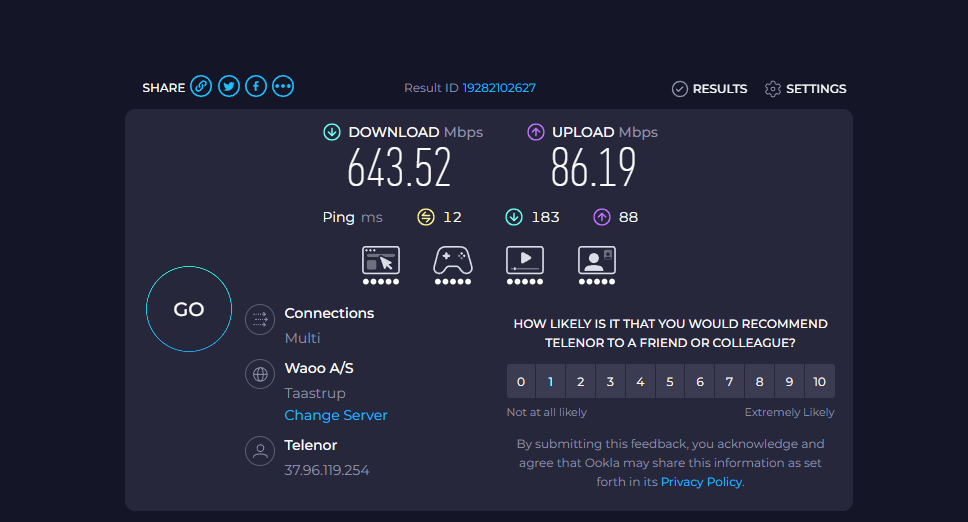
When running in NR5G-NSA/4G Auto Switch mode, the router successfully registers on the local Telenor DK tower using B7 + N78 + N3 with elite-tier signal metrics (LTE SINR: 32 dB, 5G SINR: 24 dB). Under heavy continuous load (Speedtests generating 640+ Mbps down / 85+ Mbps up), the connection holds perfectly without any drops.
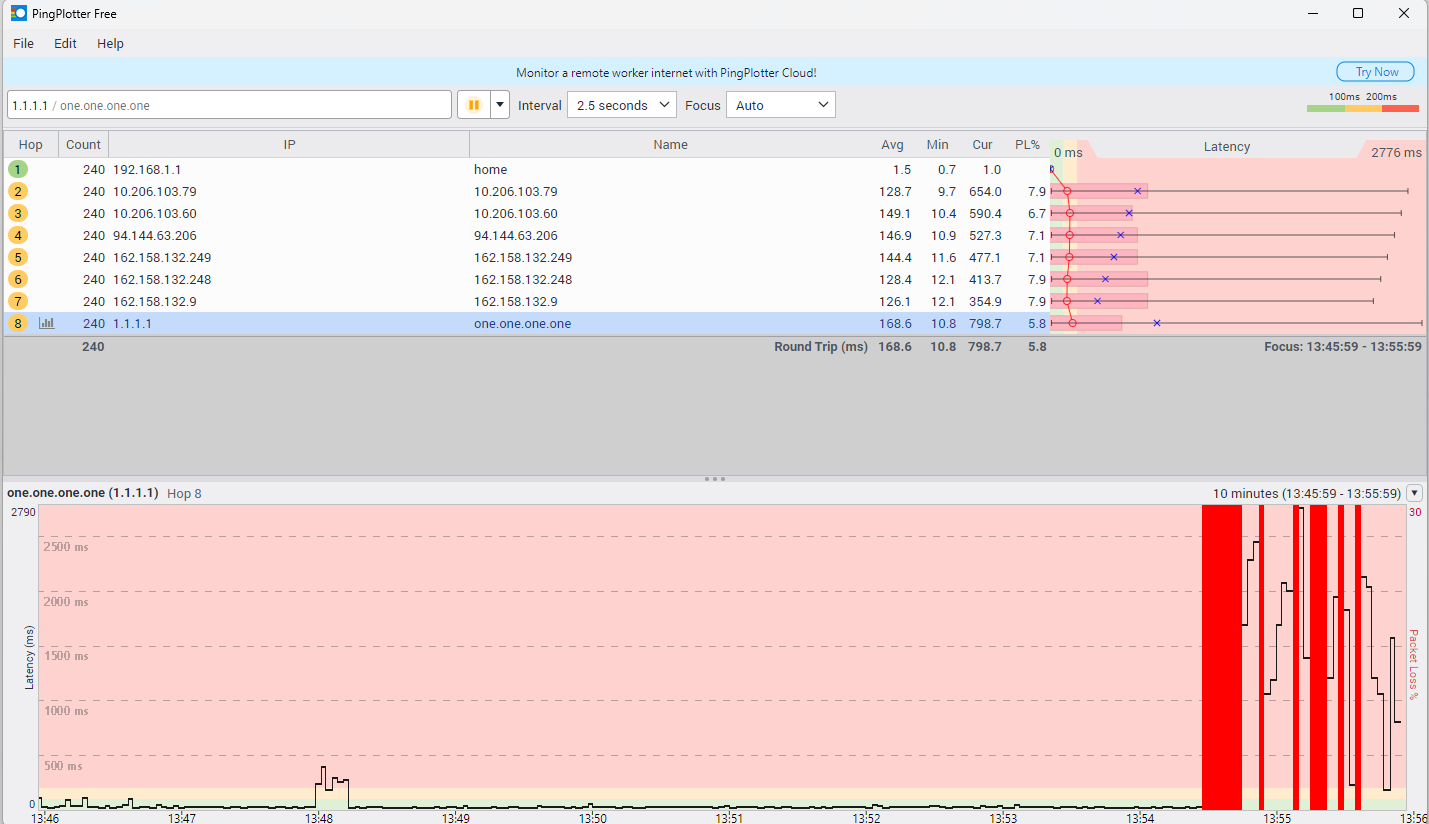
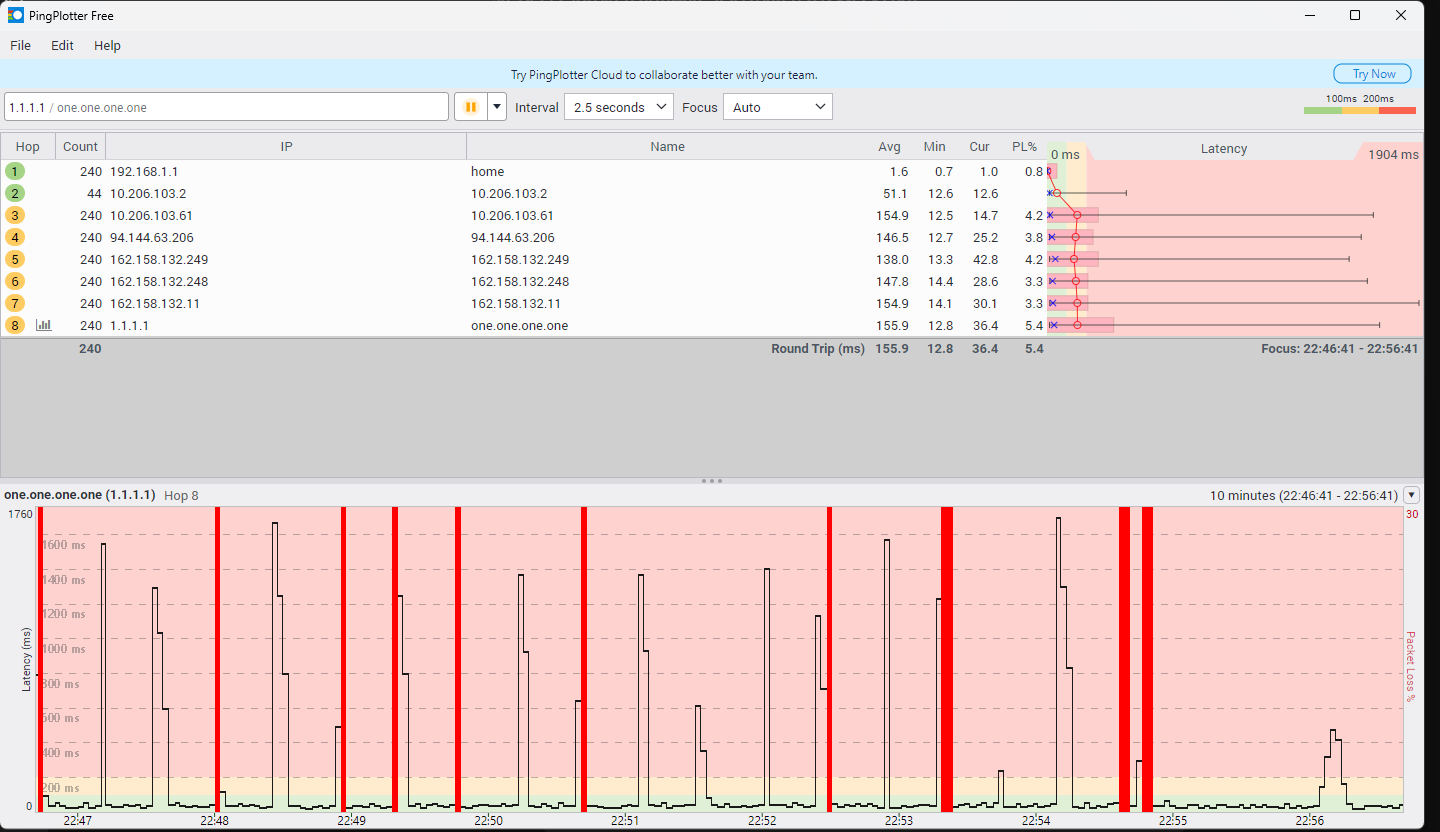
However, the exact moment the connection drops into Idle Mode, the V1.60 module firmware triggers a background frequency scan. Because of the software mismatch/bug, this background scan completely starves the active LTE transport layer, resulting in systemic blocks of 100% packet loss (PL%) every 60-90 seconds and latency spikes up to 2500ms in PingPlotter.
If I manually restrict the router to 4G Only, the background scanning stops instantly, and packet loss drops to a flawless 0.0%. A full hardware NVRAM cold-reset has been performed, but the module firmware remains stuck on the V1.60 baseband.
Attached Documentation:
- Screenshot of the pristine Cellular Info page showing 32 dB SINR.
- PingPlotter timeline showing 0% loss under load, but immediate cyclical 100% packet loss blocks during idle mode.
- PingPlotter comparison chart showing a completely flat green line the second 4G Only is enforced.
Since the standard Web GUI does not expose the #module_upgrade path in this build, I need your team to manually push/trigger the correct matching cellular module firmware for V1.20 via Nebula FOTA, or provide instructions to align Layer 1 and Layer 2.
My device is registered in Nebula. Please let me know when I should enable Support Access and provide my Organization/Site name via PM.
All Replies
-
Hi @AllanLarsen ,
The module version (cellular version) is the same — MP1V120XS.2133.01.B1 — in both the 1.20 and 1.60 firmware of the FWA510. This means your FWA510 is not stuck on the module version from the 1.60 firmware.
To better support you, could you share why you downgraded to version 1.20? What issue were you experiencing with the FWA510 on version 1.60? Generally, we investigate issues using the latest firmware version.
Zyxel_Judy
0 -
Hi @Zyxel_Judy ,
Thank you for the clarification regarding the module version. That explains why the issue has been persistent on both platforms.
To answer your question directly: I downgraded to V1.20 as a troubleshooting step because the connection under V1.60 became entirely unusable for real-time applications due to the severe, cyclical packet loss spikes outlined in my initial post.
Since the underlying baseband firmware is identical, the background scanning loop is present on both branches.
I am moving the router back up to the latest V1.60 firmware right now so your engineering team can investigate on the current platform.
Please let me know when you are ready, and I will enable Zyxel Support Access in Nebula and PM you my Organization and Site details.
Best regards,
Allan
0 -
Hi @AllanLarsen ,
A few follow-up questions to help us clear the issue you reported:
- Idle Mode behavior:
You mention the connection holds perfectly when FWA510 is running in NR5G-NSA//4G Auto Switch, and the scanning loop triggers "the exact moment the connection drops into Idle Mode."
What do you mean "Idle mode"? Could you clarify what you observe that indicates "idle mode"? For example, are you referring to a period of no active data traffic, or something visible in the router's UI or logs? ...
- Real-world impact:
You mentioned "the connection under V1.60 became entirely unusable for real-time applications due to the severe, cyclical packet loss spikes"
Could you be more specific — for example, did VoIP calls drop or break up, did video streams freeze or buffer, or were there other specific symptoms you noticed during daily use?
- PingPlotter setup:
When capturing the PingPlotter data, was your PC connected to the FWA510 via Wi-Fi or a LAN cable? A wired connection would rule out any local wireless interference and give us a cleaner baseline.
- SIM card isolation test:
Have you tested the same SIM card in another router or a mobile phone? If the same periodic drops appear there, it will point toward a network-side (Telenor DK tower) issue.
By the way, please:
- Enable Zyxel Support Access in Nebula and share the Nebula Organization and Site name for our check.
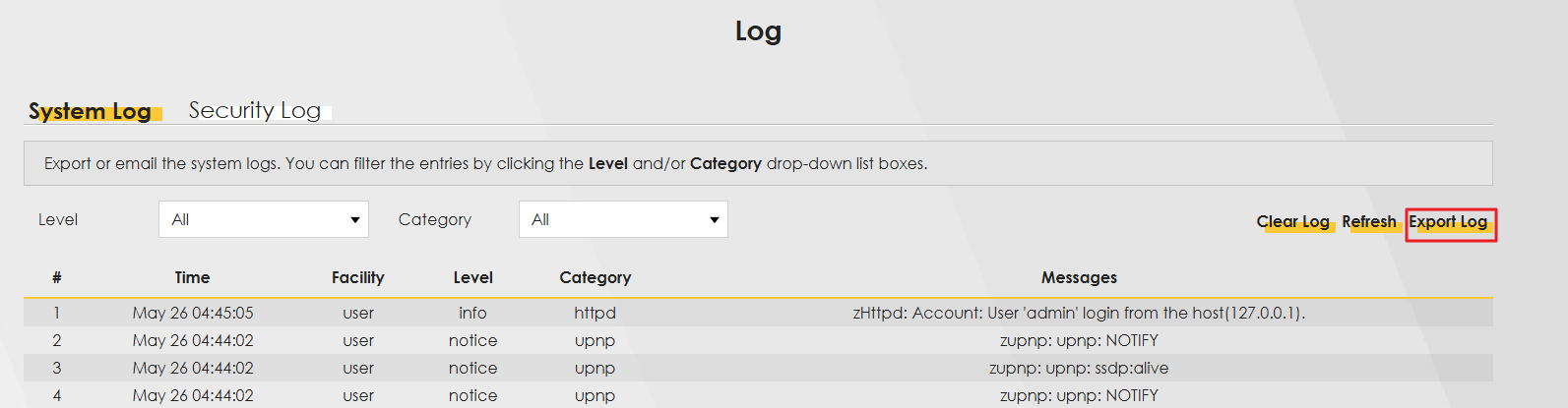
- Collect the log after you face the "issue" you report. You can find it at:
System Monitor > Log
Zyxel_Judy
0





 Zyxel Employee
Categories
- All Categories
- 442 Beta Program
- 3.1K Nebula
- 243 Nebula Ideas
- 6.8K Security
- 783 USG FLEX H Series
- 389 Security Ideas
- 1.8K Switch
- 87 Switch Ideas
- 1.5K Wireless
- 58 Wireless Ideas
- 7.2K Consumer Product
- 325 Service & License
- 527 News and Release
- 101 Security Advisories
- 31 Education Center
- 10 [Campaign] Zyxel Network Detective
- 5.3K FAQ
- 34 Documents
- 91 About Community
- 122 Security Highlight
