Nuovo acquisto


 Freshman Member
Buongiorno,
Ho acquistato ieri da Amazon il Zyxel networks, ho collegato il cavo di alimentazione ad una ciabatta a più posti, il cavo ethernet al mio PC (ha connessione internet), ma il zyxel mostra luce arancione/verde (booting) e andando a cercarlo nelle refi visibili non riesco nemmeno a collegarmi (avendo scaricato la app Nebula ed avendo fatto la procedura di installazione).
Come posso fare per risolvere il problema?
Grazie mklle per l'aiuto
Michael Martini
All Replies
-
Hi @Michael_Martini,
Benvenuto nella Zyxel Community!
Per comprendere meglio il problema e poter effettuare ulteriori verifiche, potrebbe gentilmente fornire le seguenti informazioni?
- Qual è il modello del suo dispositivo Zyxel?
- Per quanto riguarda lo stato del LED, intende dire che alterna tra arancione e verde?
- Quando indica che il cavo Ethernet è collegato al PC e che il PC ha accesso a Internet, significa che il PC si connette a Internet tramite il dispositivo Zyxel oppure tramite un'altra interfaccia (ad esempio Wi-Fi)?
- Dopo aver acceso il dispositivo, il LED rimane continuamente nello stato arancione/verde oppure il comportamento del LED cambia dopo un certo periodo di tempo?
- Per quanto riguarda il problema per cui non riesce a trovare o a connettersi al dispositivo dopo aver installato l'app Nebula, potrebbe fornire maggiori dettagli sui passaggi seguiti? Eventuali screenshot o messaggi di errore sarebbero molto utili.
Welcome to the Zyxel Commnunity!
To better understand the issue and investigate further, could you please provide the following information?
- What is your Zyxel device model?
- Regarding the LED status, do you mean it is alternating between orange and green?
- When you mention that the Ethernet cable is connected to your PC and that the PC has Internet access, does this mean the PC is connected to the Internet through your Zyxel device or via another interface (e.g., Wi-Fi)?
- After powering on the device, does it remain continuously in the orange/green LED state, or does the LED behavior change after some time?
- Regarding the issue where you cannot find or connect to the device after installing the Nebula app, could you provide more details about the steps you followed? Any screenshots or error messages would also be helpful.
Zyxel Tina
0 -
Buonasera,
Il modello dello zyxel wireless NWA30BE.
Il zyxel é connesso al mio PC con cavo suo ethernet ma il led rimabe sempre verde/arancio e anche la pprta dello zyxel rimane sullp stato arancione.
Il pc é attaccato all rete internst wifi di casa nostra tramite extender, lo stato del led stesso anche nel tempo non cambia.
Nell'app Nebula ho scannerizzato il codice QR code e seguito le istruzioni per la sua intallazione ma il problema persiste.
Grazie mille
0 -
Hi @Michael_Martini,
Innanzitutto, desidero chiarire che il NWA30BE è un Access Point (AP) Wi-Fi 7, non un router o un modem. Ciò significa che deve essere collegato a un router o modem esistente per poter funzionare. Il suo ruolo è estendere o trasmettere il segnale Wi-Fi all’interno della rete.
Per quanto riguarda l’installazione tramite l’app Nebula, potrebbe chiarire quale problema specifico ha riscontrato? Ad esempio:
- Non è riuscito ad aggiungere il dispositivo al sito (ad esempio, la scansione del codice QR non ha completato la registrazione del dispositivo)? In tal caso, la preghiamo di inviare una foto dell’etichetta del dispositivo con l’indirizzo MAC e il numero di serie (S/N) tramite messaggio privato (cliccando sul mio profilo > Messaggio).
- Oppure il dispositivo è stato aggiunto correttamente al sito, ma risulta offline senza accesso a Internet?
Per chiarire, un LED che alterna tra arancione e verde indica che il dispositivo è ancora in fase di avvio oppure sta tentando di connettersi a Internet per raggiungere il Nebula Control Center (NCC), ma non ci riesce.
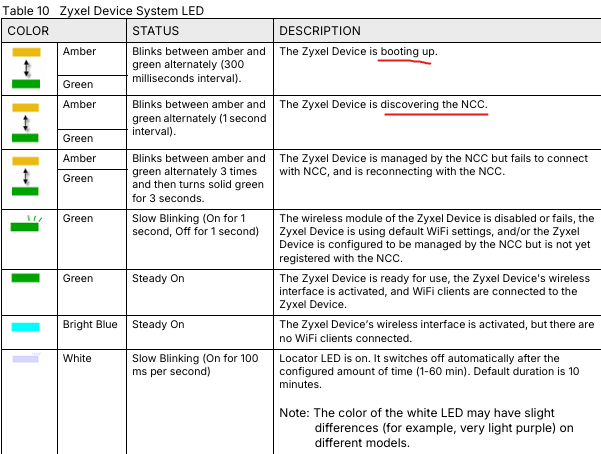
Potrebbe confermare quale situazione corrisponde a ciò che sta osservando? Questo ci aiuterà a determinare lo stato del dispositivo.
Se il problema è legato all’impossibilità di raggiungere il NCC, tenga presente che anche se il PC ha accesso a Internet tramite Wi-Fi, la porta Ethernet non fornisce automaticamente un indirizzo IP (DHCP) né condivide la connessione Internet con i dispositivi collegati. Di conseguenza, il NWA30BE non dispone di connettività di rete e non può raggiungere il NCC.
Per risolvere il problema, colleghi il NWA30BE direttamente al router o a uno switch di rete:
Scolleghi il cavo Ethernet dal PC e lo colleghi a una porta LAN disponibile del modem/router principale (oppure a uno switch già connesso a Internet). In questo modo il dispositivo potrà ottenere automaticamente un indirizzo IP tramite DHCP, accedere a Internet e connettersi al NCC.Se il dispositivo rimane bloccato nella fase di avvio, verifichi innanzitutto di utilizzare l’alimentatore originale. Successivamente, provi a eseguire un ripristino alle impostazioni di fabbrica tenendo premuto il pulsante Reset per più di 5 secondi mentre il dispositivo è acceso, in modo da consentire il completamento del processo di avvio. Se il problema persiste dopo questi passaggi, consigliamo di contattare Amazon per richiedere una sostituzione o un reso.
=====
Firstly, please allow me to clarify that the NWA30BE is a Wi-Fi 7 Access Point (AP), not a router or modem. This means it needs to be connected upstream to an existing router or modem to function. Its role is to extend or broadcast a Wi-Fi signal within your network.
Regarding the installation via the Nebula app, could you please clarify what specific issue you encountered? For example:
- Were you unable to add the device to the site at all (e.g., scanning the QR code and did not complete the device registration)? If so, please provide a photo showing the device label with the MAC address and serial number (S/N) via private message by clicking my profile > Message.
- Or was the device successfully added to the site, but it shows as offline with no Internet access?
To clarify, an LED alternating between orange and green indicates that the device is either still booting or attempting to connect to the Internet to reach the Nebula Control Center (NCC), but is unable to do so.
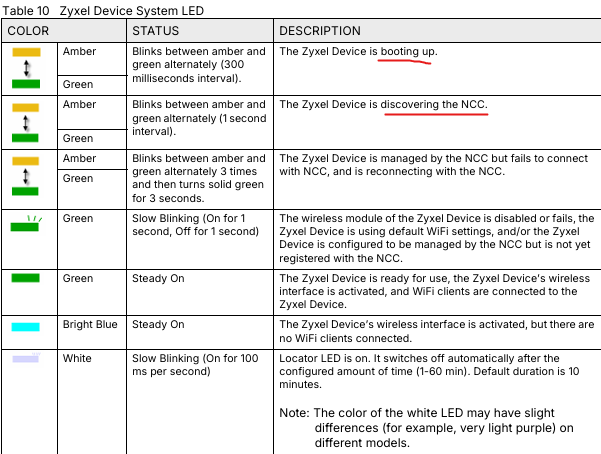
Could you please confirm which scenario matches what you are observing? This will help us determine the device status.
If the issue is related to the device being unable to reach NCC, please note that even if your PC has Internet access via Wi-Fi, its Ethernet port does not automatically provide an IP address (DHCP) or share the Internet connection with connected devices. As a result, the NWA30BE does not have network connectivity and cannot reach the NCC.
To resolve this issue, please connect the NWA30BE directly to your router or network switch: Unplug the Ethernet cable from your PC and connect it to an available LAN port on your main modem/router (or to a network switch that is already connected to the Internet). This will allow the device to obtain an IP address via DHCP, access the Internet, and connect to the NCC.
If the device remains stuck in the booting state, please first ensure that you are using the original power adapter. Then, try performing a factory reset by pressing and holding the Reset button for more than 5 seconds while the device is powered on, allowing it to go through the full boot process again. If the issue persists after these steps, we recommend contacting Amazon to request a replacement or return.
Zyxel Tina
0





 Zyxel Employee
Categories
- All Categories
- 442 Beta Program
- 3.1K Nebula
- 243 Nebula Ideas
- 6.8K Security
- 783 USG FLEX H Series
- 389 Security Ideas
- 1.8K Switch
- 87 Switch Ideas
- 1.5K Wireless
- 58 Wireless Ideas
- 7.2K Consumer Product
- 325 Service & License
- 527 News and Release
- 101 Security Advisories
- 31 Education Center
- 10 [Campaign] Zyxel Network Detective
- 5.3K FAQ
- 34 Documents
- 91 About Community
- 122 Security Highlight


