[What's New] Federated Identity, Unified Access: Nebula Identity Federation Service


 Zyxel Employee
![[NCCSR] Community Post Banner_600x200.png](https://us.v-cdn.net/6029482/uploads/22TJUPM78RPC/5bnccsr-5d-community-post-banner-600x200.png)
🎯Federated Identity. Unified Access.
For years, businesses have moved their applications, workflows, and user identities to the cloud—yet network access has often remained disconnected, relying on separate accounts, credentials, and administrative processes for WiFi and VPN.
But what if network access could follow the identity your organization already trusts?
With Nebula 20.10, Zyxel introduces Nebula Identity Federation Service (NID FS), an enterprise-grade authentication and access control solution for network access services. Instead of asking administrators to build separate identity systems for WiFi, Captive Portal, and SSL VPN, NID FS helps organizations extend their existing identity databases into Nebula-managed network access.
🎯Why identity federation matters for network access
Network access used to be managed separately from business applications. Employees might use one login for Microsoft 365 or Google Workspace, another set of credentials for VPN, and yet another method for guest or contractor WiFi. This increases administrative effort and can make access control harder to keep consistent.
NID FS changes this model by bringing WiFi, Captive Portal, and SSL VPN into the same identity-driven approach that organizations already use for cloud applications. Users authenticate with their familiar IdP accounts, while IT teams can apply access policies based on trusted identity context.
- Employees can use their enterprise IdP credentials for secure WiFi or VPN access.
- Vendors or outsourced teams can authenticate through their own trusted IdP instead of requiring local account creation.
- Admins can reduce repetitive identity configuration across services and sites.
- Authentication can inherit IdP-level security controls, including MFA where configured.
🎯What NID FS does in Nebula
NID FS is a federation layer that sits between your identity providers and your Nebula-managed services. Instead of wiring every SSID, Captive Portal, or SSL VPN to its own IdP, you configure your IdPs once in NID FS — and every connected service can authenticate against any of them.
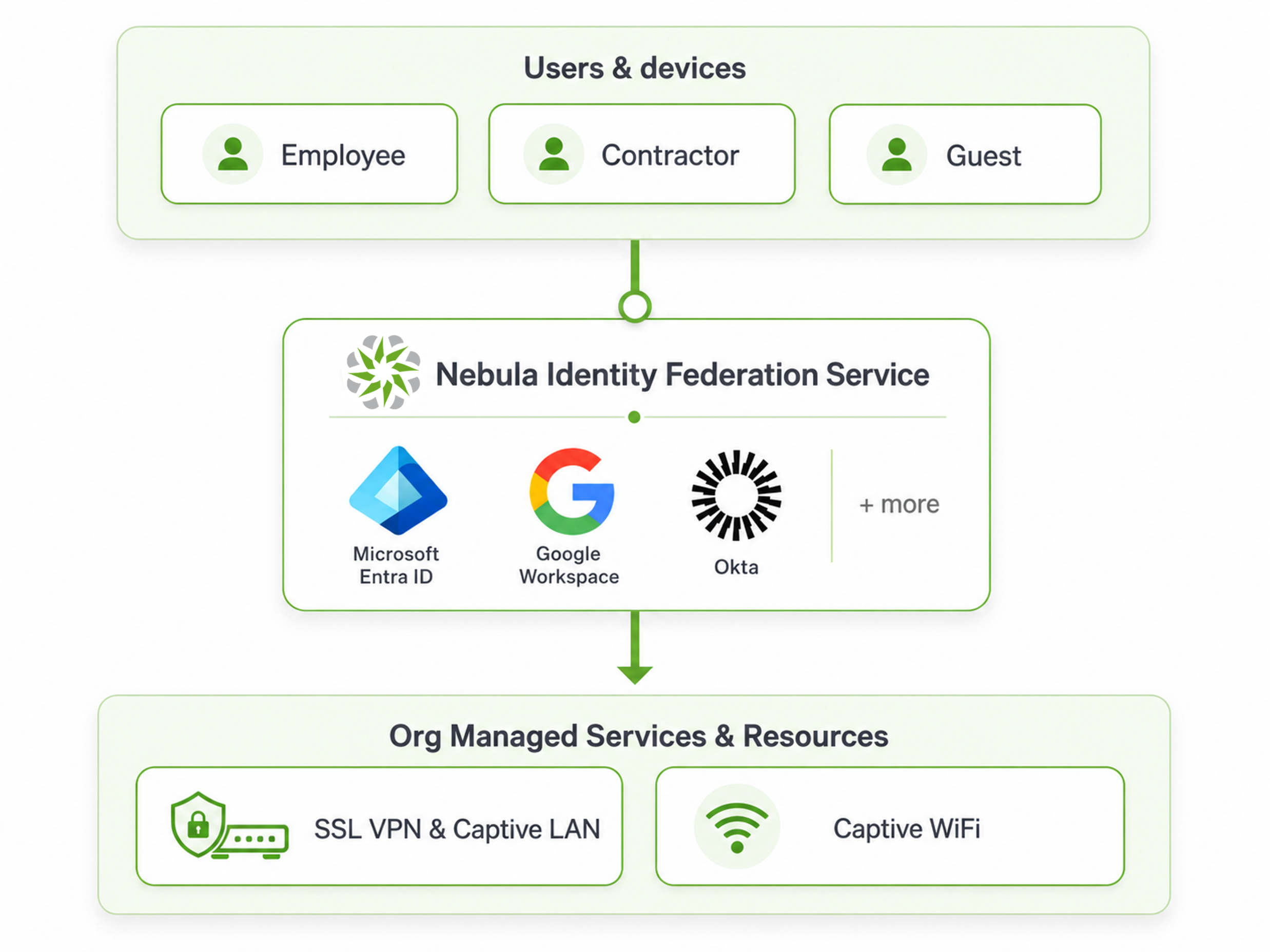
- Third-Party IdP Integration — Establishes trust with external identity providers via the open OIDC standard, allowing you to grant secure access to staff, contractors, vendors, or guests without creating separate accounts in your own directory.
- Federated Identity — Integrates multiple third-party IdPs — Microsoft Entra ID, Google Workspace, Okta, and more. Users authenticate directly against their own IdP and inherit its security controls, including MFA. Credentials always stay owned and secured by the IdP.
🛜Use case: WiFi access by identity
For WiFi access, NID FS helps organizations give the right people access to the right wireless networks based on identity. Instead of relying only on shared passwords or manually maintained user lists, users can authenticate with the identities the organization already trusts.
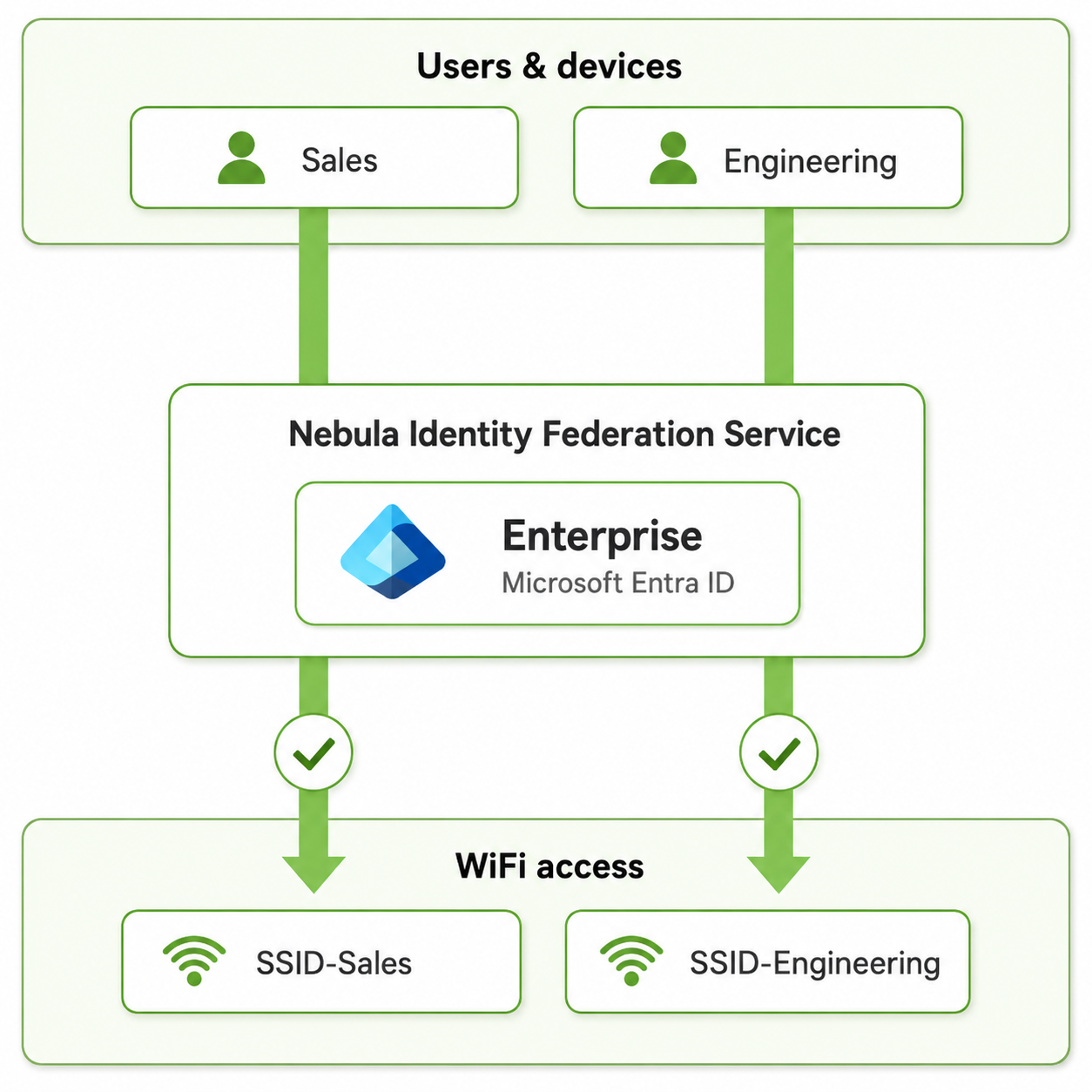
In an enterprise environment, the Sales team and Engineering team may use the same cloud identity provider, but should be guided to different SSIDs or access experiences. By tying access to identity, IT can align wireless onboarding with the organization’s existing identity structure.
🌍Use case: Remote access with users’ own IdP
Remote access often involves more than internal employees. Contractors, vendors, and project partners may need limited access to specific internal resources. NID FS allows each group to authenticate through its own IdP, while Nebula policies determine whether the user can enter and where they can go after access is granted.
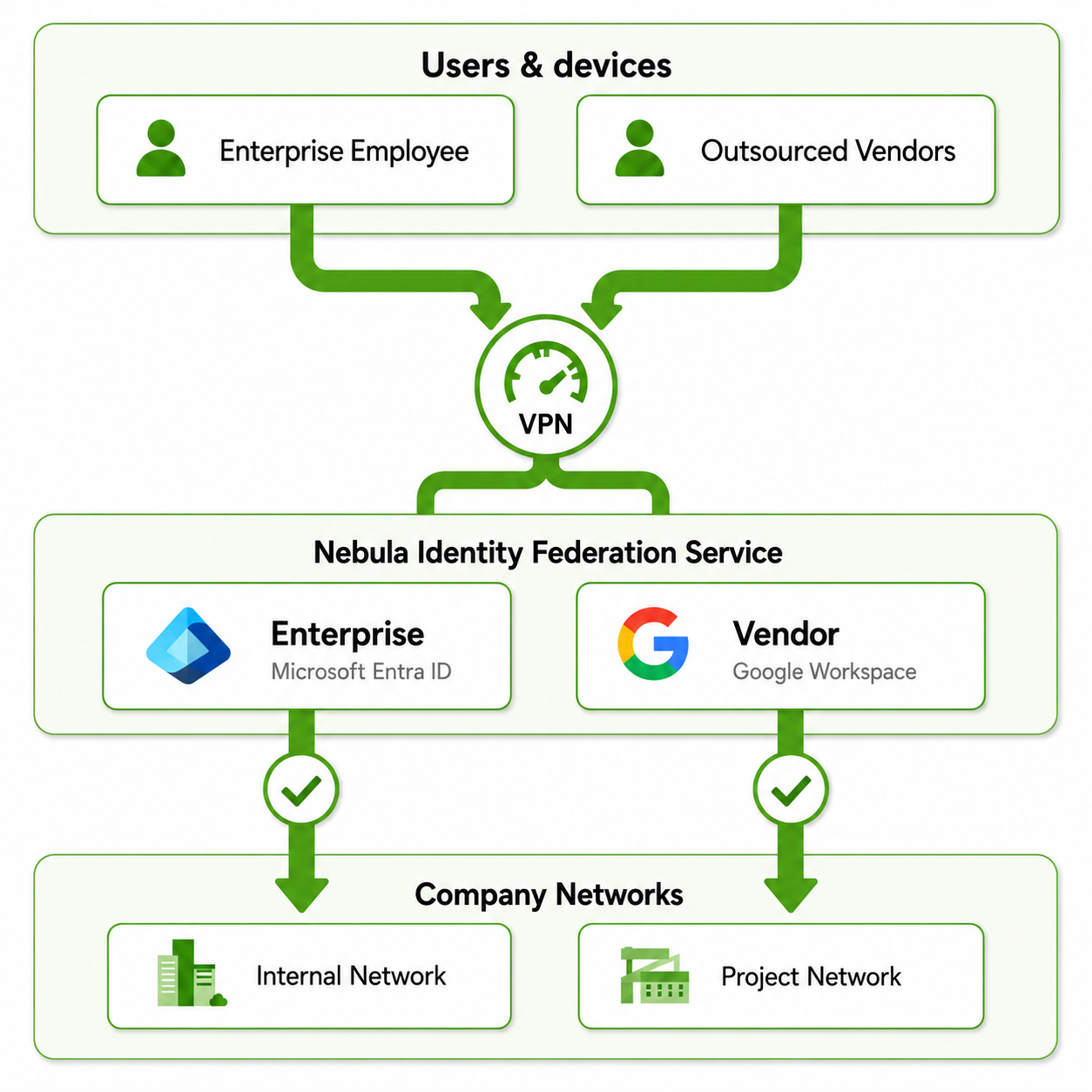
For example, employees may connect to SSL VPN with Microsoft Entra ID, while outsourced vendors authenticate through Google Workspace. Once authenticated, firewall policies can use identity context to allow internal users to reach corporate resources while restricting vendors to project-specific network segments.
🎯A simple workflow: bind IdPs, apply services, define access
From an administrator’s point of view, the NID FS workflow can be understood in four steps:
- Create identity provider profiles for existing identity databases.
- Apply NID FS as the authentication method for the desired network access services, including SSID sign-in, Firewall Captive Portal, and SSL VPN.
- Create user privilege policies that define which users from which IdP can access which services.
- Let users sign in through the NID FS portal and receive the appropriate success or denial result based on authorization settings.

🚀Try NID FS on Nebula
NID FS brings identity-based access control to Nebula network services, helping organizations use their existing cloud identities for WiFi, Captive Portal, and SSL VPN access. It simplifies multi-IdP deployment while giving IT teams more granular control over who can access which network services.
NID FS is included in the Nebula Pro Pack. If you are a Nebula Pro Pack user, you can start using it immediately. Or you may log in to Nebula and activate the 30-day free trial of Nebula Pro Pack now to gain access.
🚩For IT teams who want to configure identity provider integration, refer to the setup guides below:
Microsoft Entra ID setup guide
🚩Learn how to set up Passkeys login for firewall captive portal and SSL VPN with NID FS here:
Set Up Passkeys Login for Firewall Captive Portal and SSL VPN with NID FS
Categories
- All Categories
- 442 Beta Program
- 3.1K Nebula
- 242 Nebula Ideas
- 6.8K Security
- 764 USG FLEX H Series
- 385 Security Ideas
- 1.8K Switch
- 87 Switch Ideas
- 1.5K Wireless
- 58 Wireless Ideas
- 7.2K Consumer Product
- 324 Service & License
- 524 News and Release
- 100 Security Advisories
- 31 Education Center
- 10 [Campaign] Zyxel Network Detective
- 5.3K FAQ
- 34 Documents
- 91 About Community
- 121 Security Highlight