Iphone disconnects

 Freshman Member
Hello,
i have 3 AP NWA130BE and i wanted to extend my WIFI with 3 NWA50AX APs.
But now i have problems with my Iphone. It is similar like this problem:
https://community.zyxel.com/en/discussion/29920/macbook-and-iphone-disconnects-nwa50ax/
It connects with the WIFI and disconnects over and over again.
When i shutdown the NWA50AX APs, the problem disappears.
Have you some hints for me? Or are they not compatible with the NWA130BE APs?
They are all in the Nebula Control Center intergrated.
Accepted Solution
-
Hi @xmasman,
Thanks for the update!
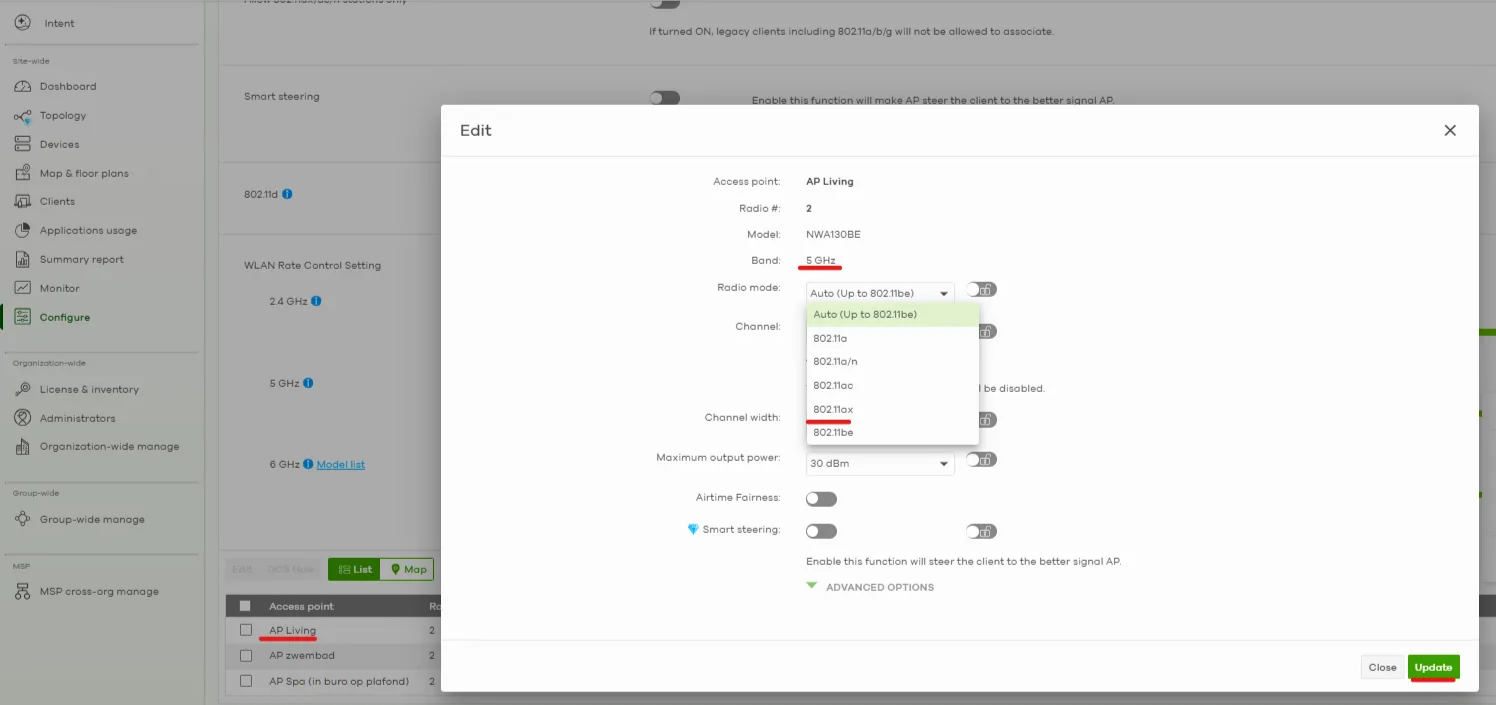
After reviewing the logs, we suggest enabling 802.11ax mode on both 5 GHz and 6 GHz under the radio settings and staying closer to the AP to see if the connection improves. (The logs from your screenshot show low signal strength, sometimes from -79dBm to -87dBm, which may be affecting stability.)
Here is an example:
Just a friendly reminder to enable Zyxel Support Access and provide us with the following details via private message when you get back to us. This will help us investigate and troubleshoot more effectively:
- Organization & site name
- The affected iPhone’s MAC address (please ensure Private Wi-Fi Address feature is disabled)
- iPhone model
- iOS version
Zyxel Tina
0

 Zyxel Employee



All Replies
-
Could you enlighten me what environment you have?
- Are there four AP's now? How big is the area you're trying to cover? In most cases you never need 3 or 4 AP's in most homes or small office spaces.
In fact, it might be even necessary to reduce the transmission power of some of the AP's. Once I encountered a problem at a house where the customer complained of extremely slow wifi on a specific device. Turned out that the AP was just 2 feet next to the plagued device. The AP was in a different room but on the other side of the same wall. Reducing the power worked out. - Channel width of more than 80MHz can also cause a lot of trouble with multiple AP's near, including those of your own network. Actually, in some cases a 40MHz channel can be more than enough in case all client devices are wifi 5 or better.
- Check what channels are actually being used on the actual location the iPhone is.
0 - Are there four AP's now? How big is the area you're trying to cover? In most cases you never need 3 or 4 AP's in most homes or small office spaces.
-
Hi @xmasman,
Welcome to the Zyxel Community!
To better understand the situation and provide proper assistance, could you please clarify the following points first?
- When you mention that the iPhone "connects with the Wi-Fi and disconnects over and over again," can you confirm if other client devices (e.g., Android phones, laptops, or tablets) experience similar instability when connected to the NWA50AX APs, or is the issue observed only on iPhones?
- If you're setting up the extension through smart mesh technology, please refer to this FAQ to review your configuration.
Additionally, please share any other details (e.g., devices' firmware versions, screenshots of the SSID config, etc.) to help us investigate further. You can also enable Zyxel Support Access and send your org & site name along with your iPhone MAC address via private message so we can check the logs directly.
Zyxel Tina
0 -
Hello Tina,
- just the Iphone experiences the instability. We have 3 Iphones in the house with the same Problem. All other Phones (Android) dont't have this issue. But sometimes my personal Android Phone disconnects from WIFI and uses the data from my sim card (4G/5G). It tells me that the Wifi Connection has no internet. After some time it connects again with the Wifi and everything works.
- The setting of smart mesh is and was just like it is mentioned in the FAQ.
The APs NWA130BE have Firmware V7.20(ACIL.3) and the NWA50AX V7.10(ABYW.3).
I have 2 SSIDs:
- WPA3-Personal, 2.4 GHz 5 GHz 6 GHz activated, and just Assisted roaming activated
- WPA3-Personal, 2.4 GHz 5 GHz, activated, Guest Network , Intra-BSS traffic blocking Enabled, Band select enabled, Assisted roaming enabled, 802.11r enabled
Maximum output power
2.4 GHz20 dBm
5 GHz30 dBm
6 GHz30 dBm
Channel width
2.4 GHz20 MHz
5 GHz40 MHz
6 GHz320 MHz
Smart steering enabled with standard
802.11d enabled
The Iphones are connected with the second SSID (Guest network)
My Android Phone with SSID 1.
0 -
My house has the APs spread across three floors.
On each floor, there's now one NWA130BE and one NWA50AX, approximately 8-10 meters apart on each floor, separated by several walls.
0 -
Hi @xmasman,
To help us investigate further, could you please:
- Collect the diagnostic info files from the NWA50AX and NWA130BE APs when the issue occurs
- Enable Zyxel Support Access
Then provide them to us via private message along with:
- Organization & site name
- Approximate timestamp when the issue occurs
- iPhone MAC address
- Could you confirm whether the issue is more likely to occur when the iPhone is near the NWA50AX, closer to the NWA130BE, or between them?
Zyxel Tina
0 -
Hi Tina,
I'll carry out the steps in the next few days.
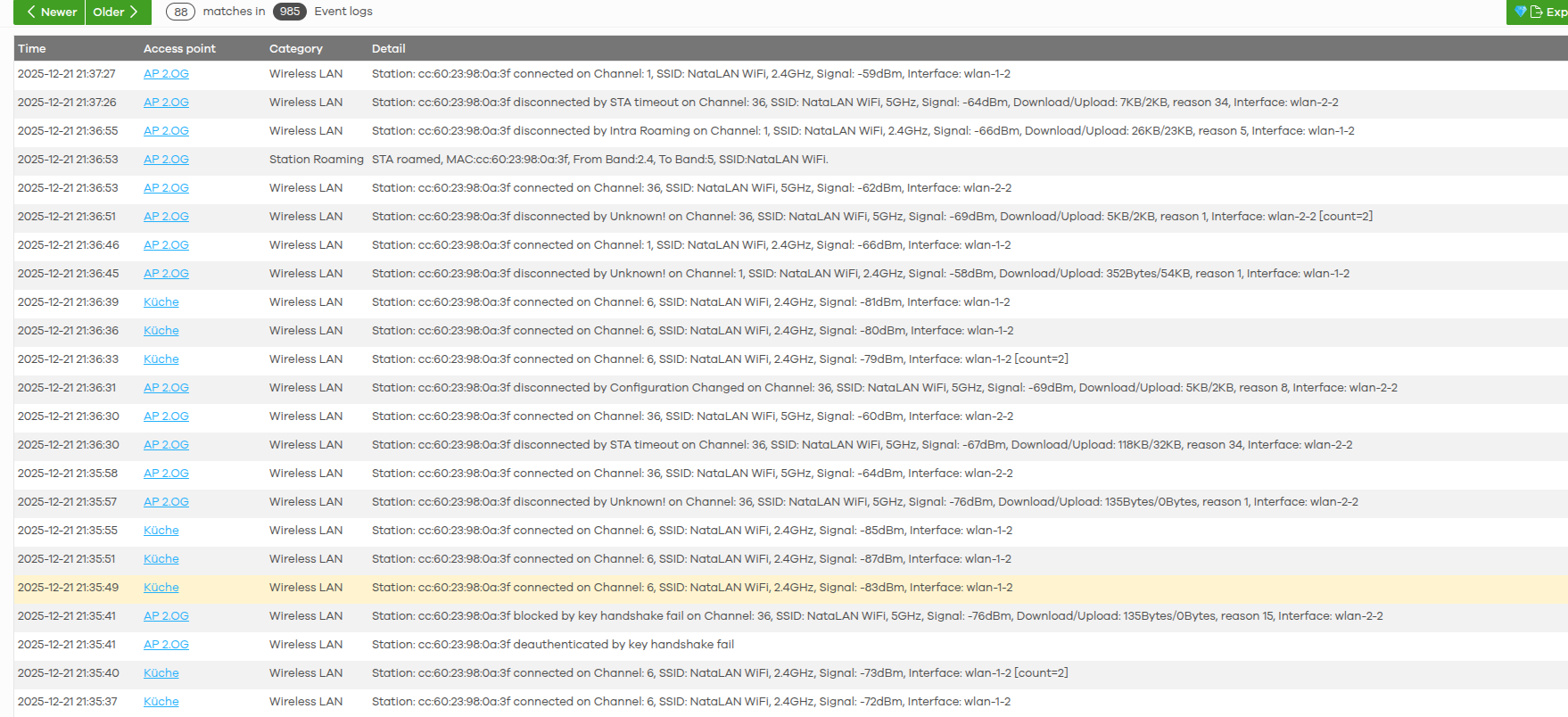
Attached is a screenshot from an affected iPhone.
 0
0 -
Hi @xmasman,
Thanks for the update!
After reviewing the logs, we suggest enabling 802.11ax mode on both 5 GHz and 6 GHz under the radio settings and staying closer to the AP to see if the connection improves. (The logs from your screenshot show low signal strength, sometimes from -79dBm to -87dBm, which may be affecting stability.)
Here is an example:
Just a friendly reminder to enable Zyxel Support Access and provide us with the following details via private message when you get back to us. This will help us investigate and troubleshoot more effectively:
- Organization & site name
- The affected iPhone’s MAC address (please ensure Private Wi-Fi Address feature is disabled)
- iPhone model
- iOS version
Zyxel Tina
0




Categories
- All Categories
- 442 Beta Program
- 3K Nebula
- 222 Nebula Ideas
- 129 Nebula Status and Incidents
- 6.5K Security
- 619 USG FLEX H Series
- 349 Security Ideas
- 1.7K Switch
- 84 Switch Ideas
- 1.4K Wireless
- 53 Wireless Ideas
- 7K Consumer Product
- 298 Service & License
- 486 News and Release
- 92 Security Advisories
- 31 Education Center
- 10 [Campaign] Zyxel Network Detective
- 4.8K FAQ
- 34 Documents
- 88 About Community
- 105 Security Highlight


