NR7302 – Firmware 1.00(ACHA.5)b1_F0: – Internet stops after a few hours, reboot

 Freshman Member
Hello,
I am experiencing a reproducible and severe stability issue with my Zyxel NR7302 running the latest firmware 1.00(ACHA.5)b1_F0.
Problem description
After a few hours of normal operation (sometimes less), LAN and WLAN clients lose Internet connectivity:
- ICMP works (e.g.
ping google.comsucceeds) - HTTP/HTTPS traffic does not work (browsers time out)
- Both LAN and WLAN clients are affected but not at the same time
Important observation
The problem is immediately fixed by either:
- rebooting the NR7302, or
- changing any network-related setting (e.g. switching DNS Proxy ↔ ISP DNS, applying settings without real changes)
What I already verified / changed
- Only one LAN bridge is configured (all unused bridges and VLANs removed)
- Only one DHCP server active
- No IP conflicts
- Gateway and DNS are correct on clients
- Internal Wi-Fi of the NR7302 is disabled (outdoor device, not used)
- External switch and Zyxel access point are Layer-2 only
- DNS Proxy enabled (issue also happens with ISP DNS)
The issue still occurs regularly after a few hours.
Firmware
- Device: Zyxel NR7302
- Firmware: 1.00(ACHA.5)b1_F0 (latest)
At the moment, only frequent reboots or forcing config reloads keep the device usable.
Thank you for your support.
Best regards
All Replies
-
Hi @lehrbua,
Thank you for reporting this issue with your Zyxel NR7302. It sounds like you're experiencing a common problem where internet connectivity is lost despite ICMP working, requiring a reboot or a setting change to resolve. This often points to a potential software or configuration-related issue.
Here are some steps we can take to further diagnose and potentially resolve this:
- Check for newer firmware: Although you mentioned you are on the latest firmware 1.00(ACHA.5)b1_F0, sometimes carrier-specific or regional firmware versions might be available. Please check with your Zyxel supplier or ISP to see if there's a newer firmware version for your specific device and region. Firmware updates often contain bug fixes that address stability issues.
- Review network monitoring settings: Ensure that "Network Monitoring" is enabled under the Cellular WAN settings. This feature allows the device to automatically attempt re-connection if the cellular connection is lost, which might help mitigate the issue.
- Test with a different DNS server: While you've tested with ISP DNS, consider setting a public DNS server (e.g., Google DNS 8.8.8.8 and 8.8.4.4) directly on the NR7302 or on a test client to see if the issue persists. This can help rule out any intermittent DNS resolution problems from your ISP's DNS.
- Examine system logs: The NR7302's system logs can provide valuable clues about what is happening when the internet connectivity drops. Please provide relevant log entries from around the time the issue occurs.
- Consider a scheduled reboot as a temporary workaround: As a temporary measure to maintain usability, you could configure a daily scheduled reboot for the NR7302. This will ensure regular refreshes of the connection until a permanent solution is found.
To help us investigate this further, please provide the following additional information:
- Network Topology Map: A simple diagram or description of how your NR7302 is connected to your external switch and Zyxel access point.
- Signal Strength (SINR Value): Navigate to
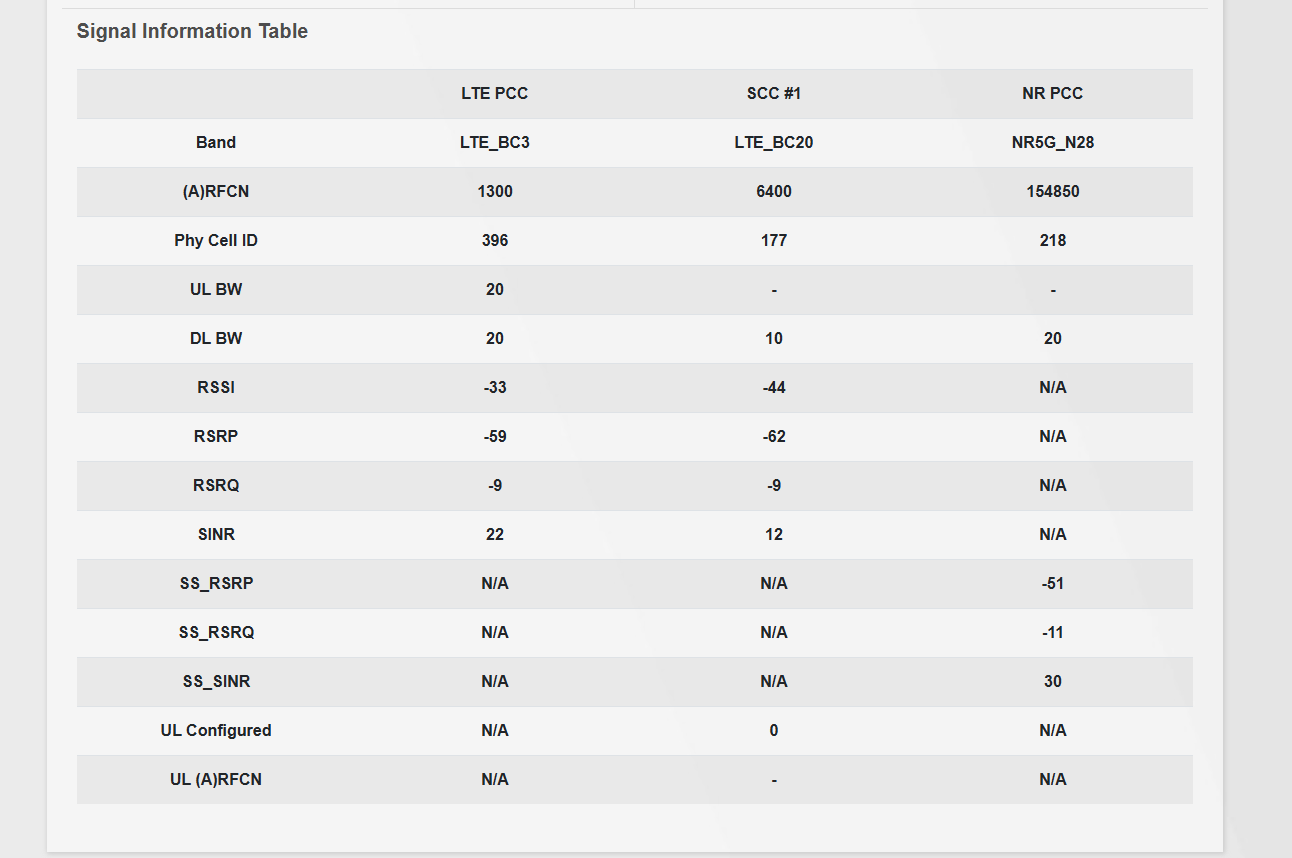
Homepage > Cellular Infoon the NR7302's web interface, click on the>icon to open the full page, and take a screenshot of the entire page. A low Signal to Interference plus Noise Ratio (SINR) can contribute to connection instability. Ensure your SINR value is >= 20 dB. - Confirmation of IP Passthrough mode: Please confirm if your NR7302 is configured in IP Passthrough mode. Some users have reported DHCP renewal issues in this mode.
We appreciate your detailed description of the problem and the troubleshooting steps you've already taken.
This AI response aims to provide initial troubleshooting steps and identify information needed for further diagnosis. Feel free to share additional details based on the suggestions above — this will help community members offer more targeted assistance.
If you have feedback or idea about this AI assistant, share them in Community Feedback.0 -
Check for newer firmware:
The device was purchased independently (not ISP-provided) and has been operated with a Magenta Austria SIM card for approximately one year.
I do not receive firmware updates via the provider. Firmware updates are only available through the Zyxel App or the Device Auto Update feature.
The currently installed firmware is V1.00(ACHA.5)b1_F0, which is also the latest available version for this model on my side.Review network monitoring settings:
I have enabled network monitoring. However, I could not find any indication that the issue is related to a WAN disconnection or cellular instability.
The WAN link remains UP, and traffic counters continue to increase even while the issue occurs.Test with a different DNS server:
I tested multiple DNS configurations (ISP DNS, DNS Proxy, and manual DNS servers).
These changes do not resolve the issue permanently. In some cases, applying DNS settings temporarily restores connectivity, but the problem reappears after a few hours.
This behavior does not appear to be DNS-specific.Examine system logs:
I reviewed the system logs but could not identify any clear error related to the observed behavior.
The logs have been attached for further analysis.Consider a scheduled reboot as a temporary workaround:
Unfortunately, the issue occurs every few hours, while a reboot is only possible once per day, making this workaround insufficient.Network topology:
The NR7302 is connected to:- one Zyxel switch
- two Zyxel access points
- multiple LAN and WLAN client devices
When the issue occurs:
- some devices lose internet connectivity
- other devices continue to work
This further suggests that the WAN connection itself is not dropping.
Signal strength (SINR value):
The current SINR value is 22 dB, with overall excellent and stable signal quality.
Cellular access technology is NR5G-NSA with carrier aggregation (BC3 + BC20 + N28).
No cellular reconnects are observed.Confirmation of IP Passthrough mode:
IP Passthrough is disabled.
As the issue started after upgrading to the current firmware, I would like to ask whether it is possible to obtain the previous firmware version for manual installation, in order to verify whether the problem is firmware-related and to use it as a temporary workaround if needed.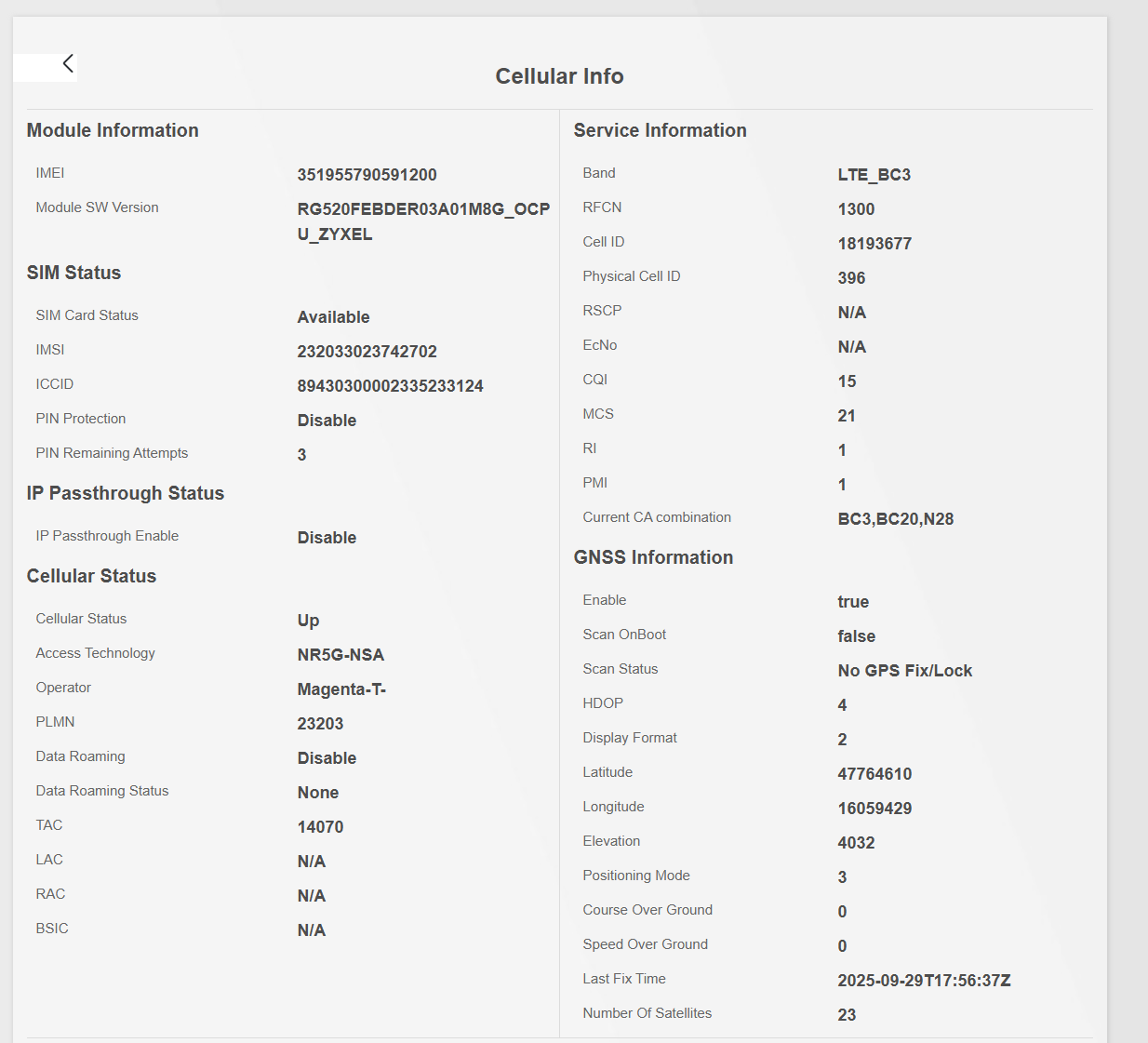
 0
0

 Zyxel Community Virtual Assistant

Categories
- All Categories
- 442 Beta Program
- 3K Nebula
- 222 Nebula Ideas
- 129 Nebula Status and Incidents
- 6.5K Security
- 619 USG FLEX H Series
- 349 Security Ideas
- 1.7K Switch
- 84 Switch Ideas
- 1.4K Wireless
- 53 Wireless Ideas
- 7K Consumer Product
- 298 Service & License
- 485 News and Release
- 92 Security Advisories
- 31 Education Center
- 10 [Campaign] Zyxel Network Detective
- 4.8K FAQ
- 34 Documents
- 88 About Community
- 105 Security Highlight
