Automatic reboot/reconnect USG Lite 60 ax




 Freshman Member
we are experiencing an intermittent issue with several Zyxel USG Lite 60 AX devices currently in operation.
From time to time, the WAN connection disconnects unexpectedly and does not automatically reconnect. The WAN interface remains down until the device is rebooted.
This behavior occurs sporadically across multiple installations and leads to a complete loss of internet connectivity until manual intervention is performed.
We would appreciate your support in identifying the root cause of this issue and advising on possible solutions or workarounds (for example, improved WAN recovery, configuration recommendations).
The devices running all the latest firmware.
Accepted Solution
-
Hi @Eckert_Schulen,
To help us better investigate the root cause, could you please provide a bit more detail about your scenario?
- Did this issue occur from the beginning of deployment, or did it start after the devices had been running normally for some time?
- Were there any recent changes before the issue started (e.g., firmware upgrade, configuration changes, ISP-related changes)?
- Could you share your network topology?
- When the issue occurs, what is the LED status on the device? Also, do you see any related error messages in the event logs?
- You may refer to the LED descriptions to identify the status
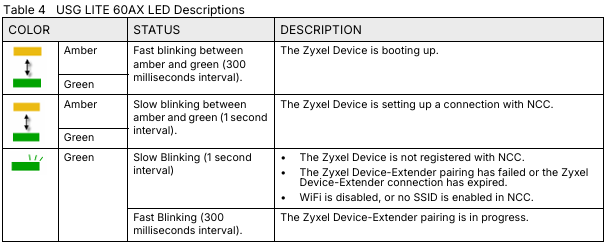
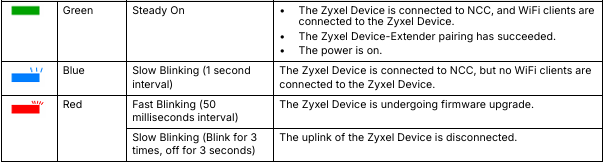
- You may refer to the LED descriptions to identify the status
In the meantime, we recommend trying the following basic troubleshooting steps:
- Check WAN Connectivity Settings
Please verify the connectivity check settings in Nebula (Site-wide > Configure > Security router > Interface). Make sure the ICMP check target is a reliable public IP (such as 8.8.8.8), so the device can properly detect and recover from WAN link failures.
- Verify DNS Configuration
If you are using a static WAN configuration, please ensure the DNS servers are set to stable public DNS services such as 8.8.8.8 or 1.1.1.1, to avoid resolution issues that may appear as connectivity drops.
Additionally, you may enable Zyxel Support Access and share your organization/site name with us. This will allow us to directly review the device for further analysis.
Zyxel Tina
0




 Zyxel Employee
All Replies
-
Hi @Eckert_Schulen,
To help us better investigate the root cause, could you please provide a bit more detail about your scenario?
- Did this issue occur from the beginning of deployment, or did it start after the devices had been running normally for some time?
- Were there any recent changes before the issue started (e.g., firmware upgrade, configuration changes, ISP-related changes)?
- Could you share your network topology?
- When the issue occurs, what is the LED status on the device? Also, do you see any related error messages in the event logs?
- You may refer to the LED descriptions to identify the status
- You may refer to the LED descriptions to identify the status
In the meantime, we recommend trying the following basic troubleshooting steps:
- Check WAN Connectivity Settings
Please verify the connectivity check settings in Nebula (Site-wide > Configure > Security router > Interface). Make sure the ICMP check target is a reliable public IP (such as 8.8.8.8), so the device can properly detect and recover from WAN link failures.
- Verify DNS Configuration
If you are using a static WAN configuration, please ensure the DNS servers are set to stable public DNS services such as 8.8.8.8 or 1.1.1.1, to avoid resolution issues that may appear as connectivity drops.
Additionally, you may enable Zyxel Support Access and share your organization/site name with us. This will allow us to directly review the device for further analysis.
Zyxel Tina
0
Categories
- All Categories
- 442 Beta Program
- 3.1K Nebula
- 241 Nebula Ideas
- 6.8K Security
- 755 USG FLEX H Series
- 379 Security Ideas
- 1.8K Switch
- 87 Switch Ideas
- 1.5K Wireless
- 58 Wireless Ideas
- 7.2K Consumer Product
- 320 Service & License
- 512 News and Release
- 99 Security Advisories
- 31 Education Center
- 10 [Campaign] Zyxel Network Detective
- 5.3K FAQ
- 34 Documents
- 90 About Community
- 119 Security Highlight


