[FWA515] - Unable to establish PPPoE over VLAN connection on WAN interface





 Master Member
Hello,
I've received today the FWA515 and I've tried to configure the WAN interface, but without success.
I've an external Fiber ONT (Zyxel PM5100-T1) and when I try to configure the ISP (Telecom Italia) parameters, the FWA don't connect.
The FWA settings are:
- Mode: Routing
- Encapsulation: PPPoE
- IPv4/IPv6 mode: IPv4 Only
- PPP Username: <My IPS tell me that I need to put the phone number>
- PPP Password: timadsl
- PPP Connection trigger: Auto Connect
- PPPoE Passthrough: Disabled
- VLAN P: 0
- VLAN Q: 835
- IP Address: Auto
- DNS Server: Auto
- MTU: 1492
- NAT: Enabled
- Default Gateway: Enabled
- IGMP Proxy: Disabled
- Fullcone NAT: Disable
- 6RD: Disable
Obviously, I've configured the ethernet WAN as ETHWAN
The WAN Information are:
- Link Type: ETHWAN
- Mode: Router
- PPPoE Uptime: 0dd 0hrs 0mins
- IP Address: N/A
- DNS Server: N/A
No SIM installed, latest firmware 1.70 manually upgraded
I've also an USG Flex 500H and I can successfully configure and establish the PPPoE on port P1 with the same VLAN/PPPoE params.
I have read on this:
Seems that here, the problem was the Service Name, that after configured blank/empty, the connection was succeeded.
In my Flex configuration, the Service Name exists as field and is empty, meanwhile I don't find this field into the FWA.
Other things: what is/are the authentications type used by FWA? Chap? Pap? MSChap?
Because, my FLEX have all of this selected, into the FWA I don't find the authentication type mode.
I've also tried to reboot the ONT, and leave it for 15 mins powered off, but nothing appens.
After my tests on the FWA, I've reconnected the ONT to the P1 of the FLEX and voilà the connection is succeeded, obtaining a WAN IP.
So there are problems with FWA and it's configuration.
Some that can help me?
Can you confirm that the FWA515 Ethernet WAN PPPoE client supports VLAN 835 with an external ONT and TIM/Telecom Italia FTTH, and whether PPP authentication is automatically negotiated (PAP/CHAP)?
Is PPPoE over VLAN actually transmitted on the ETHWAN interface in firmware 1.70, and is there any known issue with PPPoE discovery (PADI/PADO) on ETHWAN?
Thank you
All Replies
-
Hi @Maverick87 ,
Could you please check if the State is enabled under Network Setting > Broadband > Ethernet WAN?
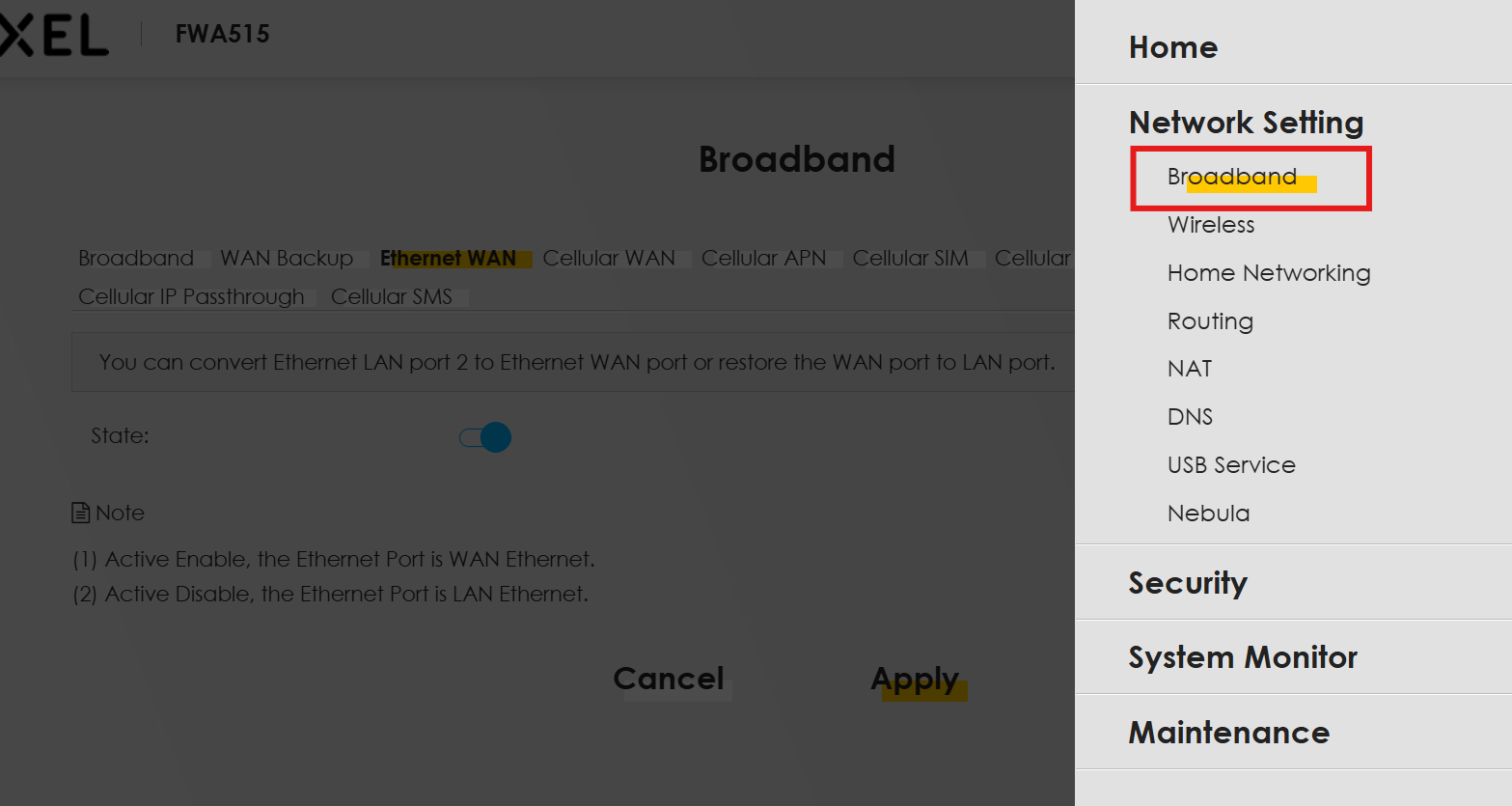
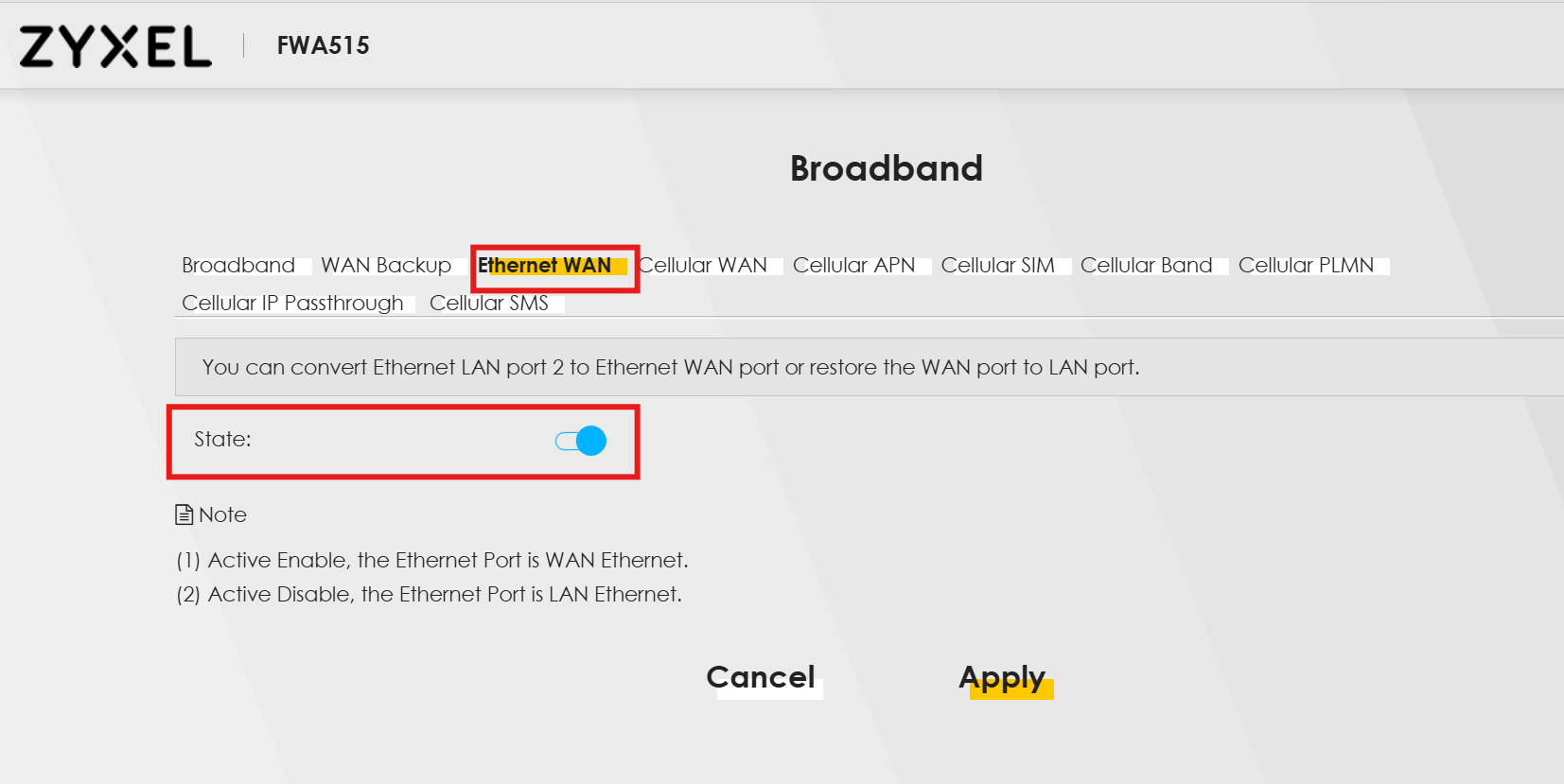 0
0 -
Hi @Zyxel_Luna,
Yes it's enabled…
I've also tried to put on the 500H, inside the field "ServiceName" a word as "blablabla" and the PPPoE goes up&running successfully, so seems that is not a how the service name is set. Also for the compression, change to ON or OFF, is equal… the PPP goes up&running.This is my 500H is set:
- VLAN
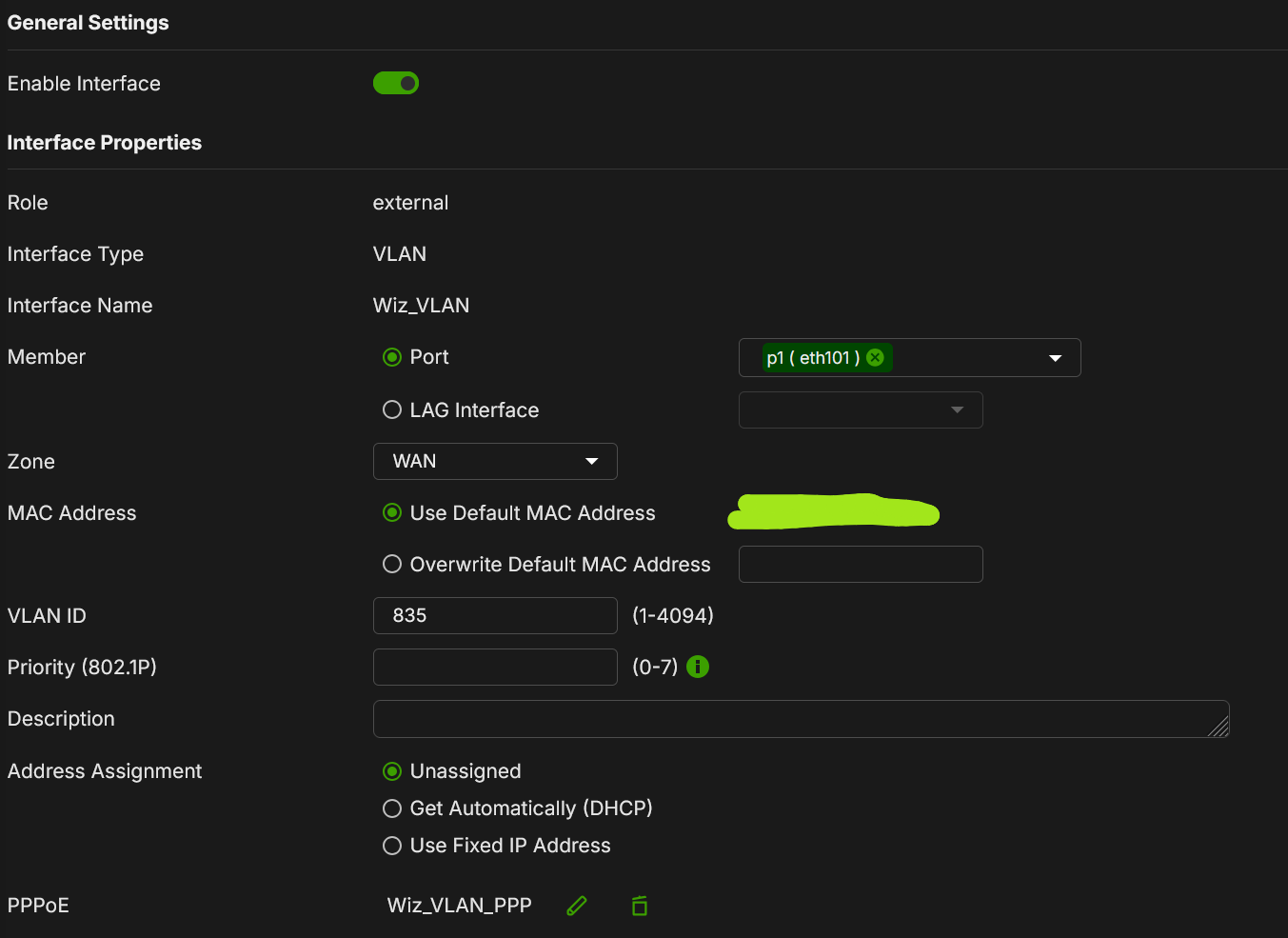
- PPPoE
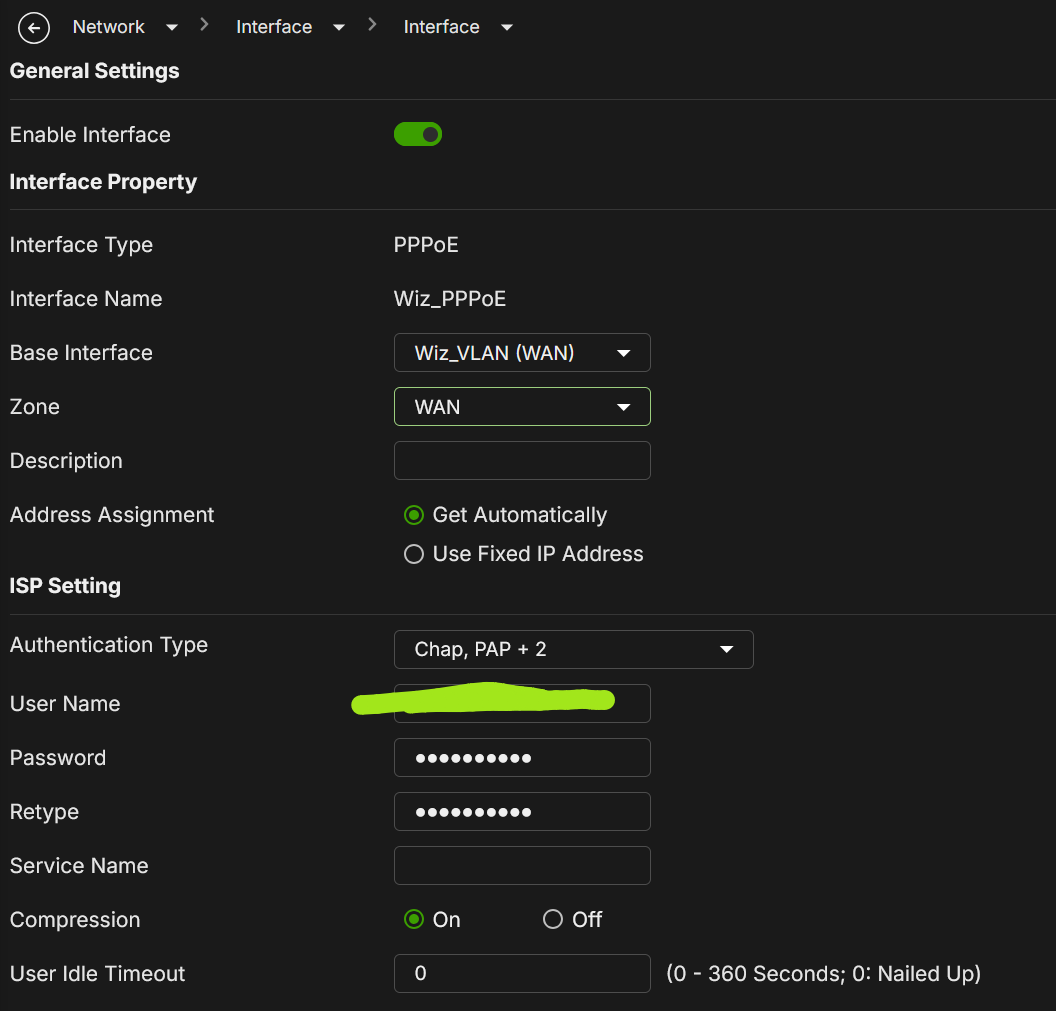
I've seen that only with PAP Authentication Type, the PPP was in success; with any other auth type fails. What are the default Auth Type for the FWA? How I can change the Auth Type since I can't do it via GUI?
[UPDATE 1]:
I've also tried to backup the configuration file, for exploring the possibility.
There is a "X_ZYXEL_AuthenticationProtocol":"Auto"; I've tried to change it into "PAP" but without any success.[UPDATE 2]:
I've tried to do a packet capture between ETHWAN and the ONT.
Packet capture proves successful PADI/PADO/PADR/PADS over VLAN 835. The kernel PPPoE session is created oneth1.835, and the access concentrator sends ten valid LCP Configure-Requests. The FWA515 sends no LCP packets, never createsppp0.3, and PPP counters remain zero until the concentrator sends PADT after approximately 31 seconds.- PADI from FWA
- PADO from access concentrator
- PADR from FWA
- PADS from access concentrator: PPPoE session open correctly
- After 5ms, ISP sends first LCP Configure-Request
- ISP send other 10 LCP requests every 3 seconds;
- FWA send 0 LCP packets
- After 30sec ISP send PADT, and FWA reply PADT
I can send the PCAP files.
Please investigate the Ethernet-WAN PPPoE channel /
ppp_generic/ LCP initialization path and provide a hotfix or beta firmware.Thank you
0 -
Hi @Maverick87,
Thank you for taking the time to troubleshoot this issue.
Please send me the download link for the PCAP files via direct message so that our team can analyze them further. Thank you!0 -
Hi @Zyxel_Luna,
I've also raise a ticket to the support "FWA515 / PPPoE LCP no response on ETHWAN" and seems that is already assigned to Thorsten Lingen.I will send to you the PCAP traces.
Thank you
0 -
Hi @Maverick87 ,
Thank you for providing the information. Our Support Team is currently investigating this issue.
Regarding the packet captures, we need some further confirmation.
If your FWA515 has not yet been registered and successfully connected to Nebula, we will need to remotely access your desktop (via AnyDesk or TeamViewer) and then SSH into the device's CLI.Could we discuss the time and method for the remote session with you via private message (PM)?
0 -
Hi @Maverick87,
We would like to clarify one observation with you: our support team tested the FWA515 in our lab, and the PPPoE connection with a VLAN tag established successfully. In our lab test, the LCP Configure-Request packets sent from the ISP carried the VLAN tag properly.
However, in the packet capture you provided, while the PPPoE Discovery stage (PADI/PADO/PADR/PADS) had the VLAN tag, the subsequent LCP Configure-Request packets from the ONT/ISP appeared untagged.
Could you help clarify the capture setup and the traffic path? For example, is there any device/setting along the path (or on the capture tool) that might strip the 802.1Q VLAN tag during the session phase?
I have sent the relevant screenshots and packet capture files to you via Private Message (PM).
Additionally, regarding your inquiry about the default authentication mode on the FWA: the default mode on the FWA515 is auto-negotiation, and it supports PAP authentication, so please rest assured.
0 -
Hi @Zyxel_Luna,
as per PM, there was no external capture device, switch or other equipment between the ONT and the FWA515. However, the two PCAP files were captured at two different Linux interface layers inside the FWA515.
- The PPPoE discovery capture was taken on the physical ETHWAN interface,
eth1. Therefore, its packets show the 802.1Q VLAN 835 header. - The LCP failure capture shown in your first screenshot was taken on the logical VLAN subinterface,
eth1.835. Linux presents packets on a VLAN subinterface after VLAN decapsulation, so the 802.1Q header is no longer included in the captured Ethernet frame.
The LCP capture command used
tcpdumponeth1.835with a filter for PPPoE Discovery and PPP LCP. This explains why the selected LCP frame directly shows EtherType0x8864. It does not indicate that the ONT removed the VLAN tag on the wire.In fact, in that same LCP PCAP, PADI, PADO, PADR and PADS are also shown without an 802.1Q header. The tagged discovery packets and untagged LCP packets therefore came from two different capture interfaces, not from a tag change between discovery and session phases.
The topology remains:
TIM FTTH → Zyxel PM5100-T1 ONT → direct Ethernet connection → FWA515 ETHWAN.
There is no intermediate device performing VLAN translation or stripping.I can repeat the test and provide simultaneous captures from physical
eth1and logicaleth1.835, using the proper offsets for each interface, if R&D needs confirmation of the VLAN header on the physical LCP frames.I also note that your lab trace reaches successful bidirectional LCP negotiation and EAP authentication, whereas on the TIM connection the FWA515 sends no LCP packets at all. Therefore, the failure still occurs before the authentication stage, independently of PAP/Auto selection.
Thank you.
0 - The PPPoE discovery capture was taken on the physical ETHWAN interface,
-
Hi @Maverick87,
As discussed via PM, we will hold another remote session on Wednesday, September 16, at 8:00 AM (Italian time / CEST). Please set aside approximately 2 to 3 hours for the operation.
Thank you for your cooperation—we are eager to resolve this issue for you as soon as possible. Could you please confirm if your AnyDesk ID and access password are the same as last time?
0 -
Hi @Zyxel_Luna,
I've replied to you via PM. I've set another meeting for tomorrow.Thank you
0 -
Hello,
Just a quick update to the community.
We are actively found a solution for this bug, and I'm personally collaborate to share any infos with Zyxel R&D department.
Seems there are problems about the interface name of the ppp that being created during configuration of a PPPoE over VLAN. The
pppdlinux command uses the interfaceppp0to establish correctly the PPP connection.When you configure the WAN interface as PPPoE and simultaneously is flagged also the VLAN settings, a
ppp0.3interface name is created; in this way thepppdprocess fails because the interface namedppp0isn't present on the system.Seems that for works correctly you need firstly configure the PPPoE on the WAN, then, after save this configuration enable the VLAN settings over the PPPoE already created. In this way, when you create a PPPoE connection without VLAN, an
ppp0interface is correctly created, and in this way thepppdprocess keep the correct interface and establish successfully the PPP connection.Thank you to @Zyxel_JoyLee and @Zyxel_Luna to help me.
1




 Zyxel Employee
Categories
- All Categories
- 442 Beta Program
- 3.1K Nebula
- 243 Nebula Ideas
- 6.8K Security
- 783 USG FLEX H Series
- 389 Security Ideas
- 1.8K Switch
- 87 Switch Ideas
- 1.5K Wireless
- 58 Wireless Ideas
- 7.2K Consumer Product
- 325 Service & License
- 527 News and Release
- 101 Security Advisories
- 31 Education Center
- 10 [Campaign] Zyxel Network Detective
- 5.3K FAQ
- 34 Documents
- 91 About Community
- 122 Security Highlight
