USG FLEX 200H: Shared BWM still affects unrelated VLANs on current firmware


 Freshman Member
This appears to be the same Shared BWM issue reported in this thread in April 2025.
https://community.zyxel.com/en/discussion/29056/usg-200h-wan-upload-problem#latest
Since that discussion is now closed, I am opening a new thread because I can still reproduce the issue on the current USG FLEX 200H firmware.
My setup:
- USG FLEX 200H
- Latest available firmware V1.39(ABWV.0)
- 1 Gbit/s symmetric WAN connection
- Multiple VLANs
- BWM configured locally on the firewall
- Several Shared BWM rules, each intended to limit only one specific VLAN
One example is a Shared BWM rule with:
- Incoming interface: VLAN 172
- Source: full subnet of VLAN 172
- Outgoing interface: WAN
- Destination: any
- Service: any
- Upload limit: 80 Mbit/s, just for testing
The problem is that this limit also affects traffic that should not match the rule.
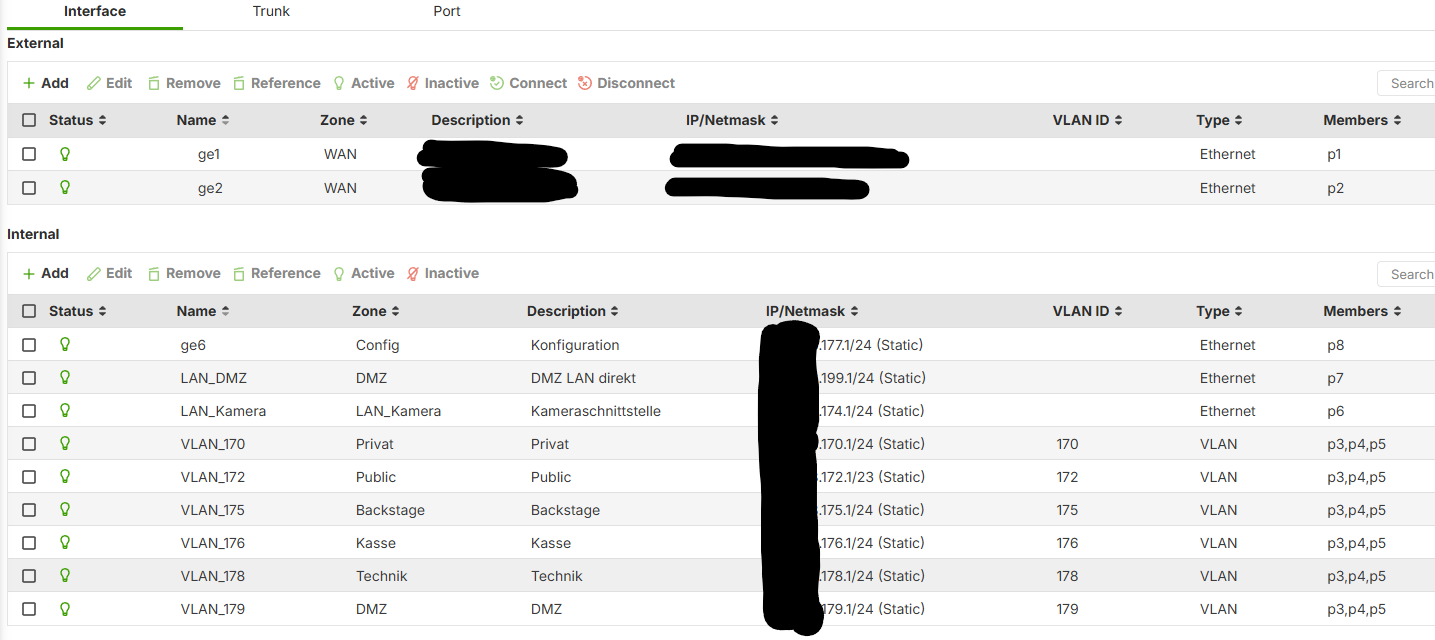
I tested this directly from a dedicated configuration port (p8) on the firewall. This port is not part of VLAN 172 and is not subject to any intended bandwidth restriction.
I also repeated the test on several different WLANs assigned to different VLANs. All of them show the same behavior: as soon as BWM is globally enabled, the upload speed is limited to roughly the value configured in one of the Shared BWM rules, even though the corresponding rule is disabled and the traffic originates from a different VLAN.
Results:
- BWM globally disabled: about 700 Mbit/s upload
- BWM globally enabled, but all custom BWM rules disabled: about 80 to 90 Mbit/s upload
- The same behavior occurs on several different WLANs and VLANs
- The measured value corresponds closely to the 80 Mbit/s upload limit configured in one of the disabled Shared BWM rules
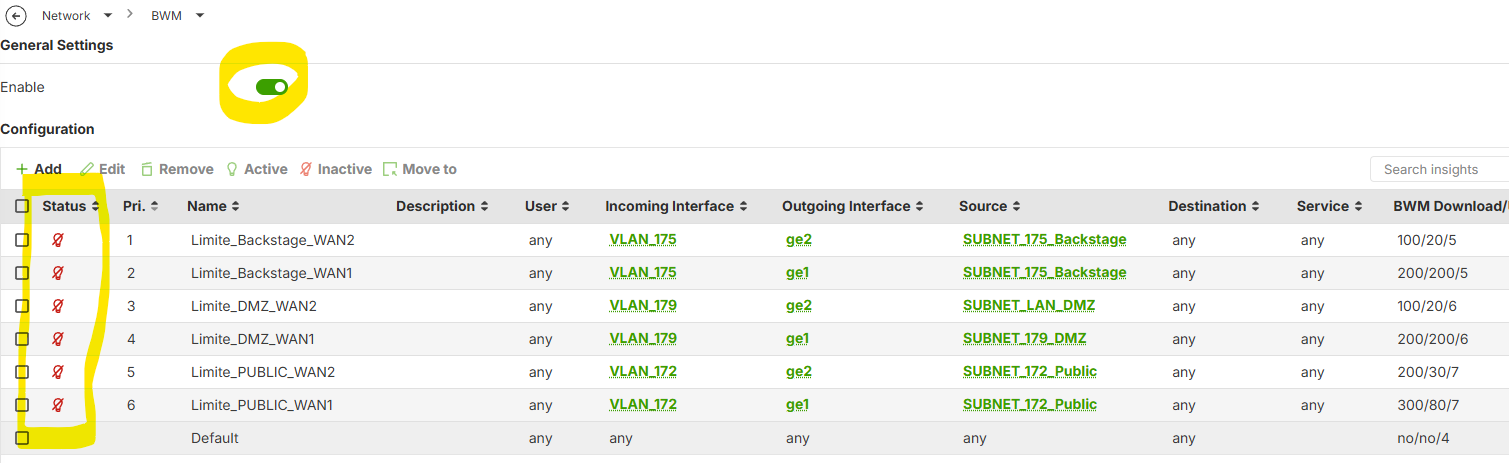
All custom BWM rules are shown as disabled in the local GUI. The default BWM rule has no bandwidth limit configured.
This shows the relevant interfaces and confirms that the test client is connected through a separate configuration port p8 and not through the VLAN affected by the BWM rule.
This looks very similar to the behavior already described earlier in this thread, where a Shared BWM rule for one VLAN also affected traffic from another VLAN, and disabling the rule did not fully remove the bandwidth restriction.
In my case, disabling BWM globally immediately restores the expected upload speed.
I found another important detail while testing:
The order or priority of the BWM rules themselves does not seem to have any effect. Instead, the upload traffic is always shaped according to the values configured in the rule with the lowest Traffic Shaping priority, regardless of whether that rule should actually match the tested interface or VLAN.
I also confirmed that this behavior only affects the upload direction. Download traffic is not affected in the same way.
Can Zyxel confirm:
- This issue was reported in this thread almost 1.5 years ago and I can still reproduce essentially the same behavior on the current firmware. Has Zyxel still not fixed this, or is this now considered a known limitation of Shared BWM on the USG FLEX H series?
- Since Per-Source-IP limits each client individually, it does not solve my use case. I need one shared bandwidth limit for the entire VLAN. Is there currently any reliable workaround or supported method to achieve this on the USG FLEX 200H?
For me, reliable and predictable bandwidth management is a basic requirement for this type of firewall. If Shared BWM cannot reliably limit one VLAN without affecting unrelated traffic, Zyxel is no longer a viable option for future deployments.
All Replies
-
Hi @Simon_Tech ,
Thank you for providing such a detailed breakdown of your test environment, scenarios, and the corresponding configuration screenshots — this allowed us to run a local test. However, on our side, the speed of a PC connected to Port 8 (which doesn't belong to the VLAN with BWM applied) is not being limited.
To help us investigate this behavior further on your USG FLEX 200H, we'd appreciate it if you could collect the diagnostic information along with the configuration file and send them to us. You can find instructions on how to collect them here:
Once we receive your configuration and diagnostic logs, we'll attempt to reproduce the issue and follow up with our findings.
Zyxel_Judy
0 -
Thank you for the quick reply.
I noticed that one screenshot was missing from my post above, so I have added it for clarity.
I am a little surprised that you were unable to reproduce the issue. I have now opened a support ticket and will send the requested files. I am very interested to see what the investigation finds.
I have used this type of configuration successfully on a USG210, VPN100, and USG FLEX 200 without the H, and I never experienced this behavior.
At this point, I cannot think of another explanation other than a firmware bug, but we will see what the analysis shows.
0 -
Fastest way for zyxel to see the bug is to have a copy of your config
1 -
Hi @Simon_Tech ,
We were able to reproduce the symptom in a corner case: when there's a BWM rule using the same outgoing interface as the traffic being tested, and its priority is lower than the default rule. And when there are several BWM rules configured, the test upload speed is affected by the upload limit set in the lowest-priority BWM rule.
We'll investigate this further and update you with any findings.
Zyxel_Judy
1 -
Thanks for the detailed write-up @Simon_Tech - we have been seeing this issue as well.
I am glad to hear @Zyxel_Judy has been able to reproduce it now, maybe we are finally close to fixing it….I had posted about this a few months ago as well, but kind of gave up on it for a while…
0 -
Hello,
I just noticed this discussion. I have been writing another thread on the BWM issues with 50H. It seems to be so that BWM rule Destination, Upload limiting and Activation/Disabling is having issues with 1.39 in 50H.
K
0 -
After an intensive exchange with Zyxel Support, they provided me with a new firmware build containing a fix for the BWM issue:
V1.39(ABWV.0)ITS-260901832I assume this build is not publicly available yet.
After extensive testing, I can confirm that all BWM-related issues I previously described in this thread appear to be resolved with this firmware.
I hope Zyxel will integrate this fix into a regular public firmware release soon and confirm here once that version becomes available.
I would also like to point out that, once Zyxel was able to reproduce the issue, the actual fix was developed and provided surprisingly quickly, within about one week. Many thanks to the Zyxel team for that.
It just took a little longer to reproduce the problem in the first place. ;-)
1 -
Hi @Simon_Tech ,
Thank you for your confirmation.
The solution will be included in a future firmware release. We recommend following our Security firmware release notes for any updates.
Zyxel_Judy
0 -





 Zyxel Employee




 Guru Member

 Ally Member
Categories
- All Categories
- 442 Beta Program
- 3.1K Nebula
- 243 Nebula Ideas
- 6.8K Security
- 782 USG FLEX H Series
- 387 Security Ideas
- 1.8K Switch
- 87 Switch Ideas
- 1.5K Wireless
- 58 Wireless Ideas
- 7.2K Consumer Product
- 324 Service & License
- 527 News and Release
- 101 Security Advisories
- 31 Education Center
- 10 [Campaign] Zyxel Network Detective
- 5.3K FAQ
- 34 Documents
- 91 About Community
- 121 Security Highlight


