FWA710 going offline



 Freshman Member
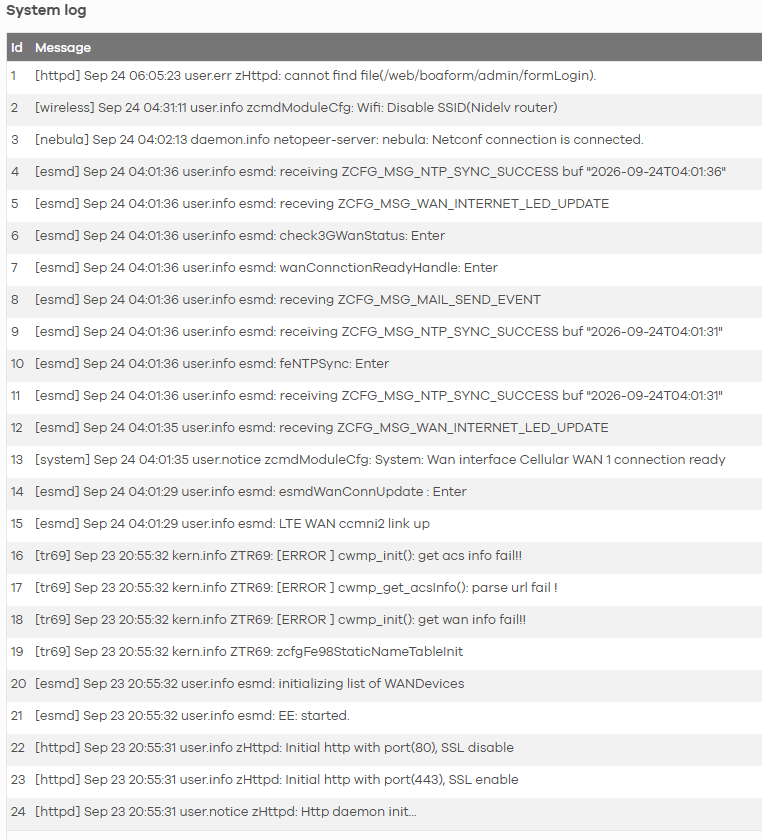
We have a FWA710 router which is going offline in time to time (daily). Sometimes minutes before going back online, sometimes for hours and needs to rebooted to get online. We have good 5G signal (less than -85db). This is what I find in the log, device went offline at 20:55, got online at 04:00 (Scheduled reboot). What could cause the device going offline and not back online?
All Replies
-
Hello,
I’d check whether the router is still reachable on its LAN when it goes offline and whether 8.8.8.8 can be pinged. If the LAN responds but the Internet doesn’t, the problem is likely on the cellular/modem/WAN side rather than Wi-Fi. Also check the exact firmware version and whether the logs show modem resets, SIM errors, or registration failures. There have also been recent FWA710 reports where the issue was traced to the cellular module chipset.
0 -
Hi @JonBl ,
Based on the system log screenshot you provided, at 20:55:31, the device's system services (such as HTTP daemon and EE) were initializing or restarting. During this process, the WAN interface failed to establish a cellular connection, resulting in the errors
[tr69] [ERROR ] cwmp_init(): get wan info fail!!andget acs info fail!!. Because the WAN connection failed to initialize at that moment, the device stayed offline until the 04:00 scheduled reboot successfully brought the connection back up (Cellular WAN 1 connection readyandNetconf connection is connected).This behavior typically points to the cellular link dropping (possibly due to an ISP IP renewal or temporary tower drop) and the router failing to automatically recover the connection.
Recommended Troubleshooting Steps
1/ Enable Network Monitoring
When the cellular connection drops, the router needs to actively verify and trigger a reconnection.
- Navigate to Network Setting > Broadband > Cellular WAN.
- Enable the Network Monitoring feature. This allows the device to ping a reliable target (such as
8.8.8.8) and automatically restart the WAN interface if the connection fails.
2/ Verify Signal Quality (SINR vs. RSRP)
An RSRP of -85 dBm is indeed a good signal strength, but connection stability is heavily dependent on SINR (Signal-to-Interference-plus-Noise Ratio).
- Go to Homepage > Cellular Info.
- Check your SINR value. If the SINR is low (close to or below 13 dB, or negative), high RF interference can cause sudden disconnects and interface lockups, please change the FWA710 position and direction.
If the issue still occurs after following the steps above, please help collect the system log (System Monitor > Log) before the scheduled reboot, and share with us the exact time the FWA710 goes offline.
By the way, please also share the Nebula organization and site name, and enable Zyxel Support so we can review further.
Zyxel_Judy
0






 Zyxel Employee
Categories
- All Categories
- 442 Beta Program
- 3.1K Nebula
- 243 Nebula Ideas
- 6.8K Security
- 783 USG FLEX H Series
- 389 Security Ideas
- 1.8K Switch
- 87 Switch Ideas
- 1.5K Wireless
- 58 Wireless Ideas
- 7.2K Consumer Product
- 325 Service & License
- 527 News and Release
- 101 Security Advisories
- 31 Education Center
- 10 [Campaign] Zyxel Network Detective
- 5.3K FAQ
- 34 Documents
- 91 About Community
- 122 Security Highlight
