FWA 515 with separate WIFI 2.4Ghz & 5Ghz



 Freshman Member
Hi everybody,
FWA515 purchased on 02/04/2026 (MM-DD-YYYY)
Firmware: 1.60 (ACPZ.0) C0
I have 15 devices that operate exclusively on the 2.4 GHz band. The other staff devices operate on the 5 GHz band.
After 3 months with MLO enabled,
I noticed that some “2.4 GHz devices” were no longer online.
Restarting the FWA515 allows the devices to reconnect.
Since last week, I’ve chosen to split the Wi-Fi to separate the 2.4 GHz and 5 GHz bands.
I encountered an issue with the grayed-out checkbox labeled “Keep 2.4 GHz and 5 GHz identical.”
After carefully reading the forum, I performed a forced firmware reinstall.
This resolved the issue with the grayed-out checkbox.
Since then, I’ve had two separate Wi-Fi SSIDs.
The devices are separated, and I thought everything would work out fine…
But I have a new problem…
The 2.4 GHz Wi-Fi disconnects on its own.
Even though the admin page shows that it’s connected.
The 5 GHz Wi-Fi works fine.
The only way to restore the 2.4 GHz Wi-Fi is to reboot the FWA515.
This is very annoying.
I haven’t seen any posts about a similar issue on the various forums.
I apologize if I missed one.
Can anyone help me with this 2.4 GHz Wi-Fi issue?
Thank you in advance for your help.
Mric
Accepted Solution
-
Hi @Mric ,
Based on the logs, we found that your FWA515 was attempting to change channels due to a driver issue. During this process, the device released its current channel but was unable to acquire a new one, resulting in the 2.4GHz frequency not functioning properly.
This will be fixed in an upcoming firmware update.
In the meantime, please manually set the channel to either 1, 6, or 11 to use. If the 2.4GHz connection continues to drop, please try disabling and then re-enabling 2.4GHz as a temporary workaround.
Zyxel_Judy
0





 Zyxel Employee
All Replies
-
Hi @Mric ,
Which WAN type are you using on your FWA515 — Ethernet or Cellular?
The 2.4 GHz Wi-Fi disconnects on its own.
Could you share more details about this? How did you confirm "the 2.4 GHz Wi-Fi disconnect on its own", as is it that 2.4 GHz clients have no internet connection — or there is no 2.4GHz SSID on the Wi-Fi list?
Do the 2.4 GHz devices show any specific error message (e.g., "SSID not found") when they are unable to reconnect?
How often does the 2.4 GHz Wi-Fi become unavailable after rebooting the FWA505?
Zyxel_Judy
0 -
Hi @Zyxel_Judy,
Thanks for your answer.
I'm using cellular only.
I confirm that the 2.4 Ghz a gone away :
- the 2.4Ghz client did'nt have internet anymore
- the specifique SSID for the 2.4Ghz is no more in the wifi network list (from all the device in my house)
there is no error from le 2.4Ghz device (cause the SSID is no more up)
there is no error in the admin page which coul be indicated any issue.
The 2.4GHz is going down less than 2h after a reboot.
I reboot the FWA515 arround 9h, the 2.4Ghz is allready gone (11h)
I'm very disapointed :/
Regards
Mric0 -
Hi @Mric ,
Thank you for the detailed information. We are going to reproduce the issue and investigate. We will update you as soon as we have any findings.
Zyxel_Judy
0 -
hi @Zyxel_Judy
Thanks a lot.
0 -
0
-
Hi @Mric ,
In our local lab, the FWA515 has provided a stable 2.4 GHz network for at least 9 hours so far, and we are still monitoring the situation.
To better assist you, we would like to remotely access your FWA515. Could you please provide your Nebula organization and site name, and enable Zyxel Support access?
[Nebula] How to turn on Zyxel Support Access? — Zyxel Community
Zyxel_Judy
0 -
This is done.
I reboot the FWA515, juste before sharing the acces.
When the 2.4Ghz is up, there is arround 17 devices connected in the station wlan tab.
When the 2.4Gz is down, there is only ~5 devices connected.Thanks for your help.
Regards0 -
Hi @Mric ,
We have checked your FWA515, and it has now been approximately 9 hours since your last reboot.

The 2.4 GHz SSID is still visible, the Bit Rate is not 0,
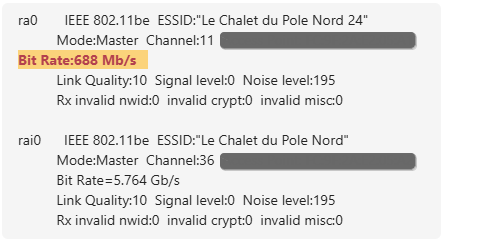
and we can confirm via Nebula's Live Tool that 2.4 GHz clients are still connected.
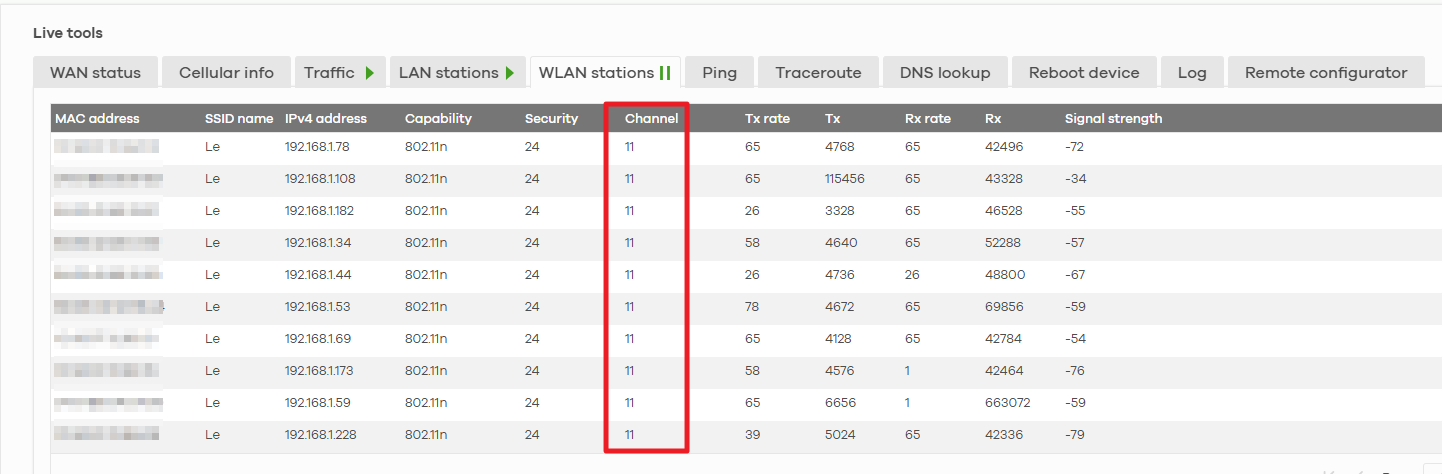
Based on our observations, we can conclude that there is no issue as the 2.4 GHz network on your FWA515 is going down within 2 hours after a reboot. The issue may be related to the wireless clients. We also noticed that your current 2.4 GHz channel is set to Auto. When the channel is change to a non-standard value (other than 1, 6, or 11), some IoT devices may have difficulty detecting the signal. We have updated the 2.4 GHz channel to a fixed channel 11. Please monitor your 2.4 GHz connection and let us know if you experience any further issues.
Zyxel_Judy
1 -
Dear @Zyxel_Judy,
Yes, I noticed that this time the 2.4 GHz Wi-Fi didn't drop out after two hours.
I don't understand why...
The FWA515 was probably scared of its parents ^^Is it possible that there’s an equipment overload on channels other than 1, 6, and 11?
Thanks for your help; I’ll keep an eye out for any potential failures.
Thanks!
0 -
Dear @Zyxel_Judy ,
After 6 perfect days, the issue is back.
The 2.4GHz going down in less than 12h.
I just restart the FWA515 to monitor the "real time".
Thanks0
Categories
- All Categories
- 442 Beta Program
- 3.1K Nebula
- 243 Nebula Ideas
- 6.8K Security
- 781 USG FLEX H Series
- 387 Security Ideas
- 1.8K Switch
- 87 Switch Ideas
- 1.5K Wireless
- 58 Wireless Ideas
- 7.2K Consumer Product
- 324 Service & License
- 527 News and Release
- 101 Security Advisories
- 31 Education Center
- 10 [Campaign] Zyxel Network Detective
- 5.3K FAQ
- 34 Documents
- 91 About Community
- 121 Security Highlight
