Linux STB (MAG544) with Realtek 8822BU cannot connect to NWA210BE




 Ally Member
What the title says: a Linux STB named Infomir MAG544 with a Realtek 8822BU fails to connect to NWA210BE. STB only supports WPA2, when I setup a WPA2 only SSID to the NWA210BE access point I get the following message in event log:
SSID: XXXXXX Interface: wlan-2-8 Security adapted from WPA2 Personal to WPA3 Personal, reason: Unsupported security option..
STB fails to set the AES decryption keys and disconnects with reason 3:
Station: 7c:25:da:xx:xx:xx left on Channel: 64, SSID: XXXXXXX, 5GHz, Signal: -69dBm, Download/Upload: 0Bytes/0Bytes, reason 3, Interface: wlan-2-8
And from the debug logs from STB I get this:
RTW: ============ STA [16:b3:0e:xx:xx:xx] ===================
RTW: mac_id : 0
RTW: wireless_mode : 0x44
RTW: mimo_type : 2
RTW: bw_mode : 80MHz, ra_bw_mode : 80MHz
RTW: rate_id : 9
RTW: rssi : 28 (%), rssi_level : 0
RTW: is_support_sgi : Y, is_vht_enable : Y
RTW: disable_ra : N, disable_pt : N
RTW: is_noisy : N
RTW: txrx_state : 0
RTW: curr_tx_rate : CCK_1M (L)
RTW: curr_tx_bw : 20MHz
RTW: curr_retry_ratio : 0
RTW: ra_mask : 0x00000000ffffffc0
RTW: rtw_aes_decrypt(wlan0) no_gkey_bc_cnt:3, no_gkey_mc_cnt:0
RTW: rtw_aes_decrypt(wlan0) no_gkey_bc_cnt:1, no_gkey_mc_cnt:0
RTW: rtw_aes_decrypt(wlan0) no_gkey_bc_cnt:3, no_gkey_mc_cnt:0
RTW: rtw_aes_decrypt(wlan0) no_gkey_bc_cnt:1, no_gkey_mc_cnt:0
RTW: rtw_set_802_11_connect(wlan0) fw_state=0x00000008
RTW: start auth
RTW: auth success, start assoc
RTW: assoc success
RTW: ============ STA [ba:0f:a3:xx:xx:xx] ===================
RTW: mac_id : 0
RTW: wireless_mode : 0x44
RTW: mimo_type : 2
RTW: bw_mode : 80MHz, ra_bw_mode : 80MHz
RTW: rate_id : 9
RTW: rssi : -1 (%), rssi_level : 0
RTW: is_support_sgi : Y, is_vht_enable : Y
RTW: recv eapol packet
RTW: send eapol packet
RTW: disable_ra : N, disable_pt : N
RTW: is_noisy : N
RTW: txrx_state : 0
RTW: curr_tx_rate : CCK_1M (L)
RTW: curr_tx_bw : 20MHz
RTW: curr_retry_ratio : 0
RTW: ra_mask : 0x00000000ffffffc0
RTW: recv eapol packet
RTW: send eapol packet
RTW: recv eapol packet
RTW: send eapol packet
RTW: set pairwise key camid:0, addr:ba:0f:a3:de:8c:00, kid:0, type:AES
RTW: set group key camid:1, addr:ba:0f:a3:de:8c:00, kid:1, type:AES
So it first tries to connect to NWA210BE but fails to setup the AES keys, then tries to the access point from the down floor (NWA90AX) and connects.
I believe the issue comes from the NWA210BE not accepting WPA2. Can you check and possibly suggest a way to fix?
Accepted Solution
-
Hi @malakudi ,
Please go to Site-wide > Configure > Access Points > Radio Settings, check whether Radio mode is configured as 802.1be. If yes, please choose another radio mode. The reason is that 802.11be mode mandates WPA3 security as the only supported option. Even if you configure an SSID with WPA2 settings, wireless clients connecting to this SSID will be automatically upgraded to WPA3.

Zyxel_Judy
0




 Zyxel Employee
All Replies
-
Hi @malakudi ,
STB only supports WPA2, when I setup a WPA2 only SSID to the NWA210BE access point
If you apply an MLO SSID with WPA2 security to the 2.4 GHz, 5 GHz, and 6 GHz bands, the system will automatically convert the security to WPA3, as the 6 GHz band requires it.
Please check the band settings of the SSID assigned to your Linux STB (MAG544). If the 6 GHz band is enabled, please disable it. The configuration path is: Configure > Access Points > SSID Advanced Settings.
Zyxel_Judy
0 -
6 ghz is not enabled
0 -
Hi @malakudi ,
Please go to Site-wide > Configure > Access Points > Radio Settings, check whether Radio mode is configured as 802.1be. If yes, please choose another radio mode. The reason is that 802.11be mode mandates WPA3 security as the only supported option. Even if you configure an SSID with WPA2 settings, wireless clients connecting to this SSID will be automatically upgraded to WPA3.
Zyxel_Judy
0 -
radio mode was set to auto (up to 802.11be) for 5GHz and auto (up to 802.11ax) for 2.4 GHz
I set it to 802.11ax (not sure if this means only 802.11ax or up-to 802.11ax). Nevertheless now MAG544 connected to 2.4GHz but still fails to connect to 5 GHz. If I use a 5g only ssid it never connects
Indeed event log no longer shows the message about WPA2/WPA3, client still disconnects with reason 3
Station: 7c:25:da:c0:f8:3c left on Channel: 100, SSID: theoniguest, 5GHz, Signal: -61dBm, Download/Upload: 0Bytes/0Bytes, reason 3, Interface: wlan-2-2
Here is the debug log from STB:
RTW: ============ STA [16:b3:0e:ea:4c:b4] ===================
RTW: mac_id : 0
RTW: wireless_mode : 0x44
RTW: mimo_type : 2
RTW: bw_mode : 80MHz, ra_bw_mode : 80MHz
RTW: rate_id : 9
RTW: rssi : 36 (%), rssi_level : 0
RTW: is_support_sgi : Y, is_vht_enable : Y
RTW: disable_ra : N, disable_pt : N
RTW: is_noisy : N
RTW: txrx_state : 0
RTW: curr_tx_rate : CCK_1M (L)
RTW: curr_tx_bw : 20MHz
RTW: curr_retry_ratio : 0
RTW: ra_mask : 0x00000000ffffffc0
RTW: rtw_aes_decrypt(wlan0) no_gkey_bc_cnt:2, no_gkey_mc_cnt:0
RTW: rtw_aes_decrypt(wlan0) no_gkey_bc_cnt:3, no_gkey_mc_cnt:0
RTW: rtw_aes_decrypt(wlan0) no_gkey_bc_cnt:2, no_gkey_mc_cnt:0
RTW: rtw_aes_decrypt(wlan0) no_gkey_bc_cnt:2, no_gkey_mc_cnt:0
RTW: rtw_aes_decrypt(wlan0) no_gkey_bc_cnt:4, no_gkey_mc_cnt:0
RTW: rtw_aes_decrypt(wlan0) no_gkey_bc_cnt:1, no_gkey_mc_cnt:0
RTW: rtw_set_802_11_connect(wlan0) fw_state=0x00000008
RTW: start auth
RTW: auth success, start assoc
RTW: assoc success
RTW: ============ STA [ba:5b:a3:df:25:5c] ===================
RTW: mac_id : 0
RTW: wireless_mode : 0x44
RTW: mimo_type : 2
RTW: bw_mode : 80MHz, ra_bw_mode : 80MHz
RTW: rate_id : 9
RTW: rssi : -1 (%), rssi_level : 0
RTW: is_support_sgi : Y, is_vht_enable : Y
RTW: disable_ra : N, disable_pt : N
RTW: is_noisy : N
RTW: txrx_state : 0
RTW: recv eapol packet
RTW: curr_tx_rate : CCK_1M (L)
RTW: send eapol packet
RTW: curr_tx_bw : 20MHz
RTW: curr_retry_ratio : 0
RTW: ra_mask : 0x00000000ffffffc0
RTW: recv eapol packet
RTW: send eapol packet
RTW: recv eapol packet
RTW: send eapol packet
RTW: set pairwise key camid:0, addr:ba:5b:a3:df:25:5c, kid:0, type:AES
RTW: set group key camid:1, addr:ba:5b:a3:df:25:5c, kid:1, type:AES0 -
Hi @malakudi ,
From the logs, we recommend:
- Try a lower 5 GHz channel: The client was on Channel 64& 100 (DFS range). Some older or budget Wi-Fi adapters have issues with DFS channels. Try switching to a non-DFS channel (e.g., 36, 40, 44, or 48) and test again.
- Try limiting the 5 GHz channel bandwidth to 20MHz: The STB's Realtek 8822BU driver debug logs show it negotiates at 80 MHz, but the initial connection consistently starts at CCK_1M with 20 MHz — this mismatch may be causing the 4-way handshake to fail. Reducing the bandwidth may stabilize the connection.
If the issue still happens after using two recommendations above, please provide the Nebula Organization and site name, and enable Zyxel support access.
Zyxel_Judy
0 -
This STB connects just fine on 64 or 100 channel with 80MHz channel bandwidth on NWA90AX. So it is not a limitation of the STB. This issue only happens with my new BE access points, NWA210BE and NWA90BEPRO (I check that today because it is on a different floor, I moved the STB there to check). Nevertheless I tried what you suggested and still can't connect.
Organization: Thermi Home Site: My Home
0 -
It seems it connects OK when I moved it closer to NWA210BE. But it still fails to connect to NWA90BEPRO, even when it is very near to it.
0 -
Here is the log from STB when it fails to connect to NWA90BEPRO
RTW: ============ STA [fe:44:2a:6c:9d:45] ===================
RTW: mac_id : 0
RTW: wireless_mode : 0x44
RTW: mimo_type : 2
RTW: bw_mode : 80MHz, ra_bw_mode : 80MHz
RTW: rate_id : 9
RTW: rssi : 54 (%), rssi_level : 0
RTW: is_support_sgi : Y, is_vht_enable : Y
RTW: disable_ra : N, disable_pt : N
RTW: is_noisy : N
RTW: txrx_state : 0
RTW: curr_tx_rate : CCK_1M (L)
RTW: curr_tx_bw : 20MHz
RTW: curr_retry_ratio : 0
RTW: ra_mask : 0x00000000ffffffc0RTW: rtw_aes_decrypt(wlan0) no_gkey_bc_cnt:2, no_gkey_mc_cnt:0
RTW: rtw_aes_decrypt(wlan0) no_gkey_bc_cnt:3, no_gkey_mc_cnt:0
RTW: rtw_aes_decrypt(wlan0) no_gkey_bc_cnt:2, no_gkey_mc_cnt:0
RTW: rtw_aes_decrypt(wlan0) no_gkey_bc_cnt:1, no_gkey_mc_cnt:0
RTW: rtw_aes_decrypt(wlan0) no_gkey_bc_cnt:1, no_gkey_mc_cnt:0
RTW: rtw_aes_decrypt(wlan0) no_gkey_bc_cnt:1, no_gkey_mc_cnt:0
RTW: rtw_aes_decrypt(wlan0) no_gkey_bc_cnt:3, no_gkey_mc_cnt:0
RTW: rtw_aes_decrypt(wlan0) no_gkey_bc_cnt:2, no_gkey_mc_cnt:0
RTW: rtw_aes_decrypt(wlan0) no_gkey_bc_cnt:1, no_gkey_mc_cnt:0
RTW: rtw_set_802_11_connect(wlan0) fw_state=0x00000008
RTW: start auth
RTW: auth success, start assoc
RTW: assoc successSTB is 3 meters away from NWA90BEPRO
0 -
Hi @malakudi ,
Based on the issue time you reported (May 20, 11:47 UTC+3), we reviewed the logs from before that point and found the following:
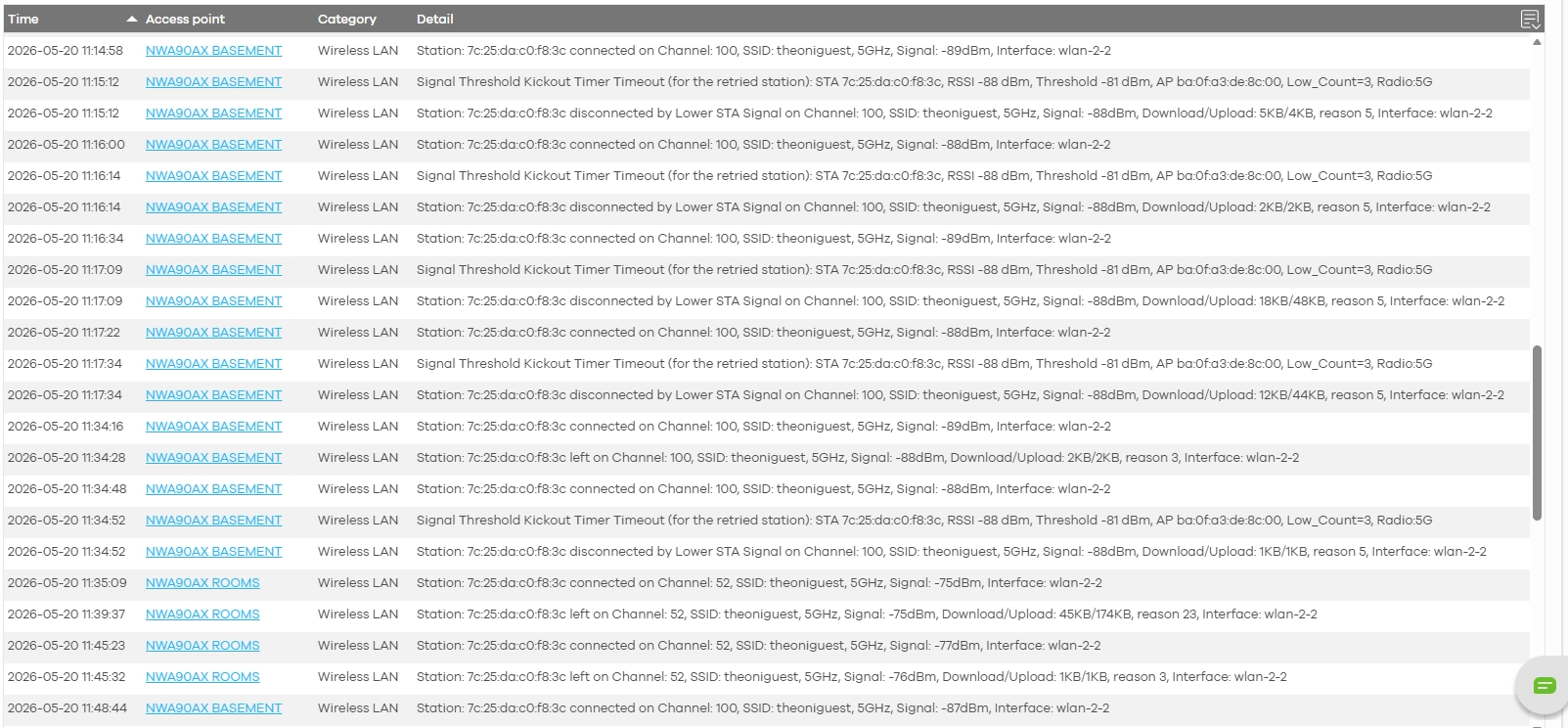
NWA90AX (BASEMENT) – Channel 100: The MAG544 was repeatedly disconnecting because the signal was too weak, falling below the -81 dBm disconnect threshold you configured for 5 GHz. The device then roamed to the NWA90AX (ROOMS) access point.
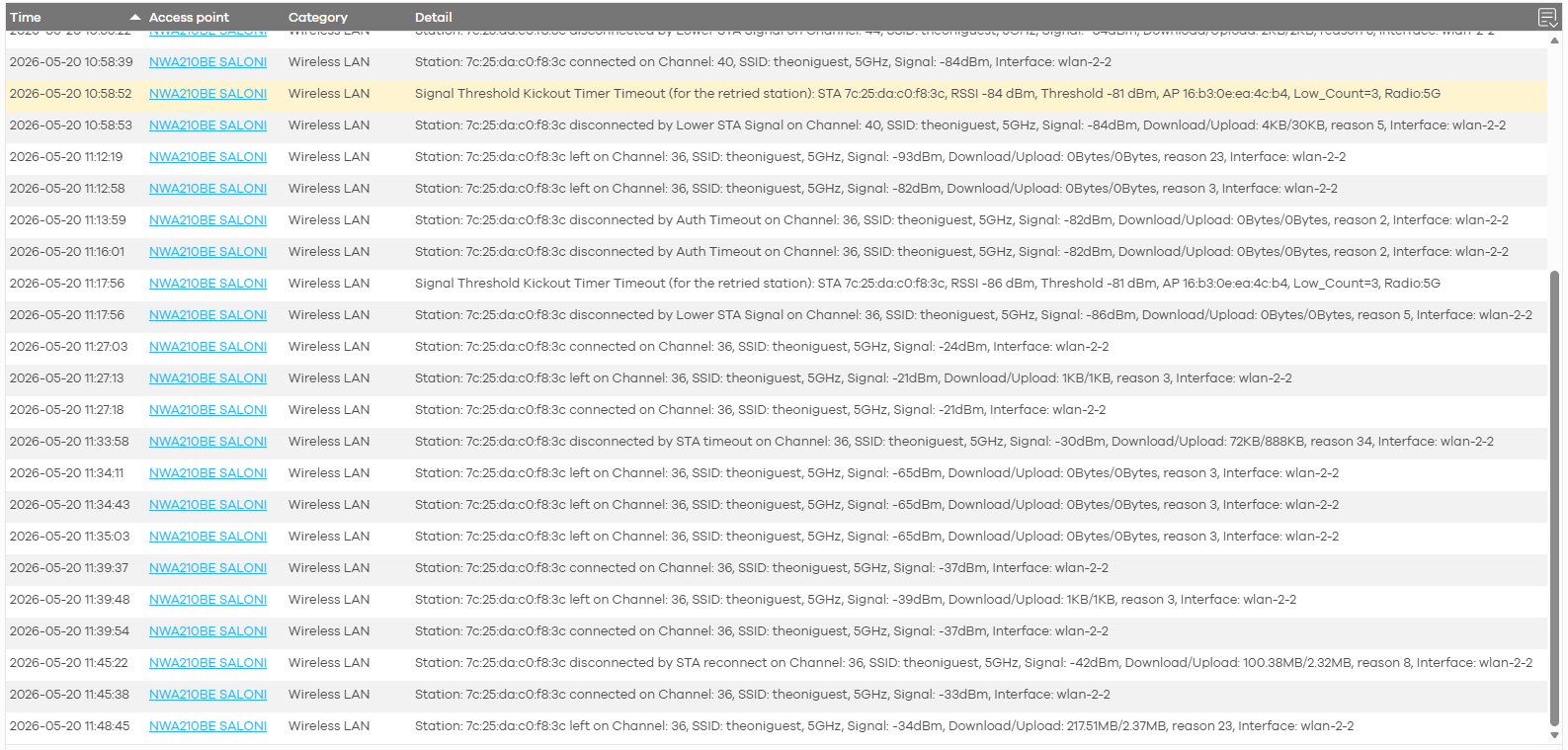
NWA210BE – Channel 36: Your NWA210BE is fixed to channel 36. The MAG544 was also repeatedly disconnecting from this AP for the same reason — signal strength below the -81 dBm threshold. However, when the MAG544 moved closer to the NWA210BE and the signal improved, it was able to maintain a stable connection.
Recommendation: Based on this behavior, we suggest changing your
NWA90AX PRONWA90BE PROfrom current channel 52 (DFS) to channel 36, keep the close distance then reconnecting the MAG544. This should help the device establish a more stable connection with a consistent channel configuration.Zyxel_Judy
0 -
Issue is with NWA90BEPRO, I don't have NWA90AX PRO. Original issue with NWA210BE is resolved, it needed the 802.11ax mode set and bring closer.
Now for NWA90BEPRO, I changed the channel to 36, STB is 3 meters away from access point with clear line of sight, and it still can't connect to it. It only connects to the access point at the other side of the floor, NWA90AX basement.
0
Categories
- All Categories
- 442 Beta Program
- 3.1K Nebula
- 243 Nebula Ideas
- 6.8K Security
- 783 USG FLEX H Series
- 389 Security Ideas
- 1.8K Switch
- 87 Switch Ideas
- 1.5K Wireless
- 58 Wireless Ideas
- 7.2K Consumer Product
- 325 Service & License
- 527 News and Release
- 101 Security Advisories
- 31 Education Center
- 10 [Campaign] Zyxel Network Detective
- 5.3K FAQ
- 34 Documents
- 91 About Community
- 122 Security Highlight


