DHCP server guard




 Ally Member
These days I've been doing several experiments to fully understand all the features of Zyxel switches.
I've understood how RSTP works with BPDUs and Loop Guard, but now I need to understand DHCP Server Guard.
I connected the link of a switch (XGS1935-52HP) to port 1, VLAN1 (MGMT) and VLAN4 (DHCP VLAN1 Firewall 192.168.1.x; DHCP VLAN4 Firewall 192.168.4.x).
Then I connected a computer to VLAN4, and I'm receiving IP addresses correctly. (192.168.4.5)
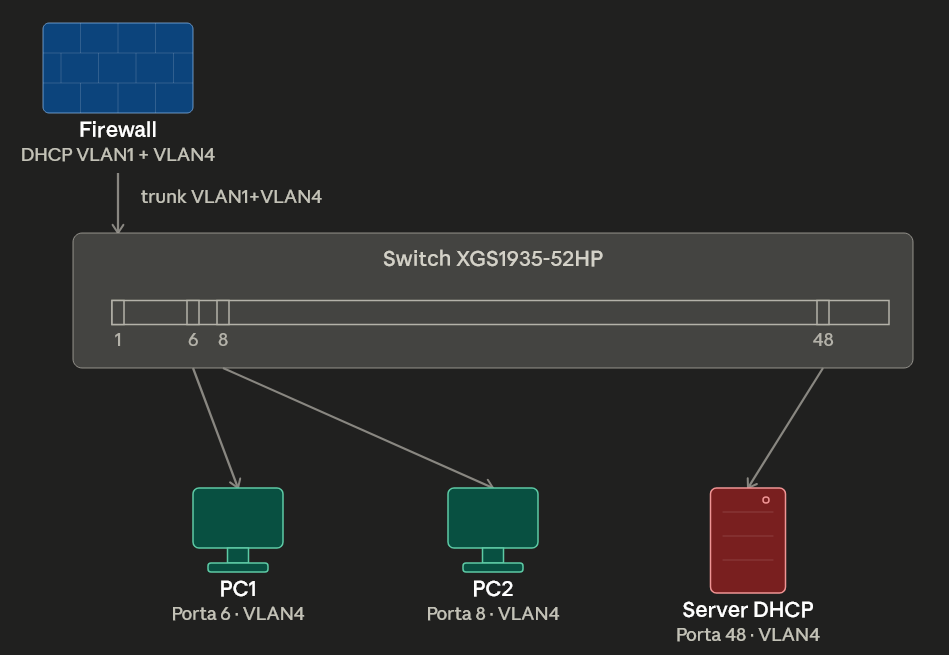
The same thing happened for PC2, which received the address correctly.
I then connected a cable from another switch with a DHCP server 172.16.5.x to port 48, again VLAN4.
For example, if I unplug PC 2 and then plug it back in, I notice that all the lights start flashing and the PC doesn't receive any address, or after a while, even 172.16.
Where can I set that only port 1 is allowed to release IPs?
Accepted Solution
-
Hi @Alex_91 ,
Regarding DHCP Server Guard: when you enable this feature, only the first DHCP server that assigned the switch's IP address is allowed to assign IP addresses to the switch in the management VLAN. This feature does not apply to end clients connected to the switch.
To secure switch clients from unauthorized DHCP, please use ACLs to set rules (path: Site-wide > Configure > Switches > ACL).
Zyxel_Judy
0




 Zyxel Employee
All Replies
-
Hi @Alex_91 ,
To assist you further, please provide:
if I unplug PC 2 and then plug it back in, I notice that all the lights start flashing and the PC doesn't receive any address, or after a while, even 172.16.
- Clarification — are all port LEDs on the XGS1935-52HP flashing, or is the issue something else?
- The tech-support file from the device.
- Your Nebula organization and site name, with Zyxel support access enabled.
Zyxel_Judy
0 -
what I think you need to setup is DHCP Snooping page 367
0 -
HI, @Zyxel_Judy
yes, all port of switch blinking. Maybe the question is, how to configure DHCP server guard correctly in nebula?
because I followed the first part of this post:
I enabled only the option, but there are other things to do? (in this case I would like to point out that I don't have Nebula Pro)
0 -
It says
[IP Source Guard ] Pro Pack license required
0 -
-
looks like IP Source Guard is not the same as DHCP server guard
don't use Nebula so hard to tell I would think there is more to do then just enable it because it would need to know what port to trust.
update so the way it looks to work is DHCP server guard trust the port that the Default Management gets it IP from by DHCP
looking at the demo for Nebula its shocking just how cut down it is with the ACL vs local
0 -
Hi @Alex_91 ,
Regarding DHCP Server Guard: when you enable this feature, only the first DHCP server that assigned the switch's IP address is allowed to assign IP addresses to the switch in the management VLAN. This feature does not apply to end clients connected to the switch.
To secure switch clients from unauthorized DHCP, please use ACLs to set rules (path: Site-wide > Configure > Switches > ACL).
Zyxel_Judy
0



 Guru Member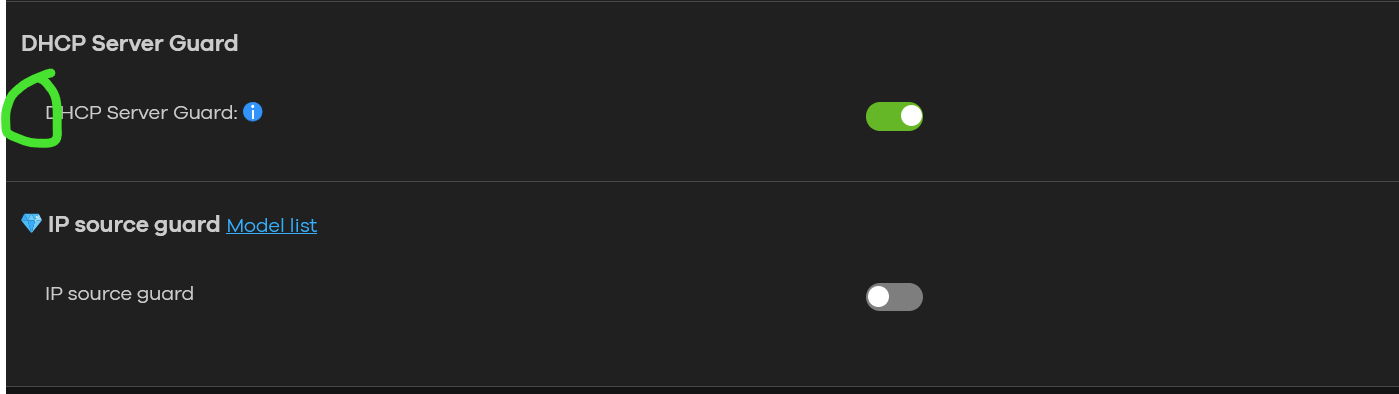
Categories
- All Categories
- 442 Beta Program
- 3.1K Nebula
- 243 Nebula Ideas
- 6.8K Security
- 783 USG FLEX H Series
- 389 Security Ideas
- 1.8K Switch
- 87 Switch Ideas
- 1.5K Wireless
- 58 Wireless Ideas
- 7.2K Consumer Product
- 325 Service & License
- 527 News and Release
- 101 Security Advisories
- 31 Education Center
- 10 [Campaign] Zyxel Network Detective
- 5.3K FAQ
- 34 Documents
- 91 About Community
- 122 Security Highlight


