Repository not visible in NSA325-v2 FW 4.81
All Replies
-
yes, here it goes the ZYPKGS file content:
Package: MetaRepositoryVersion: 20181001zypkg015Description: MetaRepository for zypkgs.Depends: Size: 184320Installed-Size: 491520Architecture: armZy-Model: allIsBuiltin: NFilename: MetaRepository_20181001_arm_015.zpkgMD5SUM: 62687de76004443c3f498ae0b4cbc154
There are no other files/folders in \admin\zy-pkgs\ , I've erased everything, i don't have a MetaRepository folder0 -
OK, that ZYPKGS file is expected, that is the file downloaded from diskstation.eu.i've put the web_prefix file in \admin\zy-pkgs folder and deleted the rest of the files. Now the ZYPKGS that appears is dated from 2018, but the applications tab is empty.
Applications tab is packages tab, I guess? As far as I remember it shouldn't be empty. It should show all installed packages, together with MetaRepository, as possible install.
I've never seen the "Retrieve List From Internet" greyed out, but I know that could happen on the Medion ST212 (same firmware family, roughly v3.x), and I *think* then the package manager crashed when trying to populate the packages tab.
Which means the internal package database is probably broken. Do you have any packages installed? Do you mind loosing them?
My next attempt would be to remove the web_prefix, rename /i-data/md0/.system/zy-pkgs/zypkg_conf, and reboot the box. The package manager should start over without database. Try to install some stock package (the ssh package is extremely handy), check if a new zypkg_conf is created, and if it looks healthy. Reboot the box to see if the package is still installed, and if everything is OK, try the web_prefix again.
1 -
Yes, the applications tab is the packages tab, you're right, but inside everything is gone and even the "Retrieve list from Internet" green button is grayed out.Mijzelf said:OK, that ZYPKGS file is expected, that is the file downloaded from diskstation.eu.i've put the web_prefix file in \admin\zy-pkgs folder and deleted the rest of the files. Now the ZYPKGS that appears is dated from 2018, but the applications tab is empty.Applications tab is packages tab, I guess? As far as I remember it shouldn't be empty. It should show all installed packages, together with MetaRepository, as possible install.
Nop, not at all, as long as my data stays in the HDD everything is fine for me, I'll just need to install the applications again, no problemMijzelf said:I've never seen the "Retrieve List From Internet" greyed out, but I know that could happen on the Medion ST212 (same firmware family, roughly v3.x), and I *think* then the package manager crashed when trying to populate the packages tab.Which means the internal package database is probably broken. Do you have any packages installed? Do you mind loosing them?
Well, done all that, everything was looking good and applied the web_prefix file again, installed the new Metarepository and now I have several apps available including info about the source (Repo: ZyXEL) and (Repo: Mijzelf)Mijzelf said:My next attempt would be to remove the web_prefix, rename /i-data/md0/.system/zy-pkgs/zypkg_conf, and reboot the box. The package manager should start over without database. Try to install some stock package (the ssh package is extremely handy), check if a new zypkg_conf is created, and if it looks healthy. Reboot the box to see if the package is still installed, and if everything is OK, try the web_prefix again.
I think its all done, at least for me it was a real struggle
Thank you so much for guiding me untying this thing up, I would not able to do it alone, I'm really sure about that!
I Have another issue but I'll open another topic for that one. Thank you again!0 -
Hi Mijzelf,
can you add Transmission? Thank you0 -
Hello there,
Im struggeling with installation of packages. I was able to install MetaRepositiory, but thats all.
I cannot see any packages. My package list looks like that:
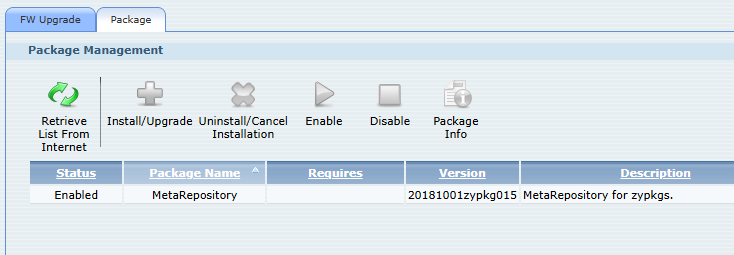
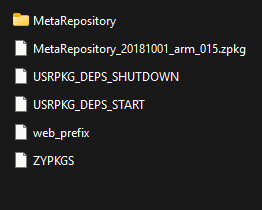
in the "zy-pkgs" fille:
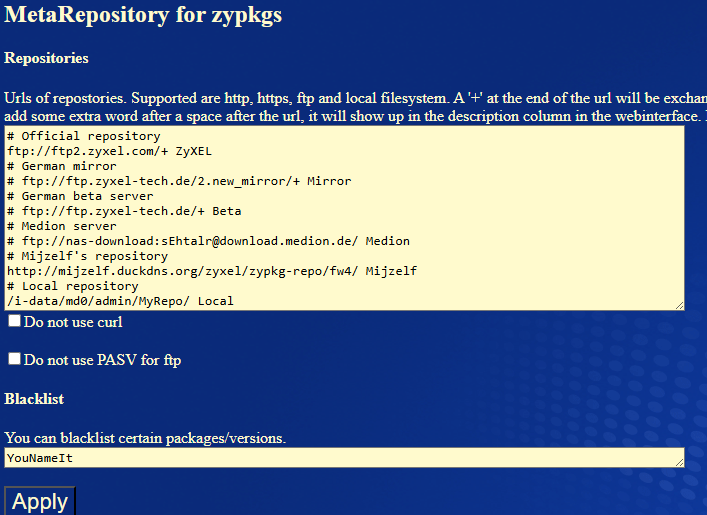
From web interface Im not able to do any changes:
I have Zyxel NSA 325 V2
Thank you for any help
0 -
There should be a logfile in \\admin\zy-pkgs\MetaRepository\ which tells why it doesn't work.
0 -
Hello, below my log. Any suggestion how to solve it?
HandleZYPKG_INFO /NSA325-v2/4.80/zypkg
FindApp md5sum found /sbin/md5sum
ReadConfig Repositories
Start of block
ftp://ftp2.zyxel.com/+ ZyXEL
http://mijzelf.duckdns.org/zyxel/zypkg-repo/fw4/ Mijzelf
/i-data/md0/admin/MyRepo/ Local
End of block
8 start: 21:02:58
9 start: 21:02:58
7 start: 21:02:58
9: FetchZYPKG_INFO ftp://ftp2.zyxel.com/NSA325-v2/4.80/zypkg/ 9 ZyXEL
8: FetchZYPKG_INFO http://mijzelf.duckdns.org/zyxel/zypkg-repo/fw4/ 8 Mijzelf
7: FetchZYPKG_INFO /i-data/md0/admin/MyRepo/ 7 Local
7: FindApp curl found /usr/bin/curl
9: FindApp curl found /usr/bin/curl
7: Fetch /i-data/md0/admin/MyRepo/ZYPKG_INFO.tgz /i-data/md0/admin/zy-pkgs/MetaRepository/_i-data_md0_admin_MyRepo_.tmp failed
7: Fetch /i-data/md0/admin/MyRepo/ZYPKGS /i-data/md0/admin/zy-pkgs/MetaRepository/_i-data_md0_admin_MyRepo_.tmp failed
7: Failed
8: FindApp curl found /usr/bin/curl
7 stop: 21:02:59
8: Fetch http://mijzelf.duckdns.org/zyxel/zypkg-repo/fw4/ZYPKG_INFO.tgz /i-data/md0/admin/zy-pkgs/MetaRepository/http___mijzelf.duckdns.org_zyxel_zypkg-repo_fw4_.tmp failed
8: Fetch http://mijzelf.duckdns.org/zyxel/zypkg-repo/fw4/ZYPKGS /i-data/md0/admin/zy-pkgs/MetaRepository/http___mijzelf.duckdns.org_zyxel_zypkg-repo_fw4_.tmp succeeded
8 stop: 21:02:590 -
Right.
You can see here that MR tries to fetch ZYPKG_INFO files from 3 sources. As expected. You can see that task 7 and 8 finish, but 9 (ftp2.zyxel.com) doesn't.
Normally, when all tasks are finished, this log is supplemented with info about merging of the collected ZYPKG_INFO files. This part lacks.
I tried to manually connect to ftp2.zyxel.com, and it timed out in 5 minutes. The MR script runs within a webserver task which tries to generate an answer to a request of the package manager. I suppose the package manager didn't wait 5 minutes for an answer and cancelled the request, causing the running MR script to be killed.
Apparently, ZyXEL has shutdown their server. Well, there was no more '325 data on it anymore. So the remedy is to remove the ftp2.zyxel.com line from the config.
0 -
Its working now, thank you 👍💪.
Is there also some chance to install transmission?
I cannot find it in the packages.
0 -
Therefore you have to add the
http://zyxel.ddnss.eu/Users/Mijzelf/zypkg-repo/fw4_stock_packages/
repo.
0

 Ally Member



 Guru Member



 Freshman Member
Categories
- All Categories
- 442 Beta Program
- 3K Nebula
- 222 Nebula Ideas
- 129 Nebula Status and Incidents
- 6.5K Security
- 619 USG FLEX H Series
- 349 Security Ideas
- 1.7K Switch
- 84 Switch Ideas
- 1.4K Wireless
- 53 Wireless Ideas
- 7K Consumer Product
- 298 Service & License
- 486 News and Release
- 92 Security Advisories
- 31 Education Center
- 10 [Campaign] Zyxel Network Detective
- 4.8K FAQ
- 34 Documents
- 88 About Community
- 105 Security Highlight
